Session and Multi-User: Persistence, Isolation, Multi-Device Sync
The previous article covered Channels – the abstraction for multi-device access. Channels solve the problem of “how events are transmitted,” but not the problem of “how state is managed.”
An agent instance needs to serve multiple users simultaneously: each user has multiple sessions, each session needs to switch between devices, restore context after disconnection and reconnection, and accumulate history over long-term use – these are all things Channels cannot handle. Channels are only responsible for transport, not for storage and state management.
The Session system fills this gap. It manages the session lifecycle, stores session history data, controls user access to sessions, and synchronizes session state changes across multiple clients. You can think of the Session system as the agent’s “state persistence layer” – it ensures that the conversation between the agent and the user is not lost due to connection disconnection or process restart.
This article starts with the basic concepts of sessions, compares the trade-offs of three persistence approaches, and then dives into how aptbot implements a lightweight but complete Session system through JSONL + sidecar storage, two-level caching, ownership-based access control, and multi-device synchronization mechanisms.
1. Concepts: What is a Session and Why Do We Need Session Management
1.1 Definition of a Session
In an agent system, a session is the complete record of an interaction between a user and the agent. It includes:
- Conversation history: what the user said, what the agent replied
- Metadata: session title, creation time, last activity time, owner, tags, etc.
- Context state: currently executing tasks, tools already called, pending items
A session starts when it’s created and continues until the user explicitly closes it or the system recycles it due to long inactivity. During this time, the user can disconnect and reconnect at any time, but the session is not lost – it is persisted to disk.
The relationship between sessions and “connections” was discussed in the previous article: sessions exist independently of connections. Multiple connections can bind to the same session (multi-device sync), and even if the connection is lost, the session remains (disconnection recovery).
1.2 Responsibilities of a Session
In an agent system, a session has three layers of responsibility:
Storage layer: Persistence of session data. Files on disk, tables in a database, caches in memory. Determines whether data survives process restarts.
State management layer: Lifecycle management of sessions. Create, activate, pause, resume, close. Controls the complete session lifecycle.
Security layer: Access control for sessions. Who can create a session, who can read a session, who can delete a session. In multi-user scenarios, this layer ensures user A cannot see user B’s conversations.
1.3 Why Sessions Cannot Be Replaced by Channels
A common question: Since Channels are connections and sessions are also connections, what’s the difference? Why can’t they be merged?
The key difference lies in their responsibilities:
- Channel is “transport”: It’s a pipe responsible for delivering events from the server to the client. Pipes are ephemeral – network disconnection, client crash, page refresh – the pipe is gone.
- Session is “record”: It’s an archive storing all the information about a conversation. Archives are persistent – even if all pipes are broken, the archive remains, ready to be reopened on the next connection.
Using a file system analogy: Channel is a file descriptor (a number allocated by the OS when opening a file, lost on process restart). Session is a file on disk (still exists after process restart, just reopen it).
Without the session layer, once a Channel is broken, all of the agent’s context is lost. With the session layer, if a Channel breaks, just create a new one, reconnect to the same session, and the agent continues working.
2. General Design Approaches: Three Core Dimensions of Session Management
Session system design can be analyzed from three dimensions.
2.1 Persistence Strategy
Where is session data stored? This is the most fundamental design decision. Three common choices:
Pure memory: Session data is only kept in process memory. Fastest read/write (nanosecond level), but all data is lost on process restart. Suitable for scenarios where sessions don’t need long-term retention.
File storage: Each session is saved as one (or a group of) files. Common formats include JSONL (one JSON object per line, append-only), JSON (entire file parsed), CSV. Zero dependencies (only needs the file system), but requires managing concurrent access and consistency yourself.
Embedded database: SQLite is the most common choice. Supports transactions, indexes, SQL queries. Feature-complete, but requires an additional library dependency. Binary format, cannot be directly viewed and debugged with a text editor.
2.2 Multi-User Isolation
In single-user scenarios, the session system only needs to handle “store and retrieve.” But in multi-user scenarios, it must answer: can user A see user B’s sessions?
Three common isolation strategies:
Directory isolation: Each user’s session files are placed in their own directory. For example, sessions/userA/ and sessions/userB/. Access is controlled through the file system’s path. Simple, but coarse-grained – if path traversal protection is not done properly, unauthorized access may occur.
Field isolation: All sessions are stored in the same storage, with each session record having an owner field. When reading, filter by owner. More flexible – can support session sharing (set owner to a specific value to indicate “shared”), but requires the query layer to support filtering by owner.
Tenant isolation: Completely independent storage instances. User A uses SQLite file A, user B uses SQLite file B. Strongest isolation (one user’s data corruption doesn’t affect another), but higher management cost (one file per user).
2.3 Client Synchronization
In multi-device access scenarios, session state changes need to be synchronized to all connected clients. The core question of synchronization strategy is: who is responsible for ensuring the client sees the latest state?
Eventual consistency: The server notifies the client that “state has changed,” and the client re-fetches the complete state when needed. The advantage is that the server doesn’t need to track “which version each client has seen,” making implementation simple. The disadvantage is that the client may see stale state for a period of time.
Strong consistency: The server maintains a state version number for each client, ensuring that the data pushed to each client includes all changes up to that client’s latest version. The advantage is that the client always sees the latest state; the disadvantage is complex implementation – the server needs to track the state of each client.
Client pull: The client periodically pulls the latest state on its own. Simplest, but has high latency (needs to wait for the next pull cycle).
Server push: The server actively pushes to the client when state changes. Low latency, but requires a long connection or webhook.
In practice, most agent systems choose the combination of eventual consistency + server push – the server actively pushes change notifications, but doesn’t guarantee completeness; the client pulls the latest state to catch up after receiving the notification.
3. Comparison of Session Management Approaches in Practice
Different projects vary greatly in their session management implementation, especially on the questions of “where to store” and “how to store.” Here are three representative approaches.
3.1 Approach A: Pure In-Memory Session, No Persistence
This approach is the simplest: session data is completely kept in process memory. A Map<sessionId, Session> is the entire session storage system. Process exits, all sessions disappear.
Design Characteristics:
- In-memory storage: Sessions are stored in a Map or similar data structure. Extremely fast read/write (nanosecond level).
- No disk writes: No file I/O, no database, no serialization. The implementation code is less than 50 lines.
- Bound to process lifecycle: The session lifecycle equals the process lifecycle. Process restart means all sessions are lost.
Advantages:
- Best performance – pure memory operations, no disk I/O, no serialization/deserialization overhead. For scenarios with frequent session reads/writes (hundreds per second), Approach A is the only choice that can handle the load
- Simplest implementation – a Map, a few methods, 20-50 lines of code for session management
- No file locks, concurrent writes, etc. – no need to worry about multiple processes writing to the same session file simultaneously
Disadvantages:
- Lost on process restart – this is the most critical problem. Deployment updates, server maintenance, unexpected crashes – all cause all sessions to be lost. The user’s ongoing conversation is interrupted, and history is irrecoverable.
- Cannot support long-lived sessions – the session’s validity cannot exceed the process’s runtime. In production, a single process run might be days or weeks, but users expect sessions to last months or even years.
- Memory leak risk – when sessions only increase and never decrease, memory grows continuously. If a user creates many sessions without closing them, the Map entries keep growing, eventually causing OOM.
Applicable scenarios: Development and debugging environments (“lost on restart” is acceptable), short-lived connection services (session lifecycle in seconds/minutes), demo projects that don’t need persistence.
3.2 Approach B: SQLite Session Storage
This approach uses SQLite as the persistent storage for sessions. Each session is a row in a SQLite table, and conversation history might be stored in another related table.
Design Characteristics:
- Relational storage: Uses SQLite’s table structure to manage session data. One table for session metadata (id, title, owner, createdAt, etc.), another for conversation history (sessionId, role, content, timestamp, etc.).
- SQL queries: Can use SQL for complex queries – “find all sessions of user A with tags containing ‘bug’, ordered by last activity time descending.” This is something the pure memory approach cannot do.
- Transaction support: SQLite supports ACID transactions. When writing session data, either all writes succeed or all fail, never a half-written state.
- Single file: The entire session database is a single file (
sessions.db), making migration, backup, and copying very simple.
Advantages:
- Feature-complete – SQL queries, transactions, indexes, full-text search, all standard database features
- Mature and stable – SQLite is an embedded database tested over decades, with few bugs and good compatibility
- Flexible queries – sort, filter, aggregate by any field without implementing it yourself
- High data consistency – transactions guarantee atomicity of writes, no need to worry about partial file writes
Disadvantages:
- Binary, not readable: SQLite files are in binary format. Want to use
tail -fto see the latest conversation content in real-time? Not possible. Debugging requires additional tools (sqlite3 CLI or database browser). For learning projects where debugging agent behavior is common, this is a significant pain point – a developer’s most natural instinct is tocata file to see what’s inside, but catting a SQLite file produces gibberish. - Write amplification: Conversation history is append-only (only adds, never modifies). But SQLite’s row storage and B-tree structure can produce write amplification in heavy append scenarios – updating a B-tree page may cause the entire page to be rewritten.
- Concurrent write limitation: SQLite is single-writer. When multiple clients append history to the same session simultaneously, they need to queue. While this isn’t a problem for personal agent use, in extreme cases (high-concurrency writes) it could become a bottleneck.
Applicable scenarios: Feature-complete production projects, scenarios needing SQL queries on session data, team collaboration agent services.
3.3 Approach C: JSONL Append-Only + Sidecar
This approach combines two modes of the file system: the main file uses JSONL format (one JSON object per line, append-only, no modification) for conversation history, and the sidecar file uses JSON format (entire file rewritten on each modification) for metadata.
Design Characteristics:
- JSONL main file:
<sessionId>.jsonl, each line is a JSON-serialized SessionEntry. Appending a new line doesn’t require parsing the entire file, justfs.appendFile. Good performance, simple implementation. - JSON sidecar:
<sessionId>.meta.json, stores session metadata (title, owner, tags, creation time, etc.). Metadata changes frequently (user changes title, adds tags), using JSON format where the entire file is rewritten on each modification. - Separation of two workloads: Conversation history is append-heavy (only adds, no deletes or modifications), metadata is random-access (frequently modified). Using two file formats to handle two workloads avoids the waste of “rewriting the entire session history to change a single field.”
Advantages:
- Plain text readability: JSONL and JSON are both plain text formats. During development,
tail -f session.jsonllets you see the latest conversation in real-time, andcat session.meta.jsonlets you see session metadata. This is immensely helpful for debugging and troubleshooting – no additional tools needed. - Zero dependencies: Only needs the file system, no SQLite library, no database driver. For a learning project, this is significant – one less dependency means one less potential point of failure.
- Semantic file naming:
<uuid>.jsonland<uuid>.meta.jsonare self-explanatory. No need to remember SQL table structures; the file system is the “database.” - Simple backup and migration:
cpfor backup,rsyncfor migration. No need to worry about SQLite’s WAL files, journal files, and other additional state.
Disadvantages:
- No complex queries – to “find all sessions with the ‘bug’ tag,” you need to iterate through all meta files and parse them yourself. No SQL WHERE or JOIN.
- Concurrent writes need file locks – when multiple processes append to the same jsonl file simultaneously, writes may interleave. Requires an external queue or locking mechanism.
- Large number of files – each session has two files. With 10,000 sessions, that’s 20,000 files. The file system has limits on the number of files in a directory (though modern file systems have high limits, 20,000 files might make some people uncomfortable).
Applicable scenarios: Learning projects (readability first), personal agent use (no complex queries needed), scenarios requiring zero dependencies.
3.4 Comparison of Three Approaches
| Dimension | Approach A (Pure Memory) | Approach B (SQLite) | Approach C (JSONL + Sidecar) |
|---|---|---|---|
| Performance | Highest (nanosecond) | Medium (millisecond, with serialization) | Medium (millisecond, with I/O) |
| Readability | N/A | Poor (binary) | Good (plain text, can tail) |
| Feature completeness | Low (no queries, no transactions) | High (SQL, transactions, indexes) | Medium (no transactions, no complex queries) |
| Dependencies | Zero | Requires SQLite library | Zero |
| Process restart | All data lost | Retained | Retained |
| Query capability | None (only iteration) | Strong (SQL) | Weak (need custom parsing/filtering) |
| Debug friendliness | Medium (needs logs) | Poor (needs extra tools) | High (cat/tail/grep) |
| Complexity | Low (dozens of lines) | Medium (ORM or SQL) | Medium (file management) |
The choice between the three approaches is essentially a triangular trade-off between “feature completeness,” “debug friendliness,” and “implementation simplicity.” Approach A sacrifices all persistence for simplicity, Approach B sacrifices readability for feature completeness, and Approach C sacrifices query capabilities for readability and zero dependencies.
4. aptbot’s Design Features
aptbot chose Approach C – JSONL Append-Only + Sidecar. This choice is highly consistent with the project’s “learning-oriented” positioning: plain text readability lets developers directly view and debug session data, zero dependencies makes the project easier to get started with, and JSONL’s simplicity lets beginners understand “how data is stored.”
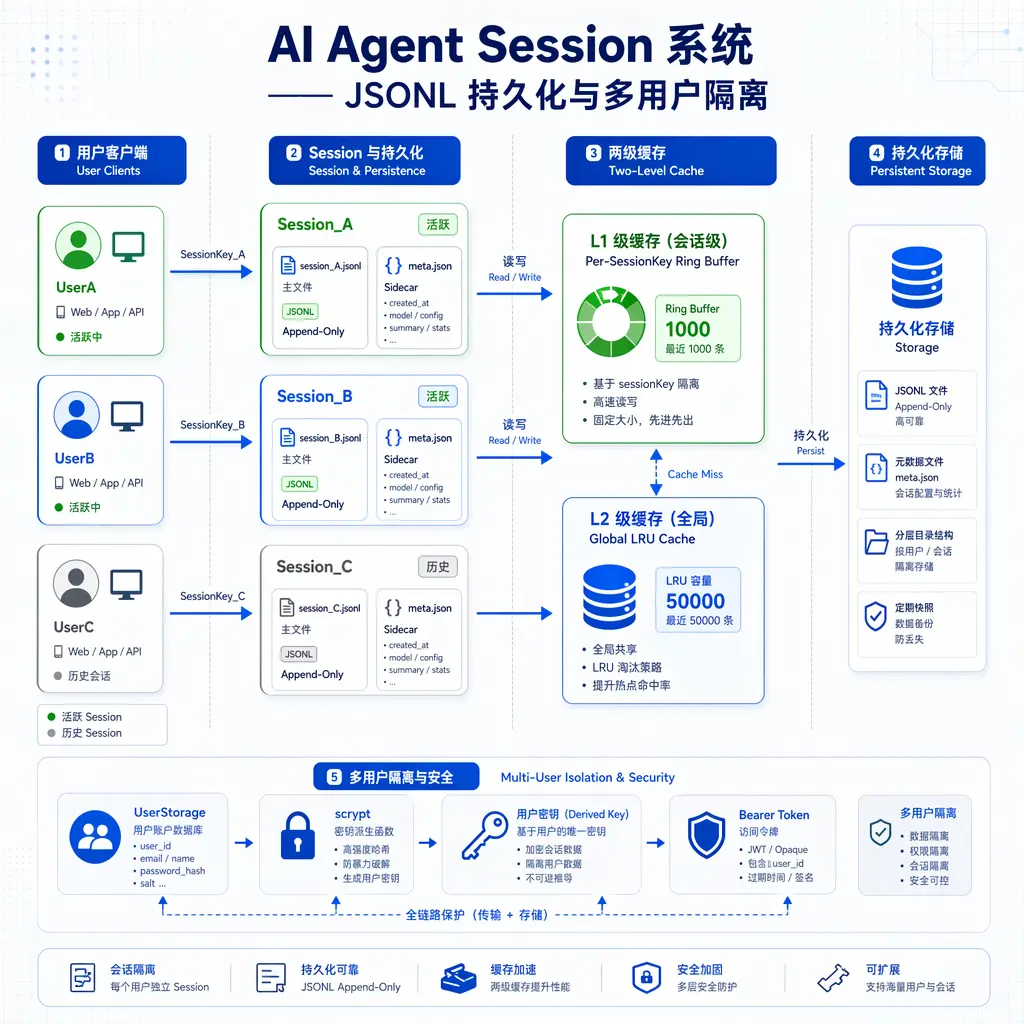
4.1 JSONL Main File + .meta.json Sidecar: Separation of Two Workloads
Each session has two files on disk:
1 | sessions/ |
.jsonl (conversation history): Append-only file. Each time the agent and user exchange a message, a line of JSON is appended to the end of the file. Characteristics of this format:
- Append-only means good write performance – no need to read old data, no parsing, just append at the end of the file. The file system has specific optimizations for append operations.
- The line order in the file is the chronological order of the conversation – line 1 is the earliest message, line 100 is the latest. Locating by line number is simpler than by timestamp.
- JSONL supports streaming reads – want to read the latest 10 messages? Read the last 10 lines in reverse. No need to parse and load the entire file into memory.
.meta.json (session metadata): Single-object JSON file. Stores session title, creation time, last activity time, owner user ID, tag list, label, and other metadata.
The reason metadata and conversation history are separated: the two workloads have different characteristics.
Conversation history is “append-only, never modified” (except for rare compaction scenarios). JSONL append-only is the most suitable – appending one line at a time minimizes CPU and I/O overhead.
Metadata is “frequently modified” – the user may change the title, add tags, star it, change the owner. If JSONL were used for metadata, each modification would require appending a line, and reading metadata would require scanning backward from the end to find the last valid line – tedious and error-prone. Using a separate file for metadata, rewriting the entire file on each modification, is simple and reliable. Metadata is typically only a few hundred bytes, so the cost of a rewrite is almost negligible.
This combination of “main file append + sidecar random modify” is a common pattern in file system storage. It avoids the waste of “rewriting the entire session history to change one field” and the absurdity of “scanning the entire file to read one piece of metadata.”
4.2 UUID v4 sessionId Path Validation
sessionId uses UUID v4 format (e.g., 550e8400-e29b-41d4-a716-446655440000). The first step in any operation involving session file paths is to validate that the sessionId is a legal UUID.
Why is validation needed? Because the sessionId directly appears in the file path: sessions/${sessionId}.jsonl. If the sessionId comes from external input (e.g., the user passes it through an API), and without validation, an attacker could pass ../../etc/passwd as the sessionId, causing the system to read or write system files. This is a “path traversal attack.”
UUID validation prevents this problem at the source: UUID v4 has a fixed format (8-4-4-4-12 hexadecimal characters with hyphens). Any input that doesn’t match this format is rejected. There’s no way to “bypass” it – because even the positions of hyphens are fixed, an attacker cannot construct a string containing ../ that also satisfies the UUID format.
Beyond security, UUID v4 has several additional benefits:
- Globally unique: No centralized ID distributor needed. Each machine generates its own UUID without conflicts. Even if multiple machines each run an aptbot instance, their sessionIds won’t conflict.
- Unguessable: 122 bits of randomness. Attackers cannot enumerate possible sessionIds to access other people’s sessions. This is important for security isolation in multi-user scenarios.
- Fixed format: 36 characters (including 4 hyphens). Regex validation is simple and efficient:
/^[0-9a-f]{8}-[0-9a-f]{4}-4[0-9a-f]{3}-[89ab][0-9a-f]{3}-[0-9a-f]{12}$/i.
The validation is implemented at the entry point of the Session system – any public method that accepts a sessionId parameter (getSession, appendEntry, claimSession, etc.) first calls isValidUUID(sessionId). If validation fails, it immediately returns an error without performing any file operations.
4.3 claimSession Strict Ownership + forceClaimSession Transfer
Sessions have the concept of an “owner” – only the user who created the session can operate on it. This is the foundation of multi-user isolation.
claimSession(sessionId, user) logic:
- If the session has no owner yet: the current user becomes the owner, operation succeeds
- If the session’s owner is the current user: operation succeeds
- If the session has an owner that is not the current user: returns 403 Forbidden
This is strict ownership. User A cannot operate on user B’s session. Each session is “private” and not shared by default.
The significance of strict ownership in multi-user scenarios: Suppose two developers share a VPS running aptbot. Developer A’s session contains sensitive project code snippets and API keys. If sessions don’t have owner isolation, developer B can freely read A’s sessions – that’s a privacy leak. Strict ownership ensures “your session is yours, my session is mine.”
But some scenarios require “shared transfer” – for example, developer A on the team is on vacation and developer B needs to take over A’s tasks. In this case, B needs to see A’s sessions. Or A leaves the company, and an admin needs to reassign all of A’s sessions to B.
forceClaimSession provides this capability: a user with admin privileges can forcefully change a session’s owner to another user. This is a “rule-breaking” interface, not a routine operation.
This design of “strict rules + exception mechanism” is common in security: by default, the rules are the strictest (nobody can see another’s session), but an explicit, privileged “back door” is provided for special cases (admin can perform session transfer). This keeps the system secure most of the time while not blocking scenarios that need flexibility.
4.4 Per-SessionKey Ring Buffer (1000) + Global LRU (50000)
Session history replay is a performance hotspot – when a client reconnects, it needs the complete history to render the conversation UI. If it reads from the JSONL file on disk every time, I/O latency will noticeably slow down reconnection.
aptbot uses two-level caching to solve this:
First level – per-sessionKey ring buffer (1000 entries): Each sessionKey (a unique identifier for user + session) maintains a ring buffer storing the most recent 1000 events.
How a ring buffer works: It’s essentially a fixed-size array with two pointers (write pointer and read pointer). Writing a new event overwrites the oldest event. Reading starts from the oldest event and goes sequentially.
Why a ring buffer instead of a regular array? Because:
- Write is O(1) – no need to move elements, just move the write pointer
- Memory usage is fixed – at most 1000 slots, never grows
- It matches the “most recent N” semantics – a ring buffer naturally “keeps the most recent N and discards the old”
Second level – global LRU (Least Recently Used, 50000 entries): The ring buffers of all sessions combined cannot exceed 50000 entries. When the total exceeds the limit, the entire ring buffer of the least recently accessed session is evicted (not entry by entry, but by session).
Why two levels instead of one?
- Ring buffer suits single session locality: When the user operates on the current session, they repeatedly read the most recent N events. The ring buffer has a very high hit rate – almost all “view history” requests complete within the ring buffer without going to disk.
- LRU suits multi-session switching: When the user switches between multiple sessions (e.g., debugging in “bug-fix-X” session in the morning, developing in “feature-Y” session in the afternoon), the LRU ensures that “recently active session caches stay resident,” while inactive session caches are evicted to free memory.
- Controllable memory ceiling: 50000 events × ~1KB/event ≈ 50MB. On a personal development machine, 50MB of memory usage is perfectly acceptable. If a user has 100 active sessions, each retaining 500 entries, that’s exactly within the 50000 limit.
There’s a noteworthy analogy here: CPU L1/L2/L3 cache architecture.
- L1 cache (per-core, fastest, smallest) ≈ per-sessionKey ring buffer – dedicated to “the currently active session,” fastest speed (memory access vs. disk access)
- L2 cache (per-core, medium speed, medium size) ≈ global LRU – shared across sessions, larger capacity
- L3 cache (shared, slower but larger) ≈ none (aptbot has no third level, goes directly to JSONL)
- Main memory (slowest, largest) ≈ JSONL disk files
This analogy helps understand two key design decisions:
- Why is the per-session ring buffer capacity 1000? Because most sessions don’t exceed 1000 events. The ring buffer can cover the entire session – the vast majority of “view history” requests hit the ring buffer without needing disk access. 1000 is an empirical value based on observation of actual usage patterns.
- Why does LRU evict by session, not by entry? Because evicting individual events is meaningless for “history replay” – when a client reconnects, it needs the complete session history, not scattered events. If LRU evicted individual entries, in the worst case, a session’s events would be partially evicted. When the client reconnects and hits the ring buffer, it would only get incomplete history and would still need JSONL as a fallback. Evicting by session guarantees: either the entire session’s ring buffer is present, or it’s not. There’s no “half-present” state.
4.5 History Replay: Ring Buffer Miss → JSONL Fallback
When a client reconnects, it needs to replay the session’s history. The full replay path:
- Client sends a reconnect request with the sessionId and the time range (or entry count range) to replay
- Check if the ring buffer for this sessionId covers the requested range
- Fast path (ring buffer covers the range): Read events directly from the ring buffer and construct the event sequence to return. O(N) time complexity (N = number of events returned), pure memory operation, typically at microsecond level.
- Slow path (ring buffer does not cover the range): Open the JSONL file, read from the end in reverse, filter by time range, construct the event sequence to return. O(M) time complexity (M = invalid lines in the file + N), involves disk I/O, typically at millisecond level.
The fast path covers the vast majority of requests – when the user operates within a session normally, all events are in the ring buffer. When the client refreshes the page or reconnects, history replay completes at the microsecond level, and the user feels no latency.
The slow path only occurs in a few edge cases: the user reopens a session after a long time (a week or even a month), during which the session’s ring buffer has been evicted by the LRU. Only then does it need to read from JSONL on disk. Although slower (compared to memory), it’s still acceptable (compared to having no session system at all).
This “fast path + slow path” design pattern is ubiquitous in computer systems. CPU has cache (fast) → main memory (slow), OS has memory (fast) → disk (slow), and aptbot’s session system is the same – ring buffer (fast) → JSONL (slow). Each layer does the same thing: use faster storage to cache slower storage, hoping most requests hit the faster layer.
4.6 Presence Broadcast
“Presence” is a common feature in instant messaging applications – showing whether a user is “online” or “offline.” In the multi-user aptbot scenario, presence means: user A can see who else is currently “online” on the same session.
Implementation is through event broadcasting:
- When a user binds a channel to a session, the system emits a
presence_onlineevent containing user information - When a channel dies (user disconnects, page closes, network interruption), the system emits a
presence_offlineevent - All channels bound to that session receive the
presence_online/presence_offlineevents, and the frontend displays the online user list accordingly
Presence makes “multi-device collaboration” possible – not just “multi-device viewing,” but “multi-device working together.” Imagine a scenario: you and a colleague share a session, with the agent executing tasks in the middle. You can see your colleague is online, see what message they just sent, see which tool’s output they’re currently viewing. The agent’s execution results are pushed to both people in real-time – you’re like in the same room watching the agent work together.
For personal use, the significance of presence lies in “device switch awareness” – when you open a session on your phone and see a “computer online” indicator, you know the session is still active on the computer, and the agent might be executing a long-running task. You don’t need to re-operate on your phone.
4.7 session_changed Control Message + Client Pull
Session state changes – a new message was sent from another endpoint, the agent is executing a tool, compaction deleted old data, metadata was modified. These changes need to be notified to all connected clients.
session_changed is a lightweight control message that only contains:
1 | interface SessionChangedMessage { |
It does not contain the specific change content. After receiving session_changed, the client decides whether it needs to refetch the complete state.
Why only send a notification instead of the complete content? Three reasons:
- Bandwidth saving: The change could be large – a single compaction might delete hundreds of history records. If the complete content were pushed to all clients, it would waste significant bandwidth. A notification is only a few dozen bytes, much cheaper than pushing the full content.
- Deduplication: Multiple changes may occur in rapid succession – the agent outputs multiple tokens simultaneously, each as an event. If each one pushed “new content,” the client would receive dozens of pushes per second, struggling to keep up. The notification + pull pattern lets the client “wait for changes to settle before pulling once,” rather than responding to every single change.
- Fault tolerance: When the server pushes complete content, if a client misses a push (e.g., network packet loss), the client permanently loses that change. But in the notification + pull pattern, if a client misses a
session_changednotification, it only delays the pull. The next pull will catch up on all missed changes at once.
The term for this pattern is “eventual consistency“ – it doesn’t guarantee that the client sees the latest state at any given moment, but it guarantees that the client will definitely see the latest state after proactively pulling. The notification is just “a reminder that you should pull,” does not bear the responsibility of “ensuring you see the latest.”
Eventual consistency is naturally compatible with WebSocket reconnection: after reconnecting, the client’s first action is to proactively pull the session’s complete state. The server doesn’t need to track “which events this client missed while disconnected.” The server only needs to return the current complete state when receiving a pull request.
4.8 Multi-User Isolation: UserStorage + scrypt + Bearer Token
In multi-user scenarios, “who can access which sessions” is the core security concern. aptbot’s multi-user isolation system consists of three components:
UserStorage: A file storage that records the user’s username, passwordHash, userId, and other attributes. UserStorage is not mixed with SessionStorage – user data and session data are in different directories with different access policies.
scrypt password hashing: The user’s password is hashed using the scrypt algorithm before storage. scrypt is a memory-hard hashing algorithm – it not only requires CPU computation but also a large amount of memory. This makes brute-force cracking extremely expensive: even if the attacker gets a copy of the hash values, cracking each password requires gigabytes of memory and significant computation time.
Compared to bcrypt (another common choice), scrypt has stronger resistance to ASIC attacks. ASIC (Application-Specific Integrated Circuit) attackers can customize chips to compute bcrypt in parallel, but scrypt’s memory requirements make this parallelization difficult – each parallel computation instance needs its own large block of memory, dramatically increasing chip area and cost. For a project of aptbot’s scale, bcrypt would actually be sufficient, but choosing scrypt reflects an attitude of “no compromise on security design.”
Bearer token authentication: After the user logs in successfully, the server issues a Bearer token. All subsequent API requests carry this token. Each token is bound to a userId, and the server parses the token to extract the userId for authentication.
Tokens have an expiration time (default 24 hours). Expired tokens are rejected, and the user needs to log in again. This is a standard design in security engineering: limiting the token’s validity period reduces the risk window if a token is leaked.
Session ownership validation: This is the underlying support for the claimSession mechanism mentioned earlier. When a user accesses any session, the system validates:
- Whether the Bearer token in the request is valid → extracts userId
- Whether the requested session’s owner field equals this userId (or whether the userId has admin privileges)
- If validation passes → allow access; if it fails → return 403
These three components together form a complete multi-user isolation system. User data (UserStorage) and session data (SessionStorage) are stored separately, passwords are protected with strong hashing, API access uses Bearer token authentication, and session access uses ownership validation.
This system allows aptbot to run safely on a shared VPS – multiple users share one aptbot process, but their sessions are completely isolated. User A cannot see user B’s sessions, user B cannot operate user A’s tools, and each user feels like they’re “exclusively using” the agent.
4.9 CLI Commands: Sessions as Organizable Work Units
The Session system is not just a set of storage and permission mechanisms; through CLI commands, it turns sessions into organizable and manageable work units for users.
aptbot CLI provides the following session management commands:
/sessions: Lists all sessions of the current user. Returns a list containing each session’s ID, title, last activity time, whether active, etc. This is the user’s entry point for “viewing all my sessions.”
/resume <sessionId>: Resumes a historical session, binding it to the current channel. When a user switches between devices, they use /resume with the sessionId they saw on their computer to continue the conversation on their phone.
/label <sessionId> <text>: Adds a text label to a session. For example, /label 550e... "bug-fix-X". Labels are the primary way for users to organize sessions – by project, by task, by priority.
/session <key> <value>: Sets a dynamic property on the session. For example, /session project monorepo-frontend injects into the session that “the project associated with this session is monorepo-frontend.” The agent and hooks can read these dynamic properties for context-aware decisions.
/session (no arguments): View all dynamic properties of the current session.
The value of these commands grows as the user spends more time with aptbot. A long-term agent user will accumulate dozens or even hundreds of sessions – without organization, the session list is just a messy “chronological list of conversations.” With /label and /session, sessions become “project units organized by topic” – “all sessions tagged with bug-fix,” “all sessions with project attribute monorepo-frontend.”
CLI commands elevate sessions from “automatically managed storage units” to “user-operable work units.” This is not just a UX improvement – it allows users to actively manage their interaction records with the agent, transforming the agent from a “use-and-forget tool” into a “long-term collaborative partner with memory.”
5. Future Directions
5.1 Pluggable Storage Backend
Currently, aptbot’s session storage is fixed to JSONL + sidecar files. In the long run, a SessionStorage interface could be abstracted to support multiple backend implementations:
- FileSessionStorage (current default): JSONL + sidecar, zero dependencies, good readability
- SQLiteSessionStorage: Feature-complete, supports complex queries
- MemorySessionStorage: Pure memory, best performance, suitable for testing and temporary scenarios
Users can choose the backend according to their needs – FileSessionStorage for development and debugging (good readability), SQLiteSessionStorage for production deployment (feature-complete). The SessionStorage interface makes this switch non-invasive to session business logic.
5.2 Session Sharing and Collaboration
The current claimSession/forceClaimSession provides the most basic sharing capability (admin-forced transfer). In the future, richer sharing modes can be supported:
- Read-only sharing: User A can share a session with user B, but B can only view, not operate
- Collaborative sharing: Multiple users can operate the same session simultaneously, with all operations synced in real-time to all participants
- Link sharing: Generate a time-limited sharing link that anyone can use to access the session (similar to Google Docs’ “anyone with the link can view”)
Sharing and collaboration are key capabilities for the agent to evolve from a “personal tool” to a “team tool.” But their prerequisite is a mature security model – before supporting sharing, we must first ensure isolation is reliable.
5.3 Automatic Archiving and Compaction
Long-used session files keep growing. After hundreds of conversation rounds, a session’s JSONL file may have tens of thousands of lines. Although JSONL is append-only, many early conversation entries are no longer needed.
An automatic archiving strategy could be: periodically scan sessions that haven’t been active for over a certain time, compress the earliest N% of conversation history into a summary (generated by an LLM), and replace the original content with the summary. This way, the session file size grows sub-linearly – new conversations keep appending, while old conversations are compressed into summaries, greatly reducing size.
This process is similar to human memory – “new events are remembered clearly, old ones leave only an impression.” It’s also needed by both Approach B (SQLite) and Approach C (JSONL) – no matter what storage is used, infinitely growing history needs management.
Summary
The Session system is the core of agent state management, providing three layers of capability on top of Channels: persistence, isolation, and synchronization.
Conceptually: A session is a complete record of an interaction between a user and an agent, existing independently of connections. It has three layers of responsibility: storage layer, state management layer, and security layer. It cannot be replaced by Channels – Channels are pipes, sessions are archives.
Approach comparison: Approach A (pure memory) has the best performance but loses all data on process restart; Approach B (SQLite) is feature-complete but is binary and cannot be debugged with tail; Approach C (JSONL append-only + sidecar) has zero dependencies and plain text readability, suitable for learning project scale.
aptbot’s design: JSONL + sidecar separates conversation history (append-only) and metadata (random read/write) into two workloads; UUID v4 sessionId prevents path traversal attacks at the source; claimSession/forceClaimSession balances strict permissions with flexible transfer; per-sessionKey ring buffer (1000 entries) + global LRU (50000 entries) provides two-level caching, understood through the analogy of CPU L1/L2 cache; presence broadcast makes multi-device collaboration visible; session_changed + client pull uses eventual consistency to simplify the synchronization model; UserStorage + scrypt + Bearer token builds complete multi-user tenant isolation; CLI commands transform sessions from storage units into organizable work units.
The next article looks at aptbot’s overall security model, connecting the scattered security design points – UUID validation, sandbox, hook trust boundary, scrypt, Bearer token – to understand how aptbot finds balance between openness and control.