Channel and Multi-Client Access: The TransportChannel Abstraction
An agent serving multiple clients simultaneously is the core scenario of aptbot 0.2.x: you open WebUI on your computer to talk to the agent, switch to your phone on the go, and continue on another computer when you get home. This requires the agent’s state to be independent of the client connection – clients can disconnect and reconnect, but the agent should not restart, nor should it lose conversation context.
This requirement sounds simple, but implementing it raises several key questions: If two clients connect to the same agent simultaneously, which one should the events be pushed to? After a client disconnects and reconnects, how does it get the history it missed while disconnected? When a user sends a message on their computer, how does their phone see the reply synchronously?
The Channel abstraction was born to solve these problems. It separates “how to communicate with the client” from “how the agent runs” into two independent concerns. This article starts with the fundamental challenges of multi-client access, compares the trade-offs of three approaches, and finally dives into how aptbot implements multi-client synchronization through a typed event bus, a minimal Channel interface, and the bindSession mechanism.
1. Concepts: What is Multi-Client Access and Why Do We Need the Channel Abstraction
1.1 The Core Problem of Multi-Client Access
The most naive implementation of multi-client access is “one agent instance per client” – when user A connects, create an agent instance to serve A; when user B connects, create another agent instance to serve B. But this approach falls apart in the “same user, multiple devices” scenario:
- State fragmentation: The user asks the agent to modify a file on their computer, then switches to their phone. The phone connects to a different agent instance that knows nothing about the modification. The two agent instances each maintain their own context without communicating, and the user sees inconsistent conversation history.
- Resource waste: One agent instance per client means each client maintains a complete LLM context window. If 10 clients connect, that’s 10 context windows in memory – even if 9 of them have no active conversation.
- No multi-device sync: The user issues a command on their computer, and the agent’s reply only shows on that computer. When the user picks up their phone, they can’t see the previous conversation – because the phone connects to a different agent instance.
The correct approach is: one agent instance + multiple client connections. Clients are just the agent’s “display” and “input devices.” The agent’s state is not tied to any single client. This way, no matter which device the user connects from, they see the same agent session.
1.2 The Role of the Channel Abstraction
To achieve “one agent + multiple clients,” the key is to decouple “how messages are transmitted” from “how the agent runs.”
The Channel abstraction is the bridge for this decoupling:
- Agent side: Only cares about “producing events” – LLM streaming output, tool call results, state changes are all emitted as events. The agent doesn’t care how these events ultimately reach the client.
- Channel side: Only cares about “consuming events” – converting agent-generated events into a format the client can understand and pushing them out. The Channel doesn’t care about how the agent makes decisions or executes tools.
The flexibility this decoupling brings: you can simultaneously use a WebSocket Channel (for WebUI), a CLI Channel (for terminal access), and a Telegram Channel (for mobile IM). All Channels receive the same event stream. If you want to add a new access method (like Slack), you only need to write a new Channel implementation – the agent loop doesn’t change a single line.
1.3 Decoupling Event Production from Event Consumption
The core design pattern behind the Channel abstraction is decoupling event production from event consumption.
In the traditional client-server model, the server pushes messages directly to the client. This implies an assumption: one message has only one consumer. But in multi-client access scenarios, the same message may have multiple consumers (computer WebUI + mobile WebApp + logger).
The decoupling is achieved by introducing an intermediate layer – an event bus. The agent sends events to the bus, and the bus distributes them to all interested parties. The agent doesn’t need to know “who is listening,” and consumers don’t need to know “who is speaking.”
This pattern is very common in large systems (like Kafka, RabbitMQ), but aptbot is a single-process application that doesn’t need a distributed message queue. aptbot implements a lightweight in-process event bus specifically for agent event distribution.
2. General Design Approaches: Common Architecture Patterns for Multi-Client Access
Implementing multi-client access in an agent involves several design dimensions. Understanding these dimensions is the foundation for analyzing specific approaches.
2.1 The Relationship Between Session and Connection
The most core design decision for multi-client access is: are sessions and connections bound or decoupled?
- Bound model: Connection equals session. The user opens a WebSocket connection, and the system creates a session; the connection is closed, and the session is destroyed. This approach is simple and direct, but cannot support “retaining the session after disconnection and reconnection.”
- Decoupled model: Sessions exist independently of connections. After the user logs in, the system assigns (or the user creates) a session. Multiple connections can then bind to the same session. The connection can be lost, but the session remains; upon reconnection, it binds back to the original session.
The decoupled model is clearly the correct choice for multi-client access, but it introduces additional complexity: sessions need to be persisted (otherwise they’re lost on process restart), sessions need to establish a mapping with connections, and session events need to be broadcast to all connections bound to it.
2.2 Event Distribution Strategies
After an agent event is generated, how is it distributed to clients? Three common strategies:
Broadcast: Every event is pushed to all connected clients. Simplest, but the problem is obvious – a private conversation from user A gets pushed to user B. Broadcast only works in single-user, multi-device scenarios.
Unicast: Each event is only pushed to “the client that initiated the request.” This is the traditional request-response model. But the problem is: the user sends a message on their computer and wants to see the reply on their phone – under the unicast model, the phone never sees it.
Multicast: Each event is pushed to “all clients bound to the current session.” This is the correct strategy for multi-device synchronization – all clients in the same session receive events. The grouping basis for multicast is the session.
2.3 Transport Protocol Selection
The transport protocol determines how events travel from the server to the client. Three common real-time transport protocols:
WebSocket: Full-duplex, low latency, natively supported by browsers. Suitable for scenarios requiring streaming push (agent streaming output is a natural fit for WebSocket). The downside is the complexity of building your own protocol (heartbeat, reconnection, serialization).
SSE (Server-Sent Events): One-way stream from server to client, based on HTTP long connections. Simpler than WebSocket (native HTTP protocol), with good browser support. But SSE is one-way – client-to-server communication still requires additional HTTP requests.
Long Polling: The client periodically initiates HTTP requests, and the server returns when there are events. Simplest to implement (only HTTP needed), but has higher latency and greater resource consumption. Suitable for low-frequency event scenarios.
3. Comparison of Multi-Client Access Approaches in Practice
Different agent projects answer the question “how to allow multiple clients to access the same agent” very differently. Here are three representative design approaches.
3.1 Approach A: Agent + Channel Tight Binding
This approach works as follows: each connection corresponds to an agent instance. Connection equals session, and disconnecting destroys the session. The channel is just an “appendage” of the agent – the agent decides which channel to use when it’s created.
Design Characteristics:
- Connection equals session: When a user connects, a session is created; when they disconnect, it’s destroyed. There’s no concept of “retaining context across disconnection and reconnection.”
- Agent holds the channel: The agent instance holds a reference to the channel internally and directly calls channel.send() to push messages. No event bus needed.
- One-to-one relationship: One agent instance serves only one client. There’s no problem of multi-client sharing – because it simply doesn’t support multi-client access.
- Extremely simple implementation: No channel abstraction layer, no event bus, no session manager. The agent loop writes data directly to the channel.
Advantages:
- Simplest to implement – minimal code, no infrastructure needed
- Most straightforward logic – reading the code makes it clear “how the agent sends messages to the client”
- Zero additional latency – no bus, no distribution, agent pushes directly to the client
Disadvantages:
- No multi-device sync: Users cannot switch between phone and computer – when the second connection comes in, the first connection has already destroyed its corresponding agent instance. The user’s conversation on the computer won’t sync to the phone.
- Disconnection means loss: When a WebSocket disconnects due to network instability, the agent’s ongoing task may be cancelled midway. Even if the user reconnects immediately, they’re back to a brand new session, and the previous conversation history is gone.
- Resource waste: One agent instance per connection means one independent LLM context window per connection. Just refreshing the page requires rebuilding an agent instance – a huge waste of CPU and memory.
Applicable scenarios: Simple demo projects, one-off conversation scenarios (users leave after use, no need to retain history).
3.2 Approach B: Independent Session Layer + Channel Passthrough
This approach advances by introducing an independent session layer: sessions are no longer bound to connections but are persistent entities. The channel acts as a passthrough between the session and the client – the session sends and receives messages through the channel.
Design Characteristics:
- Session persistence: Sessions have a lifecycle independent of connections. When a connection is lost, the session is retained and restored upon reconnection.
- Channel passthrough: The session directly holds a reference to the channel, and events are pushed to the client through the channel. No event bus; the session manages distribution itself.
- One-to-one session-to-channel: A session can still only bind to one channel. Simultaneous multi-client access is not supported.
- Connection recovery mechanism: After disconnection, the client can reconnect with the sessionId to rebind to the same session.
Advantages:
- Session persistence solves the “history lost on disconnection” problem – clients can continue their previous conversation after reconnecting
- With an independent session layer, session management features can be added (e.g., session list, session tags, session search)
- Relatively simple implementation – just add a session manager on top of Approach A
Disadvantages:
- Still no multi-device sync: A session can only bind to one channel. Users cannot send a message on their computer and see the reply on their phone – because the phone connection would “steal” the session’s channel binding.
- Scattered event consumption logic: The session directly manages channel send/receive, meaning the session code mixes “business logic” (managing conversation state) with “transport logic” (how to send messages). Every time a new transport method is added (from WebSocket to Telegram), the session code needs modification.
- State loss during connection switching: When a user switches from computer to phone, the computer’s channel disconnects and the phone’s channel binds. But there’s a time window between the computer channel disconnecting and the phone channel binding – any events the agent produces during this window are lost (because there’s no channel to push to).
Applicable scenarios: Single-user, multi-device rotating usage (only logged in on one device at a time), needing to retain conversation history but not requiring real-time multi-device sync.
3.3 Approach C: Typed Event Bus + Channel Abstraction + Many-to-One Sharing
This approach makes three key design decisions:
- Typed event bus: All agent output is emitted as typed events to the bus. The bus doesn’t care who consumes these events.
- Channel abstraction: Each access method implements the Channel interface, subscribing to events from the bus and forwarding them to the client. The agent and session don’t know about the Channel’s existence.
- Many-to-one sharing: A session can bind to multiple Channels simultaneously. The bus distributes events to all Channels bound to that session.
Design Characteristics:
- Three-layer event separation: The agent is only responsible for producing events, the bus for distributing events, and the Channel for transmitting events. Each layer has its own responsibilities and doesn’t interfere with the others.
- Minimal Channel interface: Implementing a new access method only requires implementing a few simple methods (like send, close, isAlive). No need to understand the agent’s internal logic.
- Type-safe event format: All events have a unified type definition (envelope), and consumers handle them precisely by type. There’s no “receiving a JSON string and having to parse it to figure out what event it is.”
- Automatic lifecycle management: Dead Channels are automatically unbound; new Channels automatically subscribe. No manual mapping management required.
Advantages:
- True multi-device sync – one session binds to multiple Channels, and all Channels receive the same event stream
- Low cost for adding new access methods – just implement 4 methods of the Channel interface, no changes to the agent loop
- Standardized event format – all access methods consume the same event format; there’s no “WebSocket uses one format, Telegram uses another” adaptation problem
- Robustness – a dead Channel doesn’t affect the agent; a dead agent sends close events to all Channels
Disadvantages:
- Complex architecture – requires three sets of infrastructure: event bus, Channel manager, and session-Channel mapping table
- The bus could become a bottleneck – all events go through the bus for distribution; if the bus implementation is inefficient, it affects overall performance
- Difficult debugging – events travel from the agent to the client through three layers (agent → bus → Channel → client), and tracing problems requires investigating across all three layers
Applicable scenarios: Projects requiring real-time multi-device synchronization, projects needing to integrate multiple different transport protocols, projects with high requirements for architectural clarity.
3.4 Comparison of Three Approaches
| Dimension | Approach A (Tight Binding) | Approach B (Session + Passthrough) | Approach C (Bus + Abstraction + Many-to-One) |
|---|---|---|---|
| Core philosophy | Connection equals session, one-to-one | Session persistence, channel passthrough | Three-layer separation, many-to-one sharing |
| Session lifecycle | Bound to connection | Independent of connection | Independent of connection |
| Multi-device sync | Not supported | Not supported (one-to-one) | Supported (many-to-one) |
| Event distribution | Direct push from agent | Direct push from session | Bus multicast |
| Transport vs business | Not separated | Partially separated (session manages transport) | Fully separated |
| Adding new access method | Modify agent loop | Modify session layer | Only add Channel implementation |
| Disconnection recovery | Session lost | Session retained, intermediate events lost | Session retained, events buffered |
| Implementation complexity | Low | Medium | High |
| Architectural clarity | Low (mixed) | Medium | High (clear responsibilities) |
The three approaches go from simple to complex, from tightly coupled to loosely coupled. Approach A suits minimum viable products, Approach B suits single-user scenarios needing session management, and Approach C suits products requiring true multi-device sync. aptbot chose Approach C because its positioning is “one agent serving multiple endpoints.”
4. aptbot’s Design Features
aptbot chose Approach C – Typed Event Bus + Channel Abstraction + Many-to-One Sharing. This design is practically implemented in aptbot through the following specific components.
4.1 Typed Bus + AgentEventEnvelope Design Motivation
The event bus implemented in aptbot 0.2.x is called “Scheme E” (Event-driven Engine), and its core design revolves around two concepts:
Typed event bus (Bus): The bus is a typed EventEmitter inside aptbot. All agent output – LLM streaming tokens, tool call requests, tool execution results, error messages, state changes – are emitted as typed events to the bus.
1 | type AgentEvent = |
AgentEventEnvelope: Each event transmitted on the bus is wrapped in an “envelope” containing the event’s metadata:
1 | interface AgentEventEnvelope { |
Why is an envelope needed? Two reasons:
- Multiplexing: The bus transmits events from multiple sessions simultaneously. The sessionId in the envelope lets Channels filter out events “belonging to my session.” Without the sessionId, each Channel would have to receive all session events and filter them itself – wasting CPU and leaking privacy.
- Sufficient consumer information: After a Channel receives an envelope, it knows which session the event belongs to and when it happened, without additional queries. This allows the Channel to implement “event buffering” (caching events when the client is offline and replaying them after reconnection) without maintaining additional mapping tables.
The fundamental reason for using a bus instead of direct “agent → client” push is: the bus decouples event production from event consumption. The agent only sends events to the bus, regardless of who receives them, how many receive them, or whether they’re received at all. Channels subscribe to events from the bus, regardless of who sends them, how many are sent, or why they’re sent. This decoupling allows the agent and Channels to evolve independently.
4.2 Minimal Interface: type / send / close / isAlive
The Channel is the standard interface for access methods in aptbot. It only requires 4 methods:
1 | interface Channel { |
4 methods – this is a deliberate minimal design:
- type: Identifies the Channel type (e.g.,
"websocket","telegram"). Used for logging and monitoring, not involved in business logic. - send: The core method. When the bus distributes events to Channels, it calls send. The Channel implementation decides how to send this event to the client – the WebSocket Channel serializes it to JSON and pushes via ws.send; the Telegram Channel sends it through the Bot API.
- close: Closes the Channel and releases resources. Called by the bus when it detects the Channel is no longer alive, or by the upper-layer system on shutdown.
- isAlive: Health check. The bus periodically calls isAlive to check if the Channel is still alive. If it returns false, the bus triggers the Channel death handling flow (auto-unbind, resource cleanup).
Why is the interface so small?
Because the Channel’s scope of responsibility is strictly limited to “transport“ – it’s only responsible for “delivering already-packaged events from the server to the client.” It doesn’t need to understand the meaning of events, care about session state, or handle user input.
The flip side of the minimal interface is minimal client capability assumptions – aptbot assumes the client can only “receive events” and “be closed,” not that the client can query, recover, or acknowledge. These higher capabilities are implemented through the protocol layer (like the resync protocol after WebSocket reconnection), not entering the Channel interface itself. This ensures that even the simplest client (like a read-only event display) can implement the Channel interface.
4.3 wrapTransportChannel Adapter
In practice, mature transport layer implementations often already exist – Node.js’s ws library, Telegram Bot SDK, Slack SDK. These libraries already have their own connection management, heartbeat, reconnection, message serialization mechanisms. Requiring every Channel implementation to write these from scratch would be too costly.
wrapTransportChannel is an adapter function that wraps “existing transport layer implementations” into the Channel interface:
1 | function wrapTransportChannel(options: { |
The adapter does something very simple:
- Serializes the AgentEventEnvelope into a format consumable by the transport layer (e.g., a JSON string)
- Calls the transport layer’s send method to send it out
- Maps the transport layer’s close event to the Channel’s close
- Maps the transport layer’s alive status to the Channel’s isAlive
The value of this adapter is: developers don’t need to rewrite the transport layer. If you have a WebSocket connection, you just call wrapTransportChannel({ type: 'websocket', send: ws.send, close: () => ws.close(), isAlive: () => ws.readyState === ws.OPEN }), and you get a standard Channel instance.
The adapter pattern allows aptbot’s Channel system to maintain the elegance of “zero dependencies” – the core interface doesn’t depend on any third-party library, and third-party libraries are connected through adapters. This is a concrete manifestation of “don’t reinvent the wheel.”
4.4 bindSession(sessionKey, channel): Many-to-One Sharing
Once a Channel is created, the next step is to bind it to a session. The core API is bindSession(sessionKey, channel).
Many-to-one is the most critical design: a session can bind to multiple Channels simultaneously.
Concrete scenario:
- User opens session X on the computer’s WebUI (Channel A binds to session X)
- User also opens session X on their phone (Channel B binds to session X)
- The agent processes a message and sends back events, which are distributed by the bus, simultaneously pushing to both Channel A and Channel B
- The computer and phone see the same agent output
Throughout this process, the agent is completely unaware – it only sends events to the bus, not caring who receives them. The bus is responsible for filtering events by sessionId and only pushing to Channels bound to that session.
The core capability brought by many-to-one sharing is “true multi-device sync“ – not “the user has to manually refresh to see the latest message,” but “every time the agent produces an event, all endpoints receive it in real-time.” As the user watches the agent output tokens one by one on their computer, their phone simultaneously sees the same token stream.
4.5 WebSocket as a Channel Implementation
The primary Channel implementation in aptbot 0.2.x is WebSocket. WebUI runs in the browser, which naturally uses WebSocket for bidirectional communication with the server. CLI also connects to the server via WebSocket (same machine or remote VPS), allowing it to access the same agent.
WebSocket Channel workflow:
- Connection establishment: The client establishes a WebSocket connection through the HTTP upgrade protocol
- Authentication: After the connection is established, the client sends an authentication message containing a Bearer token and the sessionKey to bind to
- Bind session: After verifying the token, the server calls
bindSession(sessionKey, channel)to bind the WebSocket connection to the corresponding session - Event push: Agent produces events → bus distributes → Channel.send → ws.send(JSON.stringify(envelope))
- Client input: The client sends user messages through WebSocket → the server parses them and injects them into the agent loop
- Connection disconnection: WebSocket triggers close event → the bus detects the Channel is no longer alive → auto-unbind
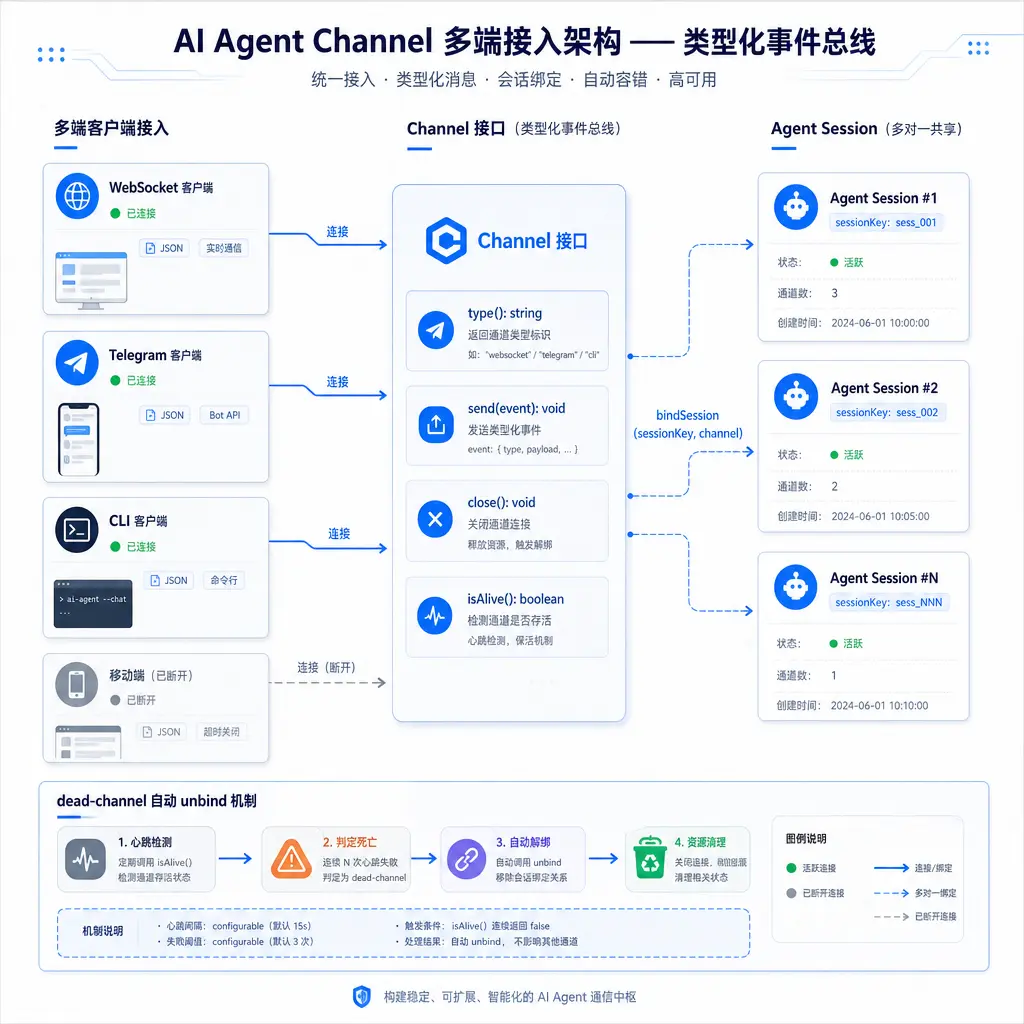
The most critical step in this workflow is step 3 – the client decides which session to bind to, rather than the server assigning one. This makes “retaining session context across disconnection and reconnection” simple: the client remembers the sessionId after disconnection, and when reconnecting, it brings the same sessionId to rebind, so all history is preserved.
One noteworthy design detail in the WebSocket Channel implementation is event buffering. After a client disconnects, the bus caches the most recent N events (N is configurable). When the client reconnects and binds to the same session, the bus replays the cached events to the new Channel, filling in what the client missed during the disconnection. This makes the “disconnect and reconnect” experience near-seamless – the user doesn’t see a gap in the middle.
4.6 Dead-Channel Auto-Unbind
Channels can “die” – network disconnection, client crash, timeout without response. If dead Channels are not cleaned up, several problems arise:
- Events lost but assumed successful: The bus calls a dead channel’s send method, the call succeeds (but the data goes into the void), and the bus assumes the client received it, when it didn’t. The user may think the agent replied but “didn’t receive it.”
- Resource leak: Each Channel occupies a subscription slot in the bus. If dead Channels aren’t cleaned up, subscription slots fill up and new Channels can’t subscribe. The Channel’s internal buffer may also grow indefinitely.
- Ghost connections: If dead Channels aren’t cleaned up, the bus assumes the client is still online. But the client has already reconnected and established a new Channel, making the dead Channel a “ghost.” If the ghost Channel still occupies the session’s binding slot, the new Channel can’t bind.
aptbot solves these problems through auto-unbind:
- Periodic health check: The bus periodically (e.g., every 30 seconds) calls all Channels’
isAlive()method - Death determination threshold: If isAlive() returns false for 3 consecutive times, the Channel is determined dead
- Auto-unbind and cleanup: The dead Channel is removed from the session’s binding list, and close() is called to release resources
When a Channel dies, if the client reconnects immediately, a new Channel is created and rebinds to the same session. The dead channel’s cleanup and the new channel’s binding are two independent processes – cleanup is triggered by the health check, and binding is initiated by the client. They may happen concurrently, but since they operate on different objects (old channel cleanup vs. new channel binding), there’s no conflict.
5. Future Directions
5.1 Telegram as the First IM Channel
Although aptbot’s architecture can support any number of Channel implementations, 0.2.x only implements WebSocket. The long-term plan for the first IM Channel is Telegram.
Reasons for choosing Telegram:
- Mature Bot API: Telegram’s Bot API is the most well-documented and least restrictive among IM platforms. It supports both webhook and polling modes, has rich message types (text, images, files, buttons, inline queries), and has stable update frequency.
- Native multi-device support: Telegram itself is multi-device (phone, desktop, web). Once aptbot connects to Telegram, users can converse with the agent in Telegram on their phone and view history in Telegram on their computer – Telegram handles the multi-device sync itself, so aptbot doesn’t need extra work.
- Publicly reachable: Telegram Bots receive messages via webhook. Users don’t need to open ports on their home network, set up dynamic DNS, or configure a reverse proxy. Run an aptbot instance on a VPS, and the Telegram Bot forwards messages through api.telegram.org.
The core difficulty of Telegram integration is message model mismatch: IM platforms use a “message” model – one message sent at a time with fixed content; aptbot uses a “streaming event” model – LLM tokens are produced one by one, and tool calls and results are independent events. “Folding” streaming events into IM messages is an adaptation problem.
One possible approach is message aggregation: Maintain a “currently sending message” buffer in the Telegram Channel. Agent-produced llm_token events are continuously appended to the buffer until a complete sentence is formed or the maximum message length is reached, then sent at once through the Bot API. Tool call events are sent as separate follow-up messages. This way, the user sees the agent “outputting sentence by sentence,” with an experience close to chatting with a real person in Telegram.
5.2 Generalizing IM Channel Integration
After Telegram, adapting more IM platforms (Discord, Slack, Feishu, WeCom) is a natural direction. The main differences between each platform are:
- Message format: Markdown, HTML, custom message cards
- Interaction capabilities: Buttons, dropdown menus, modals
- File transfer: Images, documents, code snippets
- Rate limits: Each platform’s different rate limiting policies
But the core Channel abstraction doesn’t need to change – all IM Channels implement the same 4 methods. Differences are handled through configuration parameters and internal adapter conversion logic. This is the value of the Channel abstraction: the workload of integrating 1 IM vs. 20 IMs grows linearly, not exponentially because the architecture doesn’t support it.
Summary
Channel and multi-client access are the infrastructure for the agent’s “state being independent of the client.”
Conceptually: The core contradiction of multi-client access is “one agent serving multiple clients.” The naive “one agent instance per client” approach leads to state fragmentation and resource waste. The correct approach is to decouple event production from event consumption through the Channel abstraction.
Approach comparison: Approach A (agent + channel tight binding) ties connections to sessions, simple architecture but poor experience – history lost on disconnection, no multi-device sync. Approach B (independent session layer + channel passthrough) solves session persistence but still doesn’t support simultaneous multi-client access. Approach C (typed event bus + Channel abstraction + many-to-one sharing) has the clearest architecture but requires additional event bus infrastructure.
aptbot’s design: Typed event bus (bus) + AgentEventEnvelope decouples event production and consumption; the minimal Channel interface (type/send/close/isAlive) minimizes the cost of adding new endpoints; the wrapTransportChannel adapter reuses mature transport layers; bindSession many-to-one sharing enables true multi-device sync; dead-channel auto-unbind prevents ghost connections and resource leaks. Currently WebSocket is the primary implementation, with Telegram and other IM Channels in long-term planning.
The next article looks at the Session system on top of Channels: session persistence, multi-user isolation, the eventual consistency model of multi-device sync, and how CLI commands turn sessions into organizable work units.