The Future Evolution Roadmap of the Agent
This is the last article of Track 1. The previous 12 articles have covered aptbot’s architecture, Provider, Tool, Memory, Skills, Hook, Channel, Session, security, error handling, and evolution review – these are “existing designs.” This article looks to the future – starting from 0.2.3, exploring the L2/L3 roadmap, multi-modal, MCP, self-evolving skills, browser and system control, and idle autonomous action in the long term. Finally, we return to aptbot’s core philosophy “project as learning” and provide a conclusion for the entire Track 1.
1. Overview of Completed Capabilities (L1 Milestone)
Before discussing the future, let’sreview what L1 (MVP to 0.2.2) has already accomplished. This is not just an inventory, but a reference point for “what foundation we stand on” for subsequent roadmaps.
L1 covers 6 major systems:
Provider System: Supports multiple LLM providers (OpenAI, Anthropic, DeepSeek, etc.), failover between providers (primary fails → secondary), streaming output support, TTFB + inter-chunk dual-clock streaming control. This is the agent’s “brain connection layer.”
Tool System: 4 built-in tools (bash, read, edit, update_working_memory), Zod schema validation, 30-second hard timeout + SIGTERM→SIGKILL two-phase, path traversal protection (path-guard), OOM protection + tool result truncation. These are the agent’s “hands.”
Memory System: JSONL persistence, two-layer loading (header warm-up + body lazy loading), L1 index (plain text + embedding hybrid), cross-session search. This is the agent’s “long tail.”
Skills System: Skill files as first-class citizens, two-layer loading (L1 index full load + L2 on-demand body load), minimal frontmatter (name + description), hot reload. This is the agent’s “professional knowledge base.”
Hook System: Four types of hooks (tool_before / tool_after / llm_before / llm_after), WebSocket real-time notification, persistent storage, deterministic execution (hook execution does not affect main flow results), memory safety (independent sandbox).
Session System: Session lifecycle management (create→active→expired→archived), multiple sessions running in parallel, SessionRef zero-cost switching, session ownership cross-user 403 isolation, turn_busy queue feedback, resync incremental reconnection.
In addition, there are 10+ layers of defense in depth for the security model, EventStream + reducer streaming UX, and Channel abstraction (CLI + WebSocket + WebUI). The entire architecture has formed a usable agent system.
The core theme of L1 is: building a usable agent from 0 to 1. It is not an SDK, not a demo – it’s an agent that can be cloned, configured with an API key, and used on real projects.
2. General Evolution Roadmap Thinking
Before discussing the specific roadmap, let’s understand how open-source projects plan their evolution. Generally, there are three approaches to roadmap planning.
2.1 Demand-Driven
The most straightforward approach: build whatever the community asks for. Users file issues, vote, submit PRs, and the project maintainer prioritizes based on popularity.
Advantages: Real demand, users vote for each feature; no “features nobody uses.”
Risks: Lack of top-level design, features may conflict or overlap;easily becoming “featurestacking” – everything exists but nothing excels.
2.2 Vision-Driven
Another approach: the maintainer has a clear ultimate vision, and all versions move toward that direction. Each feature is selected not by “whether users want it,” but by “whether it helps achieve the vision.”
Advantages: Strong systematization, all features are organically combined; high long-term consistency, no directional swings.
Risks: May deviate from real user needs; if the vision heads in the wrong direction, the entire project goes astray.
2.3 Evolution-Driven
Between the two: there’s a vague long-term direction, but the specific roadmap adjusts based on actual circumstances. Keep the core architecture flexible, allowing features to “grow” rather than be “designed.”
Advantages: Both direction and flexibility; can discover which features are truly useful in practice.
Risks: Requires the maintainer to make many judgments, demanding high architectural intuition;easily degenerating into demand-driven in practice.
2.4 Comparison of Three Approaches
| Dimension | Demand-Driven | Vision-Driven | Evolution-Driven |
|---|---|---|---|
| Priority source | Community votes / issuepopularity | Maintainer’s ultimate vision | Architecture flexibility + real feedback |
| Top-level design | Weak (natural growth) | Strong (pre-planned) | Medium (vague direction + flexible adjustment) |
| Feature consistency | Low (may conflict) | High (organic combination) | Medium |
| Risk ofdetachment from users | Low | High | Medium |
| Suitable projects | Mature projects with large user base | Projects where founder has strong vision | Early-to-mid stage projects in exploration |
3. Comparison of Three Open-Source Project Evolution Strategies
Applying the three approaches above to specific agent projects, we can see three different evolution strategies.
3.1 Approach A: Stable SDK Kernel + Open Upper-Layer Ecosystem
This approach’s core idea is: stable kernel, open extensions. The agent loop stays minimal and stable (~150 lines), and new features are provided through external packages/plugins, not entering the core repository.
Evolution Strategy:
- Core loop changes very rarely (API stable, backward compatible)
- New features provided through community package ecosystem
- Version numbers determined by SDK compatibility (major version for breaking changes)
- Long-term direction is “becoming the Express.js of the agent world” – lightweight kernel + rich middleware
Advantages: Stable API, user trust; community ecosystem can grow very rich; low core maintenance cost.
Challenges: New features need community members to implement; core team has weak control over “user experience”; risk of ecosystem fragmentation.
3.2 Approach B: Fast Iteration + Aggressive Feature Experimentation
This approach’s core idea is: fast trial and error, aggressive evolution. Nopursue for API stability,prioritizeexperiment with the most imaginative features (self-evolution, idle autonomous action, etc.), with possible major rewrites before features mature.
Evolution Strategy:
- Core loop changes constantly with features (may refactor within minor versions)
- New features first do MVP validation, stabilize only if useful
- Version numbers are more “milestone markers” than compatibility promises
- Long-term direction is “exploring the boundaries of agent capabilities” – trying new ideas without limits
Advantages: Fast innovation speed; can validate “whether an idea works” earliest; high community activity (always something new).
Challenges: Users need to frequentlyfollow changes; API unstable, extension development difficult; some experimental features may have high maintenance costs but low usage.
3.3 Approach C: Layered Planning + Engineering-Stable Advancement (aptbot’s Choice)
This approach’s core idea is: layered planning, layer-by-layer consolidation. The roadmap is divided into L1/L2/L3/long-term, each layer has a clear theme, and the next layer is entered only after completing the current one. New features must fit the current layer’s theme.
Evolution Strategy:
- Each layer has clearly defined goals (L1: basic usability; L2: reliable across scenarios; L3: intelligent collaboration)
- Features are queued by layer priority; features not belonging to the current layer are deferred to the next
- Version numbers correspond to layer levels (0.2.x = L2 phase)
- Long-term direction is “learning-oriented personal assistant” – both usable and learnable
Advantages: Clear evolution rhythm, users cananticipate what the next version will bring; each layer delivers complete value withoutdelay; teaching synchronized – each layer’s changes correspond to a set of learning articles.
Challenges: Less flexible than Approach B – good ideas belonging to L3 can’t be done now; requires strong planning ability and self-discipline (not to be interrupted).
3.4 Comparison of Three Strategies
| Dimension | Approach A (Stable Kernel + Ecosystem) | Approach B (Fast Iteration Experiment) | Approach C (Layered Planning) |
|---|---|---|---|
| Core strategy | API stable, ecosystem extension | Fast trial and error, aggressive evolution | Layered planning, layer-by-layer consolidation |
| Version philosophy | Compatibility-driven | Milestone markers | Layer level-driven |
| New feature entry | Community packages | Core repository MVP | Queued by layer priority |
| Core change frequency | Very low | High (may refactor in minor version) | Medium (each layer has clear scope) |
| Teaching synchronization | Weak | Weak | Strong (each layercorresponds tos learning articles) |
| Who it suits | Developers needing stable SDK | Early adopterspursue new capabilities | Personal users wanting long-term use |
4. aptbot’s Evolution Roadmap
aptbot chose Approach C (layered planning). Below is the complete roadmap after L1.
4.1 L2 Roadmap: Reliability Deepening + IM Integration + WebUI Separation
L2 is the near-term roadmap after 0.2.3, with three main lines:
Reliability deepening: 0.2.2 built basic reliability (failover, error classification, timeout, OOM protection). L2 continues to deepen. Specific directions include FallbackProvider circuit breaker (after N consecutive failures, temporarily stop trying for a short period, avoidingcontinuously wasting quota), finer error classification (distinguishing “model output errors” from “protocol errors”), and resync protocol edge case handling (e.g., sequence number wrapping).
IM integration (Telegram as first channel): Connect aptbot to Telegram. This is the first “non-WebSocket” implementation of the Channel abstraction, validating the correctness of the abstract design. After Telegram integration, users can use aptbot in Telegram on their phone, extending the agent’s capability from desktop to mobile IM. The difficulty lies in “folding” streaming events into IM messages – IM has one message at a time, aptbot has streaming tokens, requiring an adaptation layer.
WebUI separation to Cloudflare Pages: Currently, WebUI and the server are in the same codebase (src/webui/ + src/access/), deployed together. L2 will split WebUI into an independent frontend, deployed to Cloudflare Pages, with the server only exposing APIs. This reduces server resource usage (static assets go through CDN), improves WebUI loading speed, and allows WebUI to iterate independently.
L2’s core theme: making aptbot usable in more scenarios. Reliability deepening ensures the agent doesn’t crash under more edge conditions; IM integration makes the agent available on more endpoints; WebUI separation makes deployment more flexible.
4.2 L3 Roadmap: Circuit Breaker + OAuth + Session Branching + Cross-Session Memory + IM Expansion + AgentHarness + Subagent
L3 is the mid-term roadmap with deeper capability expansion:
FallbackProvider circuit breaker: Evolution of MixinProvider. Currently, MixinProvider switches to secondary when primary fails, but switches back as soon as primary recovers (via springBackMs). The circuit breaker mechanism causes the primary to enter a “circuit breaker state” after N consecutive failures, not attempting the primary for M minutes (even if springBackMs is reached), avoiding repeated switching jitter caused by “primary repeatedly briefly recovering and going down.”
OAuth integration: Currently, aptbot uses local UserStorage (username + password). L3 adds OAuth, supporting Google / GitHub / Feishu and other third-party login. This is important for multi-user scenarios after IM integration – when a user logs in through Telegram, aptbot needs to identify “which aptbot user this Telegram user corresponds to,” and OAuth provides this association.
Session branching: Currently, sessions are linear – one session, one history line. L3 adds session branching, allowing users to fork a new session from a certain turn. For example, “what if I had tried a different approach.” This is useful for exploratory tasks – the agent tries approach A and fails to fix a bug; the user can branch from the turn before the attempt, letting the agent try approach B without losing the exploration record of approach A.
Cross-session long-term memory: Currently, sessions are completely isolated; the agent doesn’t remember “what it did yesterday in another session.” L3 adds cross-session memory, allowing the agent to remember cross-session factual knowledge (“the user prefers vitest over jest,” “this project uses pnpm”).
Feishu / DingTalk IM integration: After Telegram, integrate with domestic IM platforms. This line is mainly engineering effort (one adapter per IM platform), not requiring new abstractions – the Channel interface is alreadygeneric enough.
AgentHarness: The agent’s “test framework.” Lets the agent run predefined scenarios in a controlled environment and assert behavior. This is important for the agent’s own development – currently, tests cover “module behavior,” while AgentHarness would cover “agent end-to-end behavior,” e.g., “given this task, the agent should call the bash tool N times and ultimately modify this file.”
Subagent management: Allows the agent to launch sub-agents. For example, the main agent receives a task to “refactor this module” and can launch a sub-agent specifically for “reading module dependency relationships.” The sub-agent completes its task and returns the result to the main agent. This lets the agent handle multi-step tasks in parallel rather than purely serial execution.
L3’s core theme: making the agent smarter and more collaborative. Circuit breaker makes the agent more stable, OAuth adapts the agent to real multi-user scenarios, session branching supports exploration, cross-session memory enables long-term accumulation, and subagents let the agent break down large tasks.
4.3 Multi-Modal: Image Input/Output
Currently, aptbot is pure text – LLM input is text, output is text, tool calls are text parameters. Multi-modal adds image capabilities:
Image input: Users can paste a screenshot to the agent, and the agent understands the image content through a vision model. This is important for the “agent fixing UI bugs” scenario – the user pastes a bug screenshot, and the agent understands where the problem is by looking at the image.
Image output: The agent can generate images (e.g., using DALL-E / Stable Diffusion). This lets the agent not only “modify code” but also “do design” – such as generating a project logo, drawing architecture diagrams.
The technical challenge of multi-modal is mainly at the Provider layer – OpenAI / Anthropic’s vision API differs from the text-only API in message format (images use the image_url field or base64), requiring Provider adaptation. The AgentLoop layer needs minimal changes – the messages array adds an image type, and the event stream adds an image_chunk type.
4.4 MCP: Model Context Protocol Tool Extension
MCP (Model Context Protocol) is an open protocol proposed by Anthropic that allows agents to load tools from external MCP servers. Its value lies in “tool ecosystem sharing” – tools provided by one MCP server can be used by any agent supporting MCP.
After aptbot integrates MCP, users can directly reuse existing community MCP servers (like GitHub MCP, Slack MCP, database MCP), without aptbot needing to develop these tools itself. This expands aptbot’s tool capability from “4 built-in tools” to “unlimited.”
The challenge of MCP integration is inconsistent tool quality – tools from MCP servers may have loose inputSchema, side effects during execution, or unclear security boundaries. When integrating, aptbot needs to retain its own validation layer (path-guard, timeout, OOM protection) and cannot blindly trust MCP servers.
4.5 Long-Term Vision of Self-Evolving Skills
In 0.2.x, skills are static – users write skill files, and the agent loads them on demand. The long-term vision is self-evolving skills: when the agent executes a task, if it finds that “the method for this task is worth documenting,” it writes a new skill file to the workspace on its own.
Self-evolving skills have four major difficulties:
- Quality control: Skills written by the agent may be noise (“I tried X and it failed” shouldn’t be saved as a skill). Some filtering mechanism is needed – such as LLM self-evaluation “is this skill worth keeping?”
- Conflict management: How to handle conflicts between new and existing skills? Override, merge, or coexist?
- Explainability: Users need to be able to audit skills written by the agent, otherwise it’s a black box
- Evolution pressure: Too many skills cause L1 index explosion, requiring a “prune infrequently used skills” mechanism
Self-evolving skills are work for after L3. But the existing skill system has already paved the way for future evolution – two-layer loading, minimal frontmatter, hot reload – these foundational capabilities make the implementation of self-evolving skills an extension rather than a rewrite.
4.6 Long-Term Vision of Browser/System Control
Currently, aptbot’s tools are “developer-oriented” – bash, read, edit, update_working_memory, allrevolve around code projects. Long-term capability expansion includes browser/system control:
Browser control: The agent can drive a browser (e.g., Playwright/Puppeteer), open web pages, click buttons, fill forms, take screenshots. This lets the agent complete tasks like “do X on a web page” – such as “book next Tuesday’s flight for me,” “organize this webpage’s content into markdown.”
System control: The agent can drive the operating system – switch applications, operate the file manager, configure system settings. This lets the agent complete tasks like “do X on the computer” – such as “clean up files older than 30 days in the Downloads folder.”
The security boundary for browser/system control is much more complex than file operations, requiring a more mature sandbox and permission model. aptbot mayreference this route in the long term, but won’t do it in the near term – the current priority is to solidify “developer tools” first.
4.7 Long-Term Vision of Idle Autonomous Action
Currently, aptbot is “passive response” – the agent only acts when the user sends a message. The long-term vision is “idle autonomous action”: the agent can proactively do things even when the user hasn’t sent a message.
Specific scenarios include:
- Background monitoring: The agent monitors a repository’s issues, proactively analyzing and notifying the user when a new issue appears
- Scheduled tasks: The agent organizes yesterday’s work notes every morning and generates a daily report
- Continuous optimization: In idle time, the agent reviews its own skill library, pruning outdated skills and merging duplicate skills
This is a key step for the agent to evolve from “tool” to “assistant.” But the implementation difficulty is high – the agent needs to judge “what’s worth doing,” otherwise it becomes a noise source; users need to trust the agent’s autonomous behavior, otherwise they’ll worry “it might mess things up.”
aptbot’s idle autonomous action won’t be implemented soon. The current priority is to solidify “passive response” first – an agent with unreliable passive response would only amplify its unreliability through autonomous action.
4.8 Evolution Roadmap Panorama
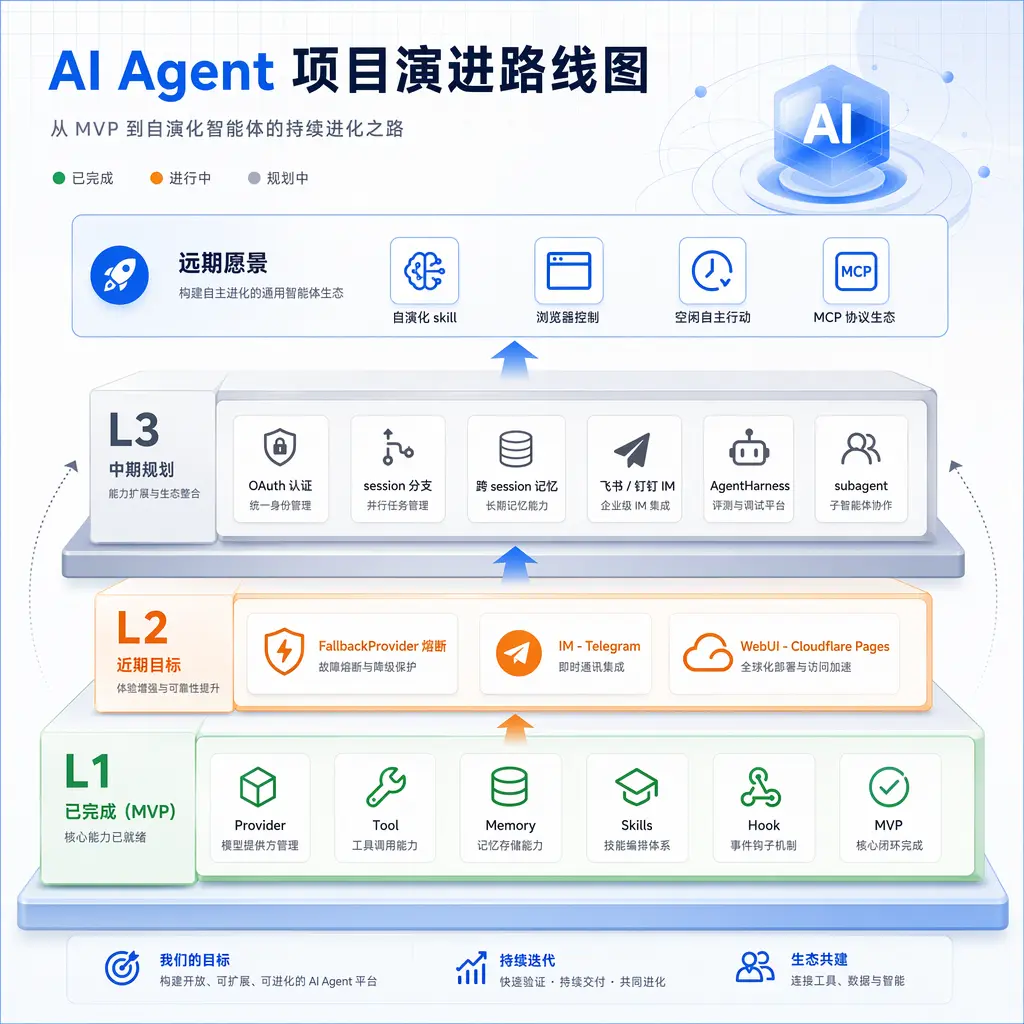
Putting all the above roadmaps together, we can see aptbot’s evolution panorama:
| Layer | Theme | Core Tasks |
|---|---|---|
| L1 (Completed) | Basic usability | Provider system, Tool system, Memory system, Skills system, Hook system, Session system, Security model, Streaming UX, Channel abstraction |
| L2 (Near-term) | Reliable across scenarios | Circuit breaker deepening, Telegram IM integration, WebUIindependent deployment |
| L3 (Mid-term) | Intelligent collaboration | OAuth, session branching, cross-session memory, multiple IM, AgentHarness, subagent |
| Long-term | Capability expansion | Multi-modal, MCP extension, self-evolving skills, browser/system control, idle autonomous action |
5. The Core Philosophy of “Project as Learning”
Returning to aptbot’s core philosophy, which is also the starting point of this learning article series: aptbot is both a tool and a textbook.
This has two meanings:
aptbot is a tool – it can be used. Users can clone, deploy, use it for code maintenance, and run agent tasks. It’s not a demo, not a prototype, but a tool for long-term use.
aptbot is a textbook – it can be learned from. Users can read its source code, its ARCHITECTURE.md, this series of learning articles, and understand the context of every design decision. It’s not a black box, not “just use it and forget it,” but a project that integrates “use + learn.”
These two layers don’t conflict; they reinforce each other:
- As a tool, every design decision in aptbot is driven by real scenarios, notmade up out of thin air. This makes the textbook content “grounded” – discussing Provider failover because provider failures actually happened; discussing path-guard because path traversal risks actually exist
- As a textbook, every design in aptbot has documentation and comments, making the tool easier to maintain. When users modify aptbot, they don’t need to “reverse engineer” – reading the documentation tells them why it was designed that way
This dual positioning also influences the choice of evolution roadmap: every new feature must consider not only “is it useful,” but also “is it learnable.” If a feature is too complex, too hacky, too difficult to explain, even if technically superior, it may be abandoned in favor of a clearer but slightly slower implementation.
This also explains why aptbot chose Approach C (layered planning) over Approach A (ecosystem extension) or Approach B (fast experimentation). Approach A’s ecosystem extension makes features richer, but the separation of core + packages forces learners tojump across multiple repositories. Approach B’s fast experimentation innovates faster, but unstable APIs mean learners may find a pattern they just learned already outdated. Approach C’s layered planning makes the learning path clear – each version teaches a new set of concepts, with concepts evolving in an orderly manner.
Summary
This article, as the conclusion of Track 1, extends thethread of the 13 articles toward “the future.”
We started from the overview of L1’s existing capabilities, understanding that aptbot has already built 6 major systems. Then we compared three evolution strategies for open-source projects – demand-driven, vision-driven, and evolution-driven – along with three corresponding project practices. Finally, we detailed aptbot’s layered evolution roadmap: L2’s reliable across scenarios, L3’s intelligent collaboration, and long-term directions including multi-modal, MCP, self-evolving skills, browser/system control, and idle autonomous action.
Finally, we returned to the core philosophy of “project as learning” – aptbot’s dual identity as both a tool and a textbook determines that its evolution is not just about “adding features,” but “adding educationally meaningful features.”
Track 1 Conclusion
The 13 articles started from “what is an agent,” passing through aptbot’s architecture, Provider, Tool, Memory, Skills, Hook, Channel, Session, Security, Error/UX, evolution review, and ending with this future outlook. This path itself is a complete framework for “understanding agents” – from principles to implementation to evolution.
If you’ve read all 13 articles, you should be able to:
- Explain the essential difference between an agent and a chatbot
- Understand aptbot’s four-layer architecture and unidirectional dependencies
- Describe the respective responsibilities of Provider / Tool / Memory / Skills / Hook / Channel / Session
- Understand how aptbot’s security model accumulates 10+ layers of defense
- Use the reducer pattern to explain how streaming UX works
- Recount aptbot’s evolution path from MVP to 0.2.2
- State the core directions of aptbot’s future L2/L3 roadmap
More importantly, you should have established a “mental model for agent system design“ – when encountering a new agent project, you can ask the right questions: How is its tool system designed? How is memory persisted? How are errors handled? How are multiple endpoints accessed? Where are the security boundaries? The answers to these questions vary, but the way of asking questions is universal.
Track 1 ends, but aptbot’s evolution does not. New versions will bring new features, new articles, new decisions. This learning article series will continue to evolve with the project – “project as learning” is an ongoing process, not a destination.
If you continue to Track 2, you’ll see a general methodology for AI-assisted coding – Track 1 covers “how to build an agent,” and Track 2 covers “how AI-assisted development is used in the process of building it.” The two tracks complement each other: one is the product, the other is the process.