Error Handling and Streaming UX: Layered Retry + EventStream + Reducer
An agent system’s “reliability” and “UX” may seem like two separate topics, but in aptbot they are actually the same thing – both about “how events flow from the agent to the user, and how errors are handled.” This article weaves these two threads together to see how aptbot’s error handling philosophy, event stream abstraction, and UI rendering patterns collaborate.
1. Concepts: Error Handling and Streaming UX Are the Same Problem
In traditional applications, error handling and user experience are two independent concerns. The backend is responsible for “not making errors,” and the frontend is responsible for “good experience.” But in agent systems, the two are highly coupled – the agent’s output itself is streaming (LLM returns tokens one by one, tool calls and results interleave), errors can occur at any layer at any moment (network errors, LLM errors, tool execution errors), and the user needs to see in real-time “what the agent is doing” and “what happens when there’s an error.”
From another perspective: the agent’s user experience is essentially error handling. Because the agent’s operation is full of uncertainty – the LLM may output invalid JSON, tools may timeout, Providers may be unavailable – every uncertainty is a potential “error.” A good agent system isn’t one that “never makes errors,” but one that, when an error occurs, “lets the user know what happened, what the system is doing, and what will happen next.” This is the core of agent UX.
2. General Design Approaches: Two Modes of Error Handling
2.1 Inline Handling Mode
The most straightforward approach: errors are handled within the core loop. The agent loop directly contains try-catch, retry logic, fallback logic. It seems simple and direct – handle errors where they occur.
But this mode has a fundamental problem: the core loop bloats. The loop’s job is to orchestrate “reasoning → action → observation.” Adding error handling means the loop must manage both the normal flow and the abnormal flow. As the error handling strategy becomes more complex (how many retries? how long to back off? switch provider? ask the user?), the loop’s code can balloon from 100 lines to 400+ lines, becoming a “god function” that knows everything but is difficult to modify.
2.2 Event-Driven Mode
Another approach: the core loop only does “execute + report errors,” and the upper layer makes decisions. The core loop produces events (“tool call completed,” “LLM reported error,” “provider timed out”), and the upper layer subscribes to events and makes decisions (“retry,” “switch provider,” “report to user”).
This keeps each layer pure – the execution layer only executes and produces events, and the decision layer only makes decisions based on events. Responsibilities are clear, and each can be tested independently.
2.3 Event Stream + Reducer Mode (Further Unification)
A variant of the event-driven mode is the event stream + reducer mode – not only is decision-making event-driven, but UI rendering is also event-driven. The core loop produces a typed event stream, which is folded into UI state through a reducer, and the UI renders based on that state. Error events, normal events, and state change events all flow through the same event stream.
This mode unifies “error UX” and “normal UX” within the same framework – errors are not “special paths,” but just one type of event in the stream. The reducer handles them, the UI renders them, and the user sees them.
3. Comparison of Three Error Handling and Streaming UX Approaches
3.1 Approach A: Inline Handling
This approach’s core philosophy is “simple and direct“ – error handling logic is written directly in the agent loop, with try-catch wrapping LLM calls and tool execution, and retrying or returning errors within the loop when things go wrong.
Design Characteristics:
- In-loop handling: The agent loop’s single method contains recursive retry, error recovery, state repair, and other logic
- Weakly typed events: Agent output is strings or unstructured objects, parsed differently by each frontend framework
- UI coupling: The frontend directly processes the raw event stream without an intermediate reducer layer. With multiple UI endpoints, each implements its own event handling logic
- Error persistence: Errors are written to session history, convenient for debugging but may pollute replay
Applicable scenarios: Rapid prototypes, projects with a single UI endpoint, scenarios with low error handling requirements.
Advantages: Intuitive implementation, all code in one place, easy to trace.
Cost: Severe loop bloat (400+ line single method), core logic coupled with error handling, making it hard for new developers to distinguish “normal path” from “abnormal path.” With multiple UI endpoints, each frontend writes its own event handling logic, prone to inconsistencies.
3.2 Approach B: Event Emit + Upper-Layer Listening
This approach’s core philosophy is “decoupling“ – the core loop emits events through an event broadcast mechanism (EventEmitter / EventBus), and the upper layer listens and handles them.
Design Characteristics:
- Event broadcast: The core loop emits events at key nodes (
tool:start,tool:end,llm:error), listened to by the upper layer - Error handling: The upper layer determines retry strategy by listening to error events
- UI rendering: Each frontend listens to events and maintains its own state
- No type constraints: Events are typically strings + payload, with no compile-time type checking
Applicable scenarios: Projects needing some decoupling but not wanting to introduce a complex event stream framework.
Advantages: Clearer than inline handling; the core loop no longer bloats; the event mechanism is simple to understand.
Cost: Weak type safety – event name typos are only discovered at runtime, and payload structure changes lack compile-time checking. Multiple UI endpoints still need torespectively maintain state management logic, potentially reproducing the same bug with different behavior across endpoints.
3.3 Approach C: Typed EventStream + External Layered Retry + Reducer (aptbot’s Choice)
This approach’s core philosophy is “structured event stream“ – all events are typed union types, passed sequentially through Generator/AsyncGenerator, and folded into UI state through a pure function reducer.
Design Characteristics:
- Typed events: All events are
AgentEventunion types, TypeScript validates each event handling point at compile time - External retry: Retry strategy is not in the core loop; it’s decided by the upper layer (session/harness) based on event type
- Shared reducer: The pure function
coreReduceris shared by CLI and WebUI, with differences only in the rendering layer - Event stream as interface: The event stream is the unified interface between the agent’s internals and the external world – core produces events, bus distributes, channel forwards, UI consumes
- Errors not persisted: Errors only exist in memory, pushed through the event stream to the client, never written to JSONL
Applicable scenarios: Projects requiring production-grade reliability, multiple UI endpoints, and type safety.
Advantages: Maximum type safety, maximum UI consistency, auditable and testable error handling.
Cost: Significant infrastructureinvestment (needs to define a complete set of event types, implement reducer and resync protocol), may beoverly heavy for simple scenarios.
3.4 Comparison of Three Approaches
| Dimension | Approach A (Inline) | Approach B (Event Emit) | Approach C (Typed Event Stream) |
|---|---|---|---|
| Core philosophy | Simple and direct | Decoupling | Structured event stream |
| Event types | Unstructured/strings | string + payload | Union types |
| Type safety | Weak | Weak | Strong (compile-time validation) |
| Error handling location | Inside loop | Event listener layer | External layered (loop reports, upper layer decides) |
| Retry strategy | Inline try-catch | Handled by listener layer | Three-layer classification (transport/business/semantic) |
| UI consistency | Each endpoint maintains its own | Each endpoint maintains its own | Shared reducer |
| Error persistence | Yes (written to history) | Usually written | No (only in memory) |
| Loop size | 400+ lines | 200-300 lines | ~150 lines |
| Infrastructure complexity | Low | Medium | Higher |
4. aptbot’s Error Handling and Streaming UX Design
aptbot chose Approach C. Below wedeconstruct each each design point.
4.1 External Layered Retry Philosophy
The most naive retry approach is “retry where the error occurs” – the network layer retries on network errors, the business layer retries on business errors. But this approach has a problem: the lower layer doesn’t understand upper-layer semantics, so retry decisions may be wrong.
For example: an HTTP request returns 401. The network layer sees “request failed” and might retry. But 401 means “authentication failed”; retrying 100 times will still return 401, purely wasteful. The retry decision should be made at a layer that understands “what 401 means.”
aptbot’s external layered retry philosophy: the loop reports, the upper layer decides. The specific execution layer (like the Provider call) doesn’t decide whether to retry on its own; it classifies the error and reports it upward, letting the upper loop decide – whether to switch provider, roll back, ask the user, or give up.
This keeps each layer pure – the execution layer only does “execute + report errors,” and the decision layer only does “how to handle errors.” Decision logic is centralized, auditable, and adjustable; execution logic is simple, reusable, and testable.
4.2 Three-Layer Retry: Transport + Business + Semantic
aptbot classifies errors into three layers, each handling the errors it understands:
Transport layer retry: Network-level errors. ECONNRESET, ETIMEDOUT, socket hang up. Retrying these errors makes sense (they may be temporary network glitches), but backoff should be used to avoid making things worse. aptbot uses exponential backoff (1s→2s→4s) + jitter.
Business layer retry: HTTP status code errors. 401/403 are fatal (don’t retry), 429/5xx are recoverable (retry + switch provider), 400 is fatal (parameter error, retrying is meaningless). This layer decides based on HTTP semantics – not “retry on any error,” but “judge whether retrying is worthwhile based on error type.”
Semantic layer retry: LLM output errors. The model returns invalid JSON, tool parameter schema validation fails, the model repeatedly calls non-existent tools. This type of “retry” is not about resending HTTP requests, but feeding the error back to the LLM to correct in the next round. This is handled by the agent loop, not the provider layer.
Each of the three layers handles errors it “understands,” not overstepping. The transport layer doesn’t know what 401 means, so it doesn’t retry 401. The business layer doesn’t know where the LLM output error is, so it doesn’t try to correct the JSON. The semantic layer doesn’t resend HTTP requests; it only feeds back to the LLM within the agent loop.
The key value of thislayered: every retry is an informed decision, not a blind attempt. The transport layer knows “network glitch” and retries; the business layer knows “401 is an authentication issue” and doesn’t retry, but instead notifies the user to check configuration; the semantic layer knows “LLM output is invalid” and sends the error message back to the LLM for self-correction.
4.3 Errors Not Persisted Principle (Preventing “400 Poisoning”)
aptbot has a counter-intuitive principle: errors are not written to session history.
Why counter-intuitive? Intuitively, “recording errors for post-mortem” is good. But in practice, this leads to “400 poisoning” – a provider temporarily returns 400 (e.g., model parameter error), and the error is written into the session history. The next time the session is replayed, this 400 is sent to the LLM as “what happened last round.” The LLM, seeing “last round 400 error,” may be confused or repeatedly trigger the same issue.
The correct approach: errors only live in memory – when they occur, they’re pushed to the client through the event stream for display, but are never written to JSONL. Session history only records “successfully completed things” (user messages, assistant messages, tool call results), not “failed attempts.”
This guarantees session replay consistency – any time you replay, you see “completed items,” without “half-baked errors” polluting the context.
4.4 AgentEvent Union Type
All agent output (LLM tokens, tool calls, state changes, errors) are events, uniformly represented by the AgentEvent union type:
- token event: A text token from LLM streaming output
- tool_call_start event: Tool call start (name + parameters)
- tool_call_end event: Tool call end (result)
- turn_end event: A turn ends
- error event: Error (includes type + message)
- presence event: User online/offline
- session_changed event: Session state change
The union type forces TypeScript to validate types at every event handling point, preventing errors like treating a token event as a tool_call_end. The event stream is aptbot’s unified interface between the internal and external world – the agent core produces events, the bus distributes, Channels forward, and the UI consumes.
This is something Approaches A and B cannot achieve at this level: in Approach A, events are strings or unstructured objects, and handling code mustdetermine “what type of event is this,” writing lots of if (typeof x === 'string') or switch (x.type) without compile-time validation. Approach C’s union types automate this validation.
4.5 EventStream → UI Reducer Pattern
The UI doesn’t directly process the event stream; it goes through a reducer pattern:
- EventStream: An ordered sequence of events flowing from the agent to the UI
- Reducer: A pure function
(state, event) => newStatethat “folds” the event sequence into UI state - UI: Renders based on state, automatically re-rendering when state changes
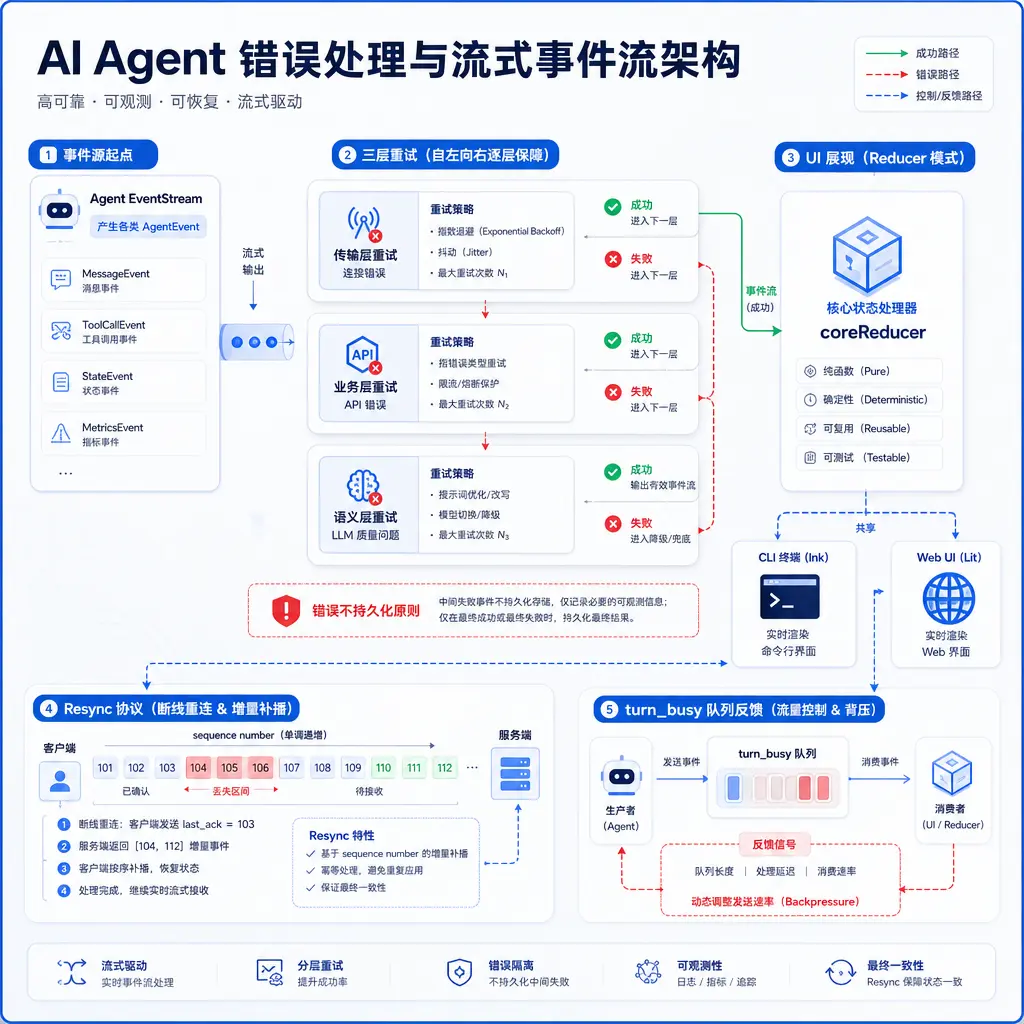
aptbot has two UIs: CLI (using Ink) and WebUI (using Lit). They use the same coreReducer – the reducer is a pure function, independent of the UI framework. The difference is only in “how to render state into pixels” – Ink renders into terminal characters, Lit renders into DOM elements.
Benefits of sharing the reducer:
- Consistency: CLI and WebUI display the same agent state. There’s no situation where “CLI sees a tool call but WebUI doesn’t”
- Testability: The reducer is a pure function; unit tests don’t need to spin up a UI framework
- Evolvability: When adding a new UI (like a mobile app) in the future, just reuse the reducer and only write the rendering layer
This is something Approaches A and B cannot achieve: in Approach A, each endpoint handles events and maintains state independently, easily leading to inconsistencies (CLI displays “executing tool” while WebUI displays “waiting for LLM reply”). Approach B improves things somewhat through event broadcasting, but state management is still built per-endpoint. Approach C’s shared reducer guarantees consistency at the architectural level.
4.6 Streaming Rendering, Turn Abortion, Multi-Device Sync Are Natural Consumption of the Event Stream
The reducerpattern makes three seemingly complex UX behaviors “natural consumption of the event stream”:
Streaming rendering: Token events arrive one by one, the reducer appends them to the “current assistant message” field of the state, and the UI detects the state change and renders the new token. No special “streaming logic” needed – it’s just the natural result of the reducer processing token events.
Turn abortion: The user clicks the “stop” button, sending an abort signal to the agent loop. The loop stops tool execution and LLM calls, sending a turn_aborted event. The reducer receives turn_aborted, marks the current message as “aborted,” and the UI shows the abort marker. Abortion is not a “special path” – it’s just another event in the event stream.
Multi-device sync: Agent events are sent to the bus, which distributes them to all channels bound to that session. Each channel’s UI runs its own reducer, and their statesrespectively evolve but stay in sync – because they consume the same event stream. Multi-device sync doesn’t need “special sync logic”; it’s a natural result of the event stream.
This is the core value of the reducerpattern – reducing “complex UX behaviors” to “event stream + pure function.” Complexity shifts from the UI layer to the event design layer, and the UI layer becomes thinner.
4.7 Resync Protocol
After a WebSocket disconnection and reconnection, how does the client “catch up” on events it missed during the disconnection? The most naive approach is “re-pull the entire session history after reconnection,” but this wastes bandwidth – the client has already received most events.
aptbot’s resync protocol:
- The client records the last received event sequence number
- On reconnection, the client sends the sequence number to the server
- The server replays events from that sequence onward
This minimizes the cost of “reconnection” – only “missed events” are replayed, not the entire history. The resync protocol underpins “seamless reconnection” – the user’s network glitches, the UI flickers, and state automatically catches up without needing to refresh the page.
Resync depends on two prerequisites: events have monotonically increasing sequence numbers; the reducer is a pure function (given the same initial state and the same event sequence, the same final state is produced). The second point guarantees the consistency of replay – after the client replays the event sequence, its state is exactly consistent with the server.
4.8 turn_busy Queue Feedback
When the agent is executing a turn (e.g., running a bash tool expected to take 30 seconds), and the user sends another message, what happens?
aptbot handles this with turn_busy feedback:
- While the agent is executing a turn, the new message enters a queue (instead of being discarded or causing an error)
- The agent sends a turn_busy event to the client, telling the user “I’m busy now, your message is queued”
- After the current turn ends, the agent automatically processes the next message in the queue
This makes the UX clearer – the user knows “my message was received, but the agent is busy and will process it later,” rather than the confusion of “I sent a message but the agent didn’t respond.” turn_busy is just another event in the event stream; the reducer handles it and displays a “busy” state.
4.9 SessionRef Mutable Reference (Switching Sessions at Runtime Without Restarting the Loop)
While the agent loop is running, the user may want to switch to another session – for example, the current session is stuck on a long task, and the user wants to switch to another session to handle something else.
The most naive implementation is “stop the current loop, restart a new loop for the new session,” but the cost is high – restarting the loop loses in-memory temporary state (like the tool currently executing, the uncompleted LLM call).
aptbot uses SessionRef mutable reference: the loop holds a reference to the current session (not the session itself), and the reference can change. Switching sessions only modifies the reference; the loop doesn’t restart. After the current LLM call completes, the next round automatically uses the new session.
This makes “switching sessions at runtime” extremely low-cost – just modifying a reference, the loop keeps running. The trade-off is that the new session needs to wait for the current turn to finish before fullytake over, but this is a reasonable cost (you can’t “swap brains” in the middle of an ongoing LLM call).
4.10 Core Differences from the Three Approaches
Compared to Approaches A and B, aptbot’s most core difference is not “using a reducer” or “using an event stream” – it’s unifying all uncertainty into the same event model.
Approach A treats errors as exceptions, with normal and abnormal flows being two separate sets of code. Approach B treats errors as events, but event types are incomplete and type-unsafe. Approach C treats everything – normal LLM tokens, tool calls, errors, state changes, connection reconnections – as the same kind of thing: events.
This means:
- No “special paths”: Errors are not special paths, interruptions are not special paths, reconnections are not special paths. They are all just events in the event stream
- All behavior is replayable: Because everything is an event, the state at any moment can be reconstructed by replaying the event stream
- Zero-cost new UI integration: A new UI only needs to implement a reducer + rendering layer, without understanding the agent’s internal logic
5. Future Directions
The current event stream + reducer model already covers core scenarios. Future directions for deepening include:
Finer error classification: The current three layers (transport/business/semantic) cover most scenarios. Futurefurther subdivision could distinguish “LLM output format errors” from “LLM output content safety errors,” “retryable 429” from “non-retryable 429.”
Reducerlayered merging: Currently all events go through a single coreReducer. In the future, the reducer could be split into sub-reducers (like chatReducer, toolReducer, sessionReducer), combined using a combine pattern. This helps maintainability as event types increase.
Resync protocol edge cases: The current resync mechanism assumes sequence numbers never wrap around (monotonically increasing, no rollback). Very long sessions may need to consider sequence wrapping.
Deepened presence events: Current presence events only cover “user online/offline.” In the future, this could extend to richer collaboration scenarios like “user is typing.”
Offline event queue: Currently, the event stream relies on an online connection. Future support could include client-side offline event caching and batch synchronization on reconnection.
These directions are candidates for the L3 route, but the current core architecture (event stream + reducer + resync) has already paved the way for these extensions.
Summary
Error handling and streaming UX are unified as the same problem in aptbot – “how events flow and how errors are handled.” The external layered retry philosophy centralizes decision-making; transport/business/semantic three-layer retry each handles its own domain; errors are not persisted to prevent 400 poisoning. The AgentEvent union type + EventStream + reducer thins the UI layer; streaming rendering, turn abortion, and multi-device sync are all natural consumption of the event stream. The resync protocol supports seamless reconnection, turn_busy makes queue feedback clear, and SessionRef allows switching sessions at runtime without restarting the loop.
Comparing Approach A (inline handling) and Approach B (event emit + upper-layer listening), aptbot chose Approach C (typed EventStream + reducer) not just for “more structured error handling” – but because in a multi-UI scenario, the shared reducer provides the lowest-cost guarantee of consistency. And the “errors are events” mental model lets all uncertainty in the agent system be handled within the same framework. Developers don’t need to distinguish “normal paths” from “abnormal paths” – everything is just the event stream.
The next article leaves the abstraction layer to look at aptbot’s actual development process: the evolution from MVP to 0.2.2.