Skills System: Two-Layer Loading and Self-Evolution Planning
The Tool system gives the agent the ability to “do things,” but when the agent faces the question of “how to use these tools to do things,” it needs another layer of knowledge—the wisdom of using tools.
A bash tool plus 100 guidelines on “how to accomplish X task with bash” is more effective than simply adding 10 new tools. Because the agent doesn’t automatically know that “to check disk space, use df -h,” “to search for files, use find . -name,” “to view running processes, use ps aux.” These are “knowledge of using tools,” not the tools themselves.
The Skills system is the module that carries this type of knowledge. It is the agent’s “knowledge layer”—telling the agent which tool to use in which scenario, what steps to follow, and what pitfalls to watch out for.
But there is a core tension here: the more knowledge, the more bloated the system prompt. If all skill descriptions are stuffed into the system prompt, the agent knows everything, but the token cost explodes. If only a few skills are included, the agent doesn’t know many things and misses optimal solutions. How to balance “knowledge breadth” and “token cost” is the core design challenge of the skills system.
This article starts with the basic concepts of the skills system, compares several mainstream knowledge injection approaches, and then dives into how aptbot balances this tension through “two-layer loading + frequency index.”
1. Concepts: What Is a Skill and Why Do We Need a Skills System
1.1 What Is a Skill: Knowledge of Using Tools
A skill is not a tool. A tool is the ability to “do something” (read files, write files, execute commands), while a skill is the knowledge of “how to use tools to accomplish a task.”
Using a real-world analogy:
- Tools are a hammer, a screwdriver, and a saw
- A skill is “how to build a bookshelf using these tools”—first saw the wood → drill holes → screw in screws → sand it down
It’s the same for an agent. It already has bash, read, and edit tools, but when facing “help me fix this TypeScript type error,” it needs to know: first read the file to understand the error context → check the type definitions → modify the code → run tsc to verify → run tests to ensure nothing else is broken. This isn’t something a single tool call can accomplish; it’s a set of “operational workflow” knowledge.
A skill file is typically a markdown document containing:
- Description: Tells the agent when this skill is useful
- Guide body: Specific steps, precautions, and best practices
1.2 The Relationship Between Skills and Tools
Tools and skills play different roles in an agent but work together:
| Tool | Skill | |
|---|---|---|
| Question answered | “What can the agent do” | “What does the agent know how to do” |
| Carrier | TypeScript function + schema | Markdown document |
| How it’s injected | Function calling definition | System prompt or context |
| Execution method | Model calls directly | Model reads and decides autonomously |
| Security boundary | Hard validation at code level | None (just knowledge, not executable) |
Simply put: tools are “executable operations,” skills are “knowledge of when to use which operation.”
1.3 The Token Cost Problem of Skill Injection
Skill knowledge needs to be “fed” to the LLM, most commonly by injecting it into the system prompt. But every skill’s description and even full text consumes tokens.
Suppose you have 50 skills, each with an average description of 50 tokens (about 35-40 Chinese characters), totaling 2500 tokens. Every LLM call pays for these 2500 tokens (in both time and money), regardless of whether the call actually needs these skills. In a 100-turn conversation, that’s 250,000 tokens spent purely on “listing the catalog.”
If you include the full content of each skill (each possibly 500-2000 tokens), the number becomes even more staggering. So the “inject all skills” approach is unsustainable—it turns the cost of “having more knowledge” into a fixed overhead paid on every call.
2. General Design Principles
2.1 Skill Management Strategies
Different agent projects make decisions on three dimensions of skill management:
Source dimension: Where do skills come from?
- Entirely built-in (out of the box, but not customizable)
- Entirely user-written (highly customizable, but high barrier to entry)
- Built-in + user-defined (combination of both)
Injection dimension: How do skills enter the model’s context?
- Full injection: All skill descriptions (or full text) are sent with every request
- On-demand injection: Only retrieve and inject relevant skills when needed
- Hybrid injection: Descriptions fully injected (so the model knows what skills exist), full text loaded on demand
Update dimension: How do skills change?
- Static: Skill files only update on release
- Hot-reload: Skill file changes take effect immediately without restart
- Self-evolution: The agent creates and updates skills itself
2.2 On-Demand Retrieval vs. Full Injection
The core challenge of on-demand injection is that “the model doesn’t know what it doesn’t know.” If a skill’s description is not in the current context, the model will never know that skill exists and naturally won’t request it. So on-demand injection needs an external retrieval system to determine “what skills the current conversation might need.”
Common retrieval strategies:
- Keyword matching: Match keywords from the current user input against skill descriptions. Simple but low precision.
- Embedding vector retrieval: Convert both skill descriptions and the current conversation into vectors, computing similarity. High precision but requires embedding infrastructure.
- Most recently used first: Record the last use time of each skill, prioritizing recently used skills for injection. No semantic understanding needed, simple to implement.
These three strategies have no absolute superiority—keyword matching is best for “precise trigger” scenarios (user explicitly says “help me run tests” → inject test skill), vector retrieval is best for “fuzzy discovery” scenarios (user says “the code seems a bit off” → inject debugging skill), and most recently used is best for “habit adaptation” scenarios (user has been using git skill for the past few days → git skill is injected first).
2.3 Skill Lifecycle
From creation to deprecation, a skill typically goes through:
- Creation: User or project writes a markdown file
- Registration: File is placed in the designated directory, system scans and discovers it
- Indexing: Skill enters the L1 index (listed as an “available skill”)
- Injection: Enters the system prompt or context at the appropriate time
- Use: Agent reads the skill content and acts accordingly
- Update: Content modification takes effect through hot-reload
- Deprecation: Unused skill is removed from the index
3. Comparison of Other Skill Management Approaches
Different agent projects have very different answers to the question of “how to manage knowledge of using tools.” Here are three representative approaches.
3.1 Approach A: All Preset, No User Extension
This approach provides a complete built-in skill library that users cannot add, modify, or delete. Skill content is written and updated by project maintainers.
Design characteristics:
- Unified skill library: All users share the same set of skills, versioned by project release cadence
- No customization path: Users cannot write their own skills or override built-in skills
- Full or curated injection: Either inject all skill descriptions or have project maintainers curate a subset for injection
Advantages:
- Quality controlled—all skills reviewed by project maintainers, no low-quality or incorrect skills
- Zero configuration for users—ready to use after cloning, no need to understand the skills system concept
- Good consistency—all users have the same agent behavior
Disadvantages:
- Inflexible: Users cannot customize skills for specific projects. For example, a company’s monorepo-specific test workflow or team code conventions—this knowledge can never enter the skill system.
- Dependent on project release cadence: If a project maintainer updates a skill, users must upgrade the entire project to get the update.
- Cannot fix errors: If a built-in skill is poorly written (e.g., recommending outdated commands), users can only tolerate it, not fix it.
3.2 Approach B: All User-Written, No Built-in
This approach goes to the other extreme: the project provides no built-in skills at all, leaving everything to users to write. Users create exclusive skills for their own projects and workflows.
Design characteristics:
- Zero built-in skills: After cloning the project, the skill directory is empty
- Entirely user-written: Each skill is created by the user based on needs
- Maximum flexibility: Users can precisely control what the agent knows and doesn’t know
Advantages:
- Highly customizable—the agent’s knowledge is fully adapted to the user’s work patterns
- No “unnecessary” skills—no token cost paid for scenarios not needed
- Users have complete control over agent behavior
Disadvantages:
- High barrier to entry: After cloning the project, new users have an agent with no “usage knowledge.” Ask it “how to debug TypeScript” and it doesn’t know—the user needs to write a debug-skill first.
- Knowledge isolation: Good skills written by user A cannot be shared with user B (unless manually copied), preventing the community from accumulating common knowledge.
- Heavy maintenance burden: Users need to maintain updates and correctness for all skills themselves. Over time, the skill library may become increasingly bloated or outdated.
3.3 Approach C: Two-Layer Loading + Usage-Frequency Dynamic Truncation
This approach combines the advantages of Approaches A and B: built-in skills provide “out-of-the-box” basic capabilities, while user-custom skills provide “project-specific” customization. At the same time, token cost is controlled through usage-frequency dynamic truncation.
Design characteristics:
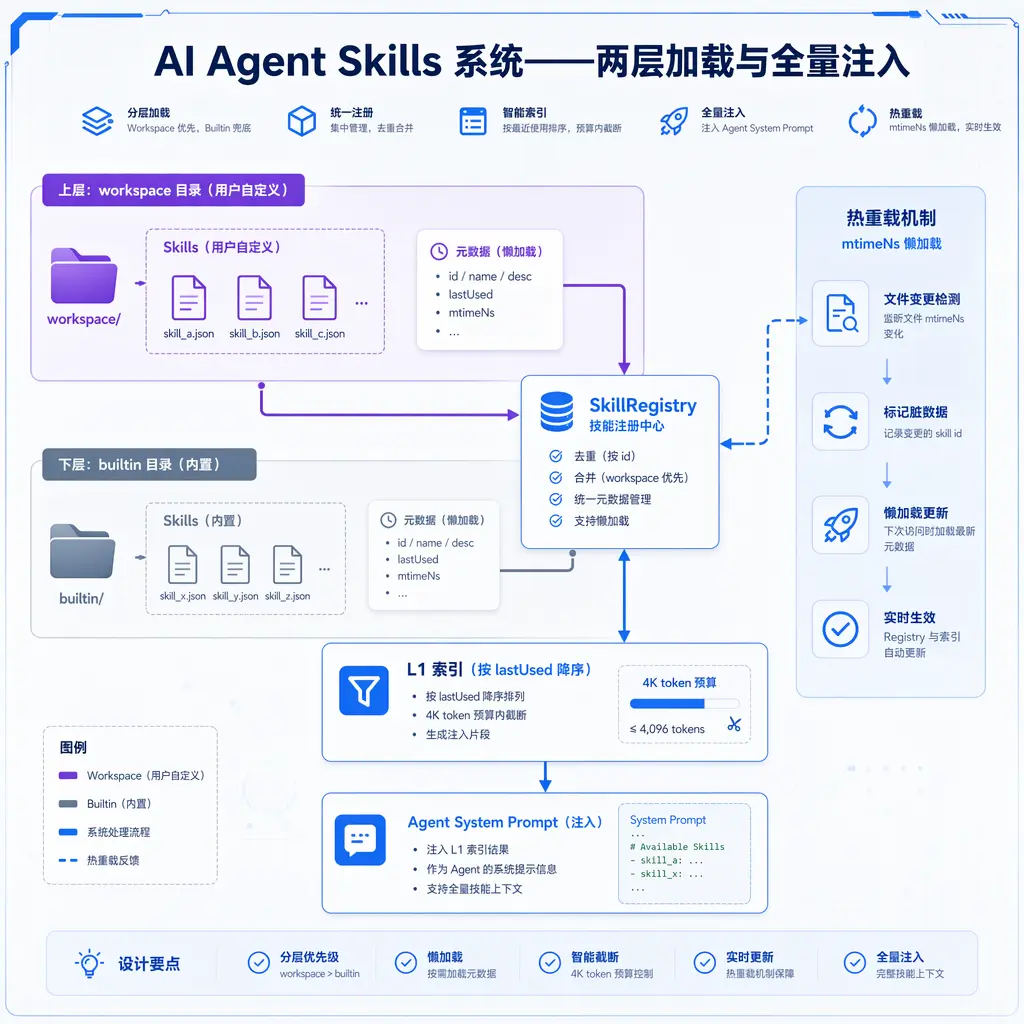
- Two-layer loading: builtin layer (project-internal) and workspace layer (user-custom). Same-named skills use the workspace version (override).
- Minimal frontmatter: Only requires two fields: name and description, lowering the barrier to writing skills.
- L1 frequency index: Sorted by lastUsed in descending order, take the top N for injection into the system prompt (token budget truncation).
- Hot-reload: Modifications to skill files take effect immediately, supporting rapid iteration.
Advantages:
- Out of the box—built-in skills give new users complete capabilities right after cloning
- Customizable—workspace layer allows users to add or override any skill
- Token cost controllable—full injection becomes on-demand injection, only frequently used skills are in the system prompt
- Self-adapting—the user’s skill usage habits determine the index order, no manual configuration needed
Disadvantages:
- More complex architecture—needs to implement two-layer loading, override logic, frequency index, hot-reload
- “Cold start” problem for new skills—a newly added skill has lastUsed as null and may never appear in the index for scenarios where it’s not used (needs special handling or fallback strategy)
- Community maintenance cost—built-in skills need continuous updates as the project evolves
3.4 Three Approaches Comparison
| Dimension | Approach A (All Preset) | Approach B (All Self-Written) | Approach C (Two-Layer + Frequency Index) |
|---|---|---|---|
| Out of the box | Yes | No | Yes |
| Customizability | None | Complete | Complete |
| Barrier to entry | Low | High | Low |
| Token cost control | Fixed (full or curated) | User-controlled | Dynamic (frequency truncation) |
| Community sharing | Strong (unified skills) | None | Medium (builtin shared + workspace private) |
| Implementation complexity | Low | Low | Medium-high |
| Suitable for | Standardized products | Highly customized workflows | Learning projects / personal agents |
4. aptbot’s Design Characteristics
aptbot chooses Approach C. The rationale aligns with its positioning as a learning project: new users should be able to use it right after cloning (built-in skills), but there should be enough room for customization (workspace override). It needs to accumulate sufficient skill knowledge while controlling the token cost of the system prompt (L1 frequency index truncation).
4.1 Two-Layer Loading: Workspace Overrides Builtin
aptbot’s skills are stored in two layers:
Builtin skills: Shipped with aptbot code. Stored in a convention-based path under the project directory. These are “general skills”—how to debug TypeScript, how to do git operations, how to write tests, how to search documentation. Each new aptbot version may add or update builtin skills.
Workspace skills: Stored in .aptbot/skills/ under the current working directory. These are “project-specific skills”—like “how to run tests in our company’s monorepo,” “this project’s coding conventions,” “this project’s unique build workflow.”
During loading, the workspace layer overrides the builtin layer. Same-named skills use the workspace version. This means:
- Not satisfied with a built-in skill? No need to fork aptbot—create a skill file with the same name under workspace, and your version automatically takes effect.
- Project has special workflow? Just write a workspace skill—the agent will automatically learn it.
- Want to extend a built-in skill? Create a new skill file under workspace—the agent loads both built-in and workspace skills together.
The fundamental problem that two-layer loading solves is “the tension between out-of-the-box and project-specific customization.” Without built-in skills, new users face an agent that “knows nothing.” Without workspace skills, experienced users can’t teach the agent project-specific knowledge.
4.2 Minimal Frontmatter: name / description
Each skill file has YAML frontmatter at the top, requiring only two fields:
1 |
|
Why only two fields?
Because the core value of a skill is in its body—the specific operation guide. Frontmatter is just a “catalog index” so the LLM knows this skill exists and when to read it. Additional fields (priority, tags, triggers, author, version, etc.) introduce two problems:
- Maintenance cost: Users have to fill in multiple fields when writing a skill. Some fields (like tags) may be useful when there are only a few skills, but become a burden as skills grow—each new skill requires thinking “is this tag reasonable?”
- Information noise: When the LLM decides “should I use this skill,” the truly useful piece is the description—one sentence that says “when is this skill useful.” Extra fields may be noise for the LLM, distracting attention from key information.
The design philosophy of minimal frontmatter is: force the user to compress “when to use” into a single sentence. This itself is good abstraction practice—if you can’t describe in one sentence when a skill is useful, the skill’s scope may be too broad or too narrow.
As for richer metadata (version control, classification tags, dependencies), these can be managed through external tools (like a skill marketplace or catalog index) when needed, without intruding on the skill file format itself.
4.3 Token Cost Analysis of Full Description Injection
Let’s start with the simplest approach—injecting all skill descriptions into the system prompt. Assume:
- 50 skills total (20 builtin + 30 workspace)
- Each description averages 50 tokens
- Each LLM call pays 2500 tokens for “listing the catalog”
- In a 100-turn conversation, 250,000 tokens total spent on “listing the catalog”
What does 250,000 tokens mean? At GPT-4 prices, roughly $5-10; at Claude 3.5 prices, roughly $1-2. For a personal project, this is not unbearable, but it’s wasteful—most skills won’t be used in most conversations. Users likely use only 20% of skills in 80% of conversations (following a Pareto distribution).
More critically, description injection only “lets the model know this skill exists.” When the model decides to use a particular skill, it also needs to load the skill’s body content. If all 50 skills’ bodies are loaded, averaging 1000 tokens each, that’s 50,000 tokens—essentially filling the entire context window of a small model (e.g., 8K context).
So “full injection is only feasible when the number of skills is very small” (e.g., no more than 10). Once the number of skills grows, a more refined injection strategy is needed.
4.4 L1 Index: lastUsed Descending + 4K Token Budget Truncation
aptbot uses the L1 index to solve the token waste problem of “full injection.” The strategy is:
- Each skill maintains a
lastUsedtimestamp, recording when it was last “used” by the agent - When assembling the system prompt, all skills are sorted by lastUsed in descending order
- Accumulate the token count of each skill’s description from the top
- When the 4K token budget is reached, truncate—skills beyond this point are not injected into this system prompt
Effect: Recently used skills are always in the system prompt; long-unused skills sink below the index. This transforms the fixed token cost of “full injection” into a dynamic cost based on usage frequency.
Why use lastUsed rather than a more complex relevance score?
- Simple: lastUsed is a single field, no external service needed to compute it
- Trustworthy: Usage time is an unforgeable signal—it reflects the agent’s actual behavior pattern, not a semantic matching “guess”
- Self-adapting: A user frequently using the git skill in a project → git skill’s lastUsed keeps updating → naturally ranks high. After switching projects and not using git skill for days → it naturally sinks down, and the new project’s relevant skills rise
The 4K token budget is an empirical value. Too little (1K) may truncate even commonly used skills; too much (16K) defeats the purpose of “controlling tokens.” 4K can accommodate about 80-100 skill descriptions (at an average of 50 tokens each), sufficient to cover the commonly used set for most projects’ skill counts.
But there’s a problem: the cold start of new skills. A newly created workspace skill has lastUsed as null or 0, placing it at the bottom of the L1 index. If the user doesn’t say something directly related to it, it may never appear in the system prompt, so the agent never knows it exists, never calls it, and lastUsed never updates—this is the “cold start trap.”
aptbot’s solution: a new skill’s lastUsed is initialized to the current timestamp (not 0), giving the new skill a chance to appear at the top of the L1 index. This is a “newcomer-first” strategy—new skills get exposure for a period of time. If actually used, lastUsed is refreshed by subsequent real usage; if never used, it naturally sinks over time.
4.5 read_file Special Case for Updating lastUsed
The lastUsed update mechanism has an important special case: when the agent reads a skill file through the read tool, it automatically updates that skill’s lastUsed.
Why is this special case needed? Under normal circumstances, “using a skill” means the agent loads the skill body into context and acts accordingly. But the read tool is a generic file reading tool—the agent can use it to read any file, including skill files. Without this special case, the following scenario would occur:
- The agent’s L1 index includes the
debug-typescriptskill (description is in the system prompt) - The agent determines “this scenario might need the debug-typescript skill”
- The agent calls the read tool to read the body of
skills/debug-typescript.md - It reads it, understands the content, and acts accordingly—but lastUsed hasn’t been updated
- On the next L1 index sort, debug-typescript’s lastUsed is still old and may be truncated
The special case solves this: the read tool, when detecting that the read path points to the skill directory, additionally updates that skill’s lastUsed. This way, the agent’s behavior of reading a skill is correctly recorded as “having used that skill,” and the L1 index reflects the actual usage pattern.
This is a small design detail, but it embodies the idea of “using behavioral signals to complement semantic signals.” Rather than updating lastUsed through the model actively reporting “which skill I used” (which depends on whether the model is honest and accurate), it uses the side effects of tool execution to update automatically—more reliable and more seamless.
4.6 Hot-Reload Integration
Skills are a frequently iterated “knowledge base.” When writing a skill, users might write a line, try it, change it, try again. If each modification requires restarting aptbot, the iteration experience would be painful.
aptbot’s skill system supports hot-reload—when the user modifies a skill file under workspace, the next LLM call automatically reflects the changes without restarting.
The hot-reload implementation follows the same pattern as Config and Memory hot-reload: mtimeNs lazy loading.
The specific flow:
- Before each LLM call, check the skill directory’s latest mtimeNs (file modification time, nanosecond precision)
- If mtimeNs differs from the last scan, there have been file changes
- Re-scan the skill directory, rebuild the L1 index
- Update the cached mtimeNs
The benefits of this mechanism are:
- Lazy loading: No resources wasted on “real-time monitoring of file changes”—only checks when needed
- Zero configuration: Users don’t need to manually trigger a “reload” command
- Consistent with existing architecture: mtimeNs lazy loading has already been validated in the configuration system and memory system; the skill system reuses the same pattern
Hot-reload makes the skill writing experience close to “instant feedback”—save the file, and the next conversation turn verifies the new skill’s effect. For skills, which are essentially prompt engineering, a fast trial-and-error cycle is critical.
5. Future Directions
5.1 Self-Evolving Skills
Currently, skills are static—written by humans or the project, loaded on demand by the agent. The longer-term vision is self-evolution: when the agent executes a task and finds “this task’s approach is worth recording,” it writes a new skill file to the workspace on its own.
The significance is that the agent not only “uses knowledge” but also “creates knowledge.” A long-running agent gradually accumulates its own skill library, becoming more and more adapted to the user’s work patterns.
The core challenges of self-evolving skills:
- Quality control: Skills written by the agent might be noise (“I tried X but it failed” shouldn’t be saved as a skill). Some filtering mechanism is needed—possibly LLM self-evaluation, user review, or a combination of both.
- Conflict management: When a new skill conflicts with an existing skill (e.g., two versions of “how to run tests”), how to handle it? Use the newer one? Let the user choose? Auto-merge?
- Explainability: Users need to be able to audit agent-created skill content, otherwise it’s a black box. Metadata like “who wrote this, when, based on what experience” needs to be preserved.
Self-evolution is a long-term goal on aptbot’s L3 roadmap and won’t be implemented in the near term. But the infrastructure of two-layer loading, minimal frontmatter, and hot-reload has already paved the way—self-evolving skills are essentially the agent using tools to create and update markdown files in the workspace directory.
5.2 Skill Marketplace Community Ecosystem
Built-in skills are currently written by aptbot project maintainers. In the future, a community-contributed skill marketplace could be explored—users can share good workspace skills, and others can install them with one click into their built-in layer.
This preserves “out-of-the-box” functionality (community-curated skills can become part of the built-in layer) while solving the “information silo of user-written skills” problem. However, the operational mechanism of a skill marketplace (version management, quality review, dependency management) is a complete platform engineering problem, outside the scope of aptbot’s current MVP.
5.3 Smarter Injection Strategy
The current L1 index is a simple sorting and truncation based on lastUsed. In the future, this can be made smarter:
- Dynamic retrieval based on conversation context: In addition to lastUsed sorting, relevant skills can be retrieved from L2/L3 storage based on the current conversation’s semantics
- Hierarchical token budget: Instead of evenly distributing the 4K token budget among all skills, reserve a fixed quota for “core skills” (like debug, test, git) and leave the remaining budget for long-tail skills to compete
- Cross-skillassociation recommendation: If the agent is using a “debug TypeScript” skill, automatically boost the sorting priority of “how to write tests” skills
These strategies can be stacked incrementally without requiring a one-time overhaul of the entire system. The value of the L1 index is precisely that it’s “simple enough to serve as the foundation for more complex strategies.”
Summary
The Skills system is the agent’s “knowledge layer,” complementing the Tool system’s “execution layer.” This article breaks down the design of the skills system from three perspectives:
Conceptual level: A skill is “knowledge of using tools,” not the tool itself. It answers the question of “how to do it” and is carried in markdown documents. The core tension of skill injection is “more knowledge = more expensive tokens.”
Approach comparison: Approach A (all preset) is out-of-the-box but not customizable; Approach B (all self-written) is highly flexible but has a high barrier to entry; Approach C (two-layer loading + frequency index) achieves a balance among “out-of-the-box,” “customizability,” and “token cost” through builtin + workspace layering and lastUsed sorting with truncation.
aptbot’s choice: Two-layer loading resolves the “general vs. specific” tension (workspace overrides builtin), minimal frontmatter lowers the writing barrier (only name/description required), L1 index sorts by lastUsed + 4K budget truncation controls token cost, read_file special case makes usage behavior accurately feed back into the index, and hot-reload gives skill writing the ability to iterate instantly.
The next article is the 7th in this series, where we look at the Hook system: how 8 extension points make agent behavior pluggable.