Memory System: Persistence, Compaction, Cross-Session Memory
An agent without memory starts from zero every conversation. It doesn’t remember what you said ten minutes ago, doesn’t remember which bug you fixed yesterday, doesn’t remember the progress on this project from last week. It’s like a colleague who needs you to reintroduce yourself every time you meet—you can tolerate it, but you can’t collaborate.
But “remembering everything” isn’t the answer either. LLMs have limited context windows—current mainstream models range from 128K to 200K tokens, which sounds large, but a single complete ReAct loop (conversation history + tool definitions + tool results + system prompt) can easily consume 10K-20K tokens. After dozens of interactions, the context will be exhausted. And the longer the context, the slower the inference and the higher the cost, both linearly.
So the core tension of a Memory system is: we need to remember enough information to maintain continuity, but we can’t let memory expand indefinitely and blow up the context window. This article starts with the basic concepts of memory systems, compares the trade-offs of several persistence approaches, and then dives into how aptbot resolves this tension through append-only logging + periodic compaction.
1. Concepts: What Kind of “Memory” Does an Agent Need?
1.1 Three Types of Memory
Cognitive science divides human memory into three layers: sensory memory, short-term memory, and long-term memory. An agent’s memory system has similar hierarchical divisions, but in engineering terms, we typically classify it functionally into three types:
Conversation History: The complete record of every turn in the current session—what the user said, what the model replied, which tools were called, and what the results were. This is the most “expensive” memory because it requires full context for the model to understand the current state.
Working Memory: Key information about the “current task” the agent is focused on. Unlike conversation history, which records every entry, this is a “summary card” actively maintained by the agent—which bug is currently being fixed, what approaches have been tried, what’s still pending. Working memory is “actively maintained”; the agent itself decides what information is worth remembering.
Long-term Knowledge: Factual knowledge across sessions—the project’s code structure, commonly used command patterns, user preferences. This type of memory doesn’t need to be loaded every turn; it’s retrieved only when relevant. Long-term knowledge is the “cheapest” but also the hardest to get right—it requires efficient retrieval and reasonable update strategies.
1.2 The Role of Memory in the ReAct Loop
In the ReAct loop, memory appears in two stages:
- Context assembly before reasoning: Before each turn begins, the system needs to retrieve relevant memory from persistent storage and assemble it into the LLM’s input context. What to retrieve, how much, and in what format—these decisions directly impact reasoning quality and cost.
- Memory update after action: After each turn ends, new interactions need to be written to persistent storage. Conversation history is appended, working memory may be updated, and tool execution results are recorded.
Simply put: read memory when reasoning, write memory after acting. Reading determines the agent’s current “field of view,” and writing determines the agent’s future “scope of recall.”
1.3 Engineering Requirements for Persistent Storage
An agent’s memory storage solution needs to meet the following engineering requirements:
- Efficient writes: Writes happen after every interaction and must be fast. Append-only O(1) writes are ideal.
- Flexible reads: Must be able to read full history sequentially (to restore context) and also jump-read (to retrieve specific information).
- Good fault tolerance: Process crashes, full disks, concurrent writes—these exceptional scenarios must not cause complete data loss or make files unparseable.
- Lightweight and readable: For a learning project, storage files should be openable with a text editor for direct viewing. This is both a teaching advantage and a debugging advantage.
- Zero or low dependencies: Should work without needing to introduce an external database system.
These requirements may conflict with each other. For example, “efficient writes” and “flexible reads” are hard to achieve simultaneously—the choice of a specific storage solution is essentially a prioritization of these requirements.
2. General Design Principles
2.1 Choosing a Persistence Format
An agent’s memory persistence is essentially a problem of “how to store structured interaction data to disk.” There are three common choices:
JSON array: Store the entire conversation history as a JSON array in a single file. Simple and direct—JSON.parse / JSON.stringify in two lines of code for read and write.
But the problem is: appending an entry requires rewriting the entire file. When the file grows to several MB (conversation history easily reaches this size), the O(N) cost of each write becomes unacceptable. Also, reading the entire file into memory and parsing it puts significant memory pressure on large sessions.
SQLite: Use an embedded relational database to store each entry. Writes are O(1) INSERT operations, reads can use SQL for flexible querying and filtering, and concurrency control, transactions, and indexes are all available.
But SQLite uses a binary format—you can’t view the data directly with a text editor. It increases package size and dependency complexity. For a learning project, SQLite is like a “black box”—you can’t see how data is stored; you can only operate through APIs.
JSONL (JSON Lines): Each line is an independent JSON object. Writes are append-only O(1) operations. Reading parses line by line without loading the entire file into memory. It’s plain text format, openable with any editor for direct viewing.
The cost of JSONL is that “modifying by line number” is expensive—to change a line, you need to rewrite all subsequent lines. But this cost can be managed through a “append-only, periodic compact” strategy.
2.2 General Compaction Strategy Ideas
Regardless of the storage solution, the context window’s capacity limit is an unavoidable hard constraint. So any agent memory system needs a compaction strategy—condensing early conversation history into a summary rather than keeping every entry.
The general compaction idea is:
- Set a trigger threshold (e.g., context usage reaches 80%)
- Keep the most recent N turns of complete conversation (preserving recent interaction details)
- Compress the conversation before N turns into a summary—using the LLM to generate a brief summary containing key decisions and results
- Replace the old history with the summary
This maintains a balance of “recent detail + distant summary.” Recent context retains details so the model can accurately understand the current state; distant summaries preserve key information without paying the cost of keeping every entry.
2.3 Two Modes of Cross-Session Memory
If an agent’s memory doesn’t cross sessions, each new session is an “amnesia.” There are two common approaches to cross-session memory:
Full inheritance: When a new session starts, load the complete history of the old session into context. Simplest, but context expands fastest—if the old session already ran for hundreds of turns, inheriting it directly blows the limit.
Summary inheritance: When a new session starts, only inherit the “key summary” from the old session (e.g., task status, to-do items, key findings), without loading the complete history. Saves more tokens, but the quality of the summary directly determines the effectiveness of inheritance.
These two modes aren’t mutually exclusive—many systems combine them: short-interval new sessions use full inheritance, long-interval ones use summary inheritance.
3. Comparison of Other Memory Approaches
Different agent projects have different emphases in their memory system persistence and compaction strategies. Here are three representative design approaches.
3.1 Approach A: Full JSON In-Memory Loading
This approach is the simplest: persist all conversation history as a JSON array, load the entire file into memory on startup, modify in memory during runtime, and write the whole file back to disk on shutdown.
Design characteristics:
- Simple data structure: Just a JSON array
[{role, content, timestamp}, ...] - Full in-memory loading:
JSON.parse(fs.readFileSync(path))on session startup, all history in memory - Whole-file write-back:
fs.writeFileSync(path, JSON.stringify(data))after every change
Advantages:
- Extremely simple implementation: only a few dozen lines total
- All data immediately available in memory, fastest read speed
- No external dependencies
Disadvantages:
- Writes are O(N)—the longer the session, the slower the writes. After hundreds of turns, each append may take hundreds of milliseconds
- Memory usage grows continuously with session size—a 500-turn session may consume tens of MB
- Concurrent writes are unsafe—two parallel write operations can cause data loss
- No fault tolerance—if the process crashes mid-write, the file may become unparseable JSON
3.2 Approach B: SQLite Database
This approach writes each entry as a row in a SQLite database table, using SQL for querying and management.
Design characteristics:
- Structured storage: Each field is an independent column (role, content, tool_name, timestamp, etc.)
- SQL queries: Flexible filtering by time range, role, tool type, etc.
- Transaction support: ACID guarantees for writes, automatic rollback on crash
- Index optimization: Can build indexes on session_id, timestamp, etc. for faster queries
Advantages:
- Most feature-complete—transactions, indexes, complex queries all available out of the box
- Stable read performance—even millions of records can be quickly located through indexes
- Mature concurrency control—multiple sessions writing simultaneously don’t interfere with each other
- High data integrity—a write crash doesn’t corrupt existing data
Disadvantages:
- Heavy dependency—the project must include a SQLite library, increasing package size and compilation time
- Binary, not readable—
.dbfiles can’t be viewed with a text editor, unfriendly for learning and debugging - Queries require SQL knowledge—even a simple “read all” requires
SELECT * FROM entries ORDER BY seq - Over-engineered for small data volumes—agent sessions typically have only hundreds to thousands of entries; SQLite’s indexes and transactions don’t provide noticeable benefits
- Operational knowledge of embedded databases (WAL mode, vacuum, connection pooling) is a burden for learning projects
3.3 Approach C: JSONL Append-Only + Compaction
This approach uses the JSONL format for append-only writes, combined with periodic compaction to control file growth and context expansion.
Design characteristics:
- Append-only writes: Each new entry is appended as a line to the end of the file. O(1) operation, no rewriting of existing data
- Incremental parsing: Reads parse line by line in a streaming fashion, not loading the entire file into memory at once
- Periodic compaction: When context usage reaches a threshold, compress old history into a summary and rewrite the file
- Fault tolerance: Skip corrupted lines + automatic truncation repair
Advantages:
- Zero dependencies—plain text format, no database library needed
- Plain text, readable—any editor can open it, convenient for learning and debugging
- Stable write performance—regardless of session size, appending a line is O(1)
- Controllable read memory—line-by-line parsing, no memory explosion even with large files
Disadvantages:
- Complex compaction logic—requires implementing the full “old history → summary → replacement” flow
- No random row modification—changing a middle row can only be done through compaction rewriting
- Concurrent writes require file locking—but sufficient for single-agent scenarios
3.4 Three Approaches Comparison
| Dimension | Approach A (Full JSON) | Approach B (SQLite) | Approach C (JSONL + Compaction) |
|---|---|---|---|
| Write performance | O(N) whole-file write | O(1) INSERT | O(1) append |
| Memory overhead | Full load, high | On-demand, low | Line-by-line parsing, low |
| Dependency complexity | No dependencies | Requires SQLite library | No dependencies |
| Data readability | Plain text, readable | Binary, not readable | Plain text, readable |
| Fault tolerance | Poor (crash loses everything) | Good (transaction protection) | Medium (skip corrupted lines) |
| Concurrency safety | Poor | Good | Medium (needs file lock) |
| Implementation complexity | Low | Medium | Medium-high (compaction logic) |
| Suitable for | Minimal prototypes | Enterprise multi-user | Learning projects / personal agents |
4. aptbot’s Design Characteristics
aptbot chooses Approach C—JSONL append-only + compaction. The reason is straightforward: as a learning-oriented personal project, “zero dependencies, plain text readable, teaching-friendly” has higher priority than “feature-complete, enterprise-grade concurrency.” Let’s look at the specific implementation.
4.1 JSONL Append-Only: Why One JSON per Line
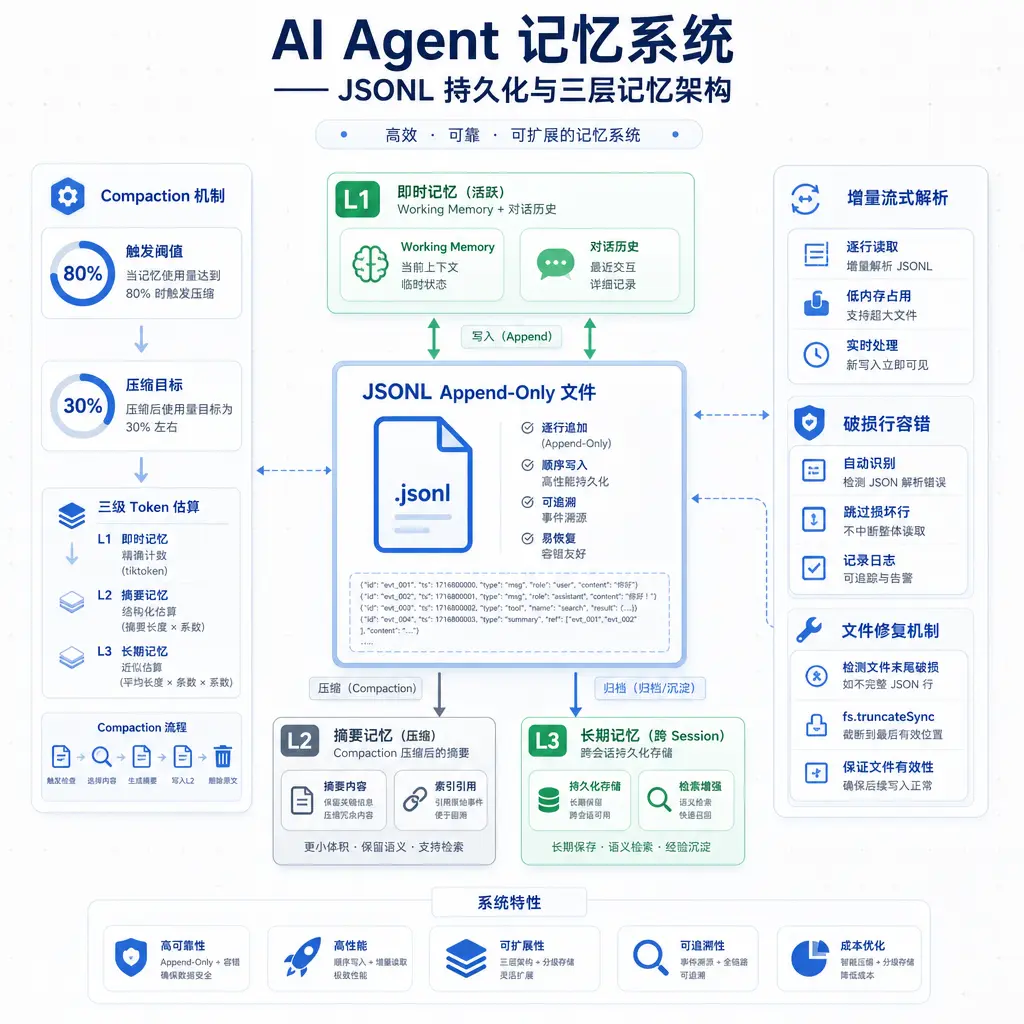
Each session corresponds to a .jsonl file, with the filename being a UUID v4. Each line is a JSON object, appended in chronological order.
1 | Example session_abc123.jsonl content: |
Writes only append—fs.appendFileSync(file, JSON.stringify(entry) + '\n'). This operation is O(1) regardless of file size, ensuring write performance doesn’t degrade as the session grows.
4.2 Incremental Streaming Parsing + Corrupted Line Tolerance + Auto-Repair
When reading JSONL, it doesn’t load everything into memory and JSON.parse it all at once. Instead, it parses line by line in a streaming fashion. There are three reasons for this:
- No memory explosion with large files: Processes line by line without putting the entire file into memory. Even if the session file grows to tens of MB, memory usage stays at “one line’s size.”
- Concurrency safety: Streaming parsing can tolerate the file being appended to during reading—if new lines are written while reading is in progress, the already-read portion is unaffected.
- Corrupted line tolerance: File writes may produce corrupted lines due to process crashes or disk errors (e.g., a half-written JSON). Streaming parsing encountering a corrupted line skips it and outputs a warning, without blocking the entire loading process.
On top of corrupted line tolerance, aptbot adds an auto-repair layer: when a corrupted line is detected, it calls fs.truncateSync to truncate the file to after the last complete line. This is “repair” rather than “ignore”—it restores the file to a normally usable state, ensuring the agent can load all valid data on the next startup.
This “tolerance + self-repair” combination allows JSONL to work stably in non-ideal environments. It doesn’t guarantee zero data loss (the content of the corrupted line is indeed lost), but it guarantees the file is always parseable and the agent can always start. For a personal project that may be interrupted by the user’s Ctrl+C at any time, this resilience is important.
4.3 SessionEntry Union Type + UUID Path Validation
Each line in a session file is a SessionEntry, using TypeScript’s discriminated union to distinguish different types:
- user message: User input
- assistant message: Model reply text
- tool_call: Tool call record (tool name + parameters + result)
- compaction_marker: Compaction point marker, indicating the location of history summary
- metadata: Session metadata (title, creation time, model name, etc.)
The value of the union type is type safety—TypeScript forces type narrowing when parsing each line, ensuring you cannot treat a tool_call as a user message. This is a compile-time guarantee that neither Approach A nor Approach B can provide.
Session filenames use UUID v4 format. Before each session file read or write, the UUID format is validated—only sessionIds matching /^[0-9a-f-]{36}$/ are accepted. This is an often-overlooked security protection: even if an attacker constructs ../../etc/passwd as a sessionId for path traversal, UUID validation rejects it directly. Together with the path-guard in the tool system, they form a cross-module security synergy.
4.4 Working Memory + /continue Cross-Session Inheritance
aptbot distinguishes two types of memory rather than a single “all-in-one” storage:
Conversation History: Complete turn-by-turn records stored in .jsonl files. This is the agent’s “long-term archive,” read-only and never deleted (except during compaction).
Working Memory: Key information the agent is currently focused on, stored in a .meta.json sidecar file. This is not a compression of history but a “current state card” actively maintained by the agent.
For example, when the agent is executing a “fix bug X” task, working memory might contain:
1 | Current task: Fix null reference on line 42 of src/foo.ts |
Working memory is actively updated by the agent through the update_working_memory tool. This means the agent itself decides “what information is worth remembering”—it’s a semantic memory mechanism, not simply “the last few turns of conversation.”
The /continue command implements cross-session inheritance: when a new session starts, the user specifies --continue <sessionId>, and the new session inherits the old session’s working memory (not the complete history). This allows users to “pick up where they left off yesterday”—the agent doesn’t need to re-read all history because working memory has already condensed the key information.
4.5 Compaction: 80% Trigger, 30% Target, Three-Level Token Estimation
The longer the session, the larger the context. When context usage exceeds the LLM’s context window, reasoning fails—either critical information is truncated or an error occurs directly. Compaction is the core mechanism for solving this problem.
aptbot’s compaction parameters:
- Trigger threshold 80%: Compaction is triggered when the estimated token count of the current context reaches 80% of the context window. 20% buffer is reserved to avoid exceeding the limit right at the edge due to a single tool result return.
- Target 30%: After compaction completes, context usage drops to 30%. 70% space is left for subsequent conversation, avoiding frequent compaction.
- Three-level token estimation: Provides rough/medium/precise three estimation levels. Rough estimation is fastest (based on character count × coefficient), precise estimation is slowest (uses a tokenizer). Balances precision and performance—rough estimation for daily use, precise estimation when compaction is triggered.
The compaction execution flow:
- Keep the most recent N turns of complete conversation (currently configured to 10 turns, preserving recent interaction details)
- Send all conversation before N turns to the LLM, requesting a summary: “The user initially asked X, the agent completed Y through tools A and B, encountered problem Z, current approach is W”
- Inject the generated summary as a
compaction_markertype system message into the context - Rewrite the
.jsonlfile as: summary line + complete lines of the most recent N turns
The effect is: the agent can still reference earlier events (through the summary), but doesn’t need to pay the per-entry token cost for every historical message.
Compared to Approach A’s “full in-memory loading,” compaction allows aptbot to run for hundreds of turns within a 128K context window without exceeding the limit. Compared to Approach B’s “SQLite without compaction,” compaction controls context growth at the root, rather than just pushing the storage problem to the database.
5. Future Directions
5.1 Three-Layer Memory Architecture (L1/L2/L3)
aptbot’s current memory system is “single-layer”—only conversation history + working memory. The planned long-term architecture has three layers, referencing cognitive science’s hierarchical memory model:
- L1 (Immediate Memory): The current session’s conversation history, currently in use. Fully loaded for every LLM call, most expensive.
- L2 (Short-term Memory): Summaries of recent sessions, retrieved on demand. When the agent needs to use “last week’s work accomplishments,” it retrieves relevant summaries from L2 and loads them into context.
- L3 (Long-term Memory): Cross-session factual knowledge, retrieved by relevance. Project code structure, commonly used command patterns, user preferences—these don’t need to be loaded every turn, only queried by the agent when relevant.
The core idea of the three-layer architecture is “layered storage by usage frequency”: frequently accessed data goes to expensive L1, rarely accessed data sinks to cheap L3, and is “promoted” or “demoted” on demand. L1 is already implemented; L2/L3 are directions for future versions.
5.2 Working Dict: Letting the LLM Manage Its Own Key-Value Store
The current working memory is a string field, entirely replaced by the agent through the update_working_memory tool. The long-term plan is a working dict—a structured key-value store:
set(key, value): Set an itemget(key): Read an itemdelete(key): Delete an itemkeys(): List all keys
This allows the agent to “remember multiple things and reference them separately,” rather than stuffing everything into a single string. When executing multi-step tasks, intermediate results of each step can be stored under different keys, and subsequent steps can retrieve them by key. Compared to the current “replace the entire string” mode, a working dict is more precise and controllable.
5.3 Semantic Memory Retrieval
Current memory retrieval is based on “chronological order” and “explicit inheritance”—either loading history in chronological order or explicitly inheriting through /continue. In the future, semantic retrieval could be introduced: the agent can “recall” relevant memories rather than only trace back linearly through time.
For example, if the user says, “Remember the database migration plan we discussed last week?” the agent should be able to retrieve the relevant session summary or working memory content, rather than flipping through history from the beginning. This requires embedding indexes and vector retrieval, which is a key technology for implementing the L2/L3 architecture.
Summary
The Memory system solves the agent’s “continuity” problem—allowing the agent to live beyond the current conversation turn. This article breaks down memory system design from three perspectives:
Conceptual level: An agent needs three types of memory: conversation history (complete records), working memory (current focus), and long-term knowledge (cross-session facts). Memory plays the role of “read when reasoning, write after acting” in the ReAct loop.
Approach comparison: Approach A (full JSON in-memory loading) is simple to implement but has poor performance for large sessions; Approach B (SQLite database) is feature-complete but has heavy dependencies and binary unreadability; Approach C (JSONL append-only + compaction) has zero dependencies, plain text readability, and is suitable for learning projects.
aptbot’s choice: JSONL append-only ensures write performance doesn’t degrade as sessions grow; incremental streaming parsing + corrupted line tolerance + auto-repair ensures data resilience; SessionEntry union types provide type safety; Compaction (80% trigger / 30% target / three-level estimation) controls context growth; Working memory + /continue provides lightweight cross-session inheritance.
In the next article, we look at the Skills system: how the agent’s “knowledge layer” can be both rich and avoid blowing up the system prompt.