Boundaries and Pitfalls: Capability Boundaries, When to Intervene, and Case Studies
If you’re new to AI-assisted development, you’ve likely experienced two extreme feelings: sometimes AI is like a god — writing perfect code, tests and documentation all in one go, ten times faster than you; other times AI is like a terrible teammate — implementing features you never asked for, introducing dependencies you explicitly told it not to, failing at the same mistake ten times in a row.
Both feelings are real. AI isn’t “all-powerful” or “useless” — it’s a tool that’s extremely strong in some areas and extremely weak in others. Understanding its capability boundaries is the prerequisite for effective collaboration. This article helps you build an “AI capability map” — what it’s good at, what it’s not good at, when you must intervene, and which pitfalls are most common.
Concept: The AI Capability Map
The first step to effectively using AI is acknowledging that it has clear capability boundaries. The diagram below visually illustrates AI’s capability map in development — the green area is what AI excels at, the red area is what AI is poor at, and the dividing line between them is the critical timing for human intervention:
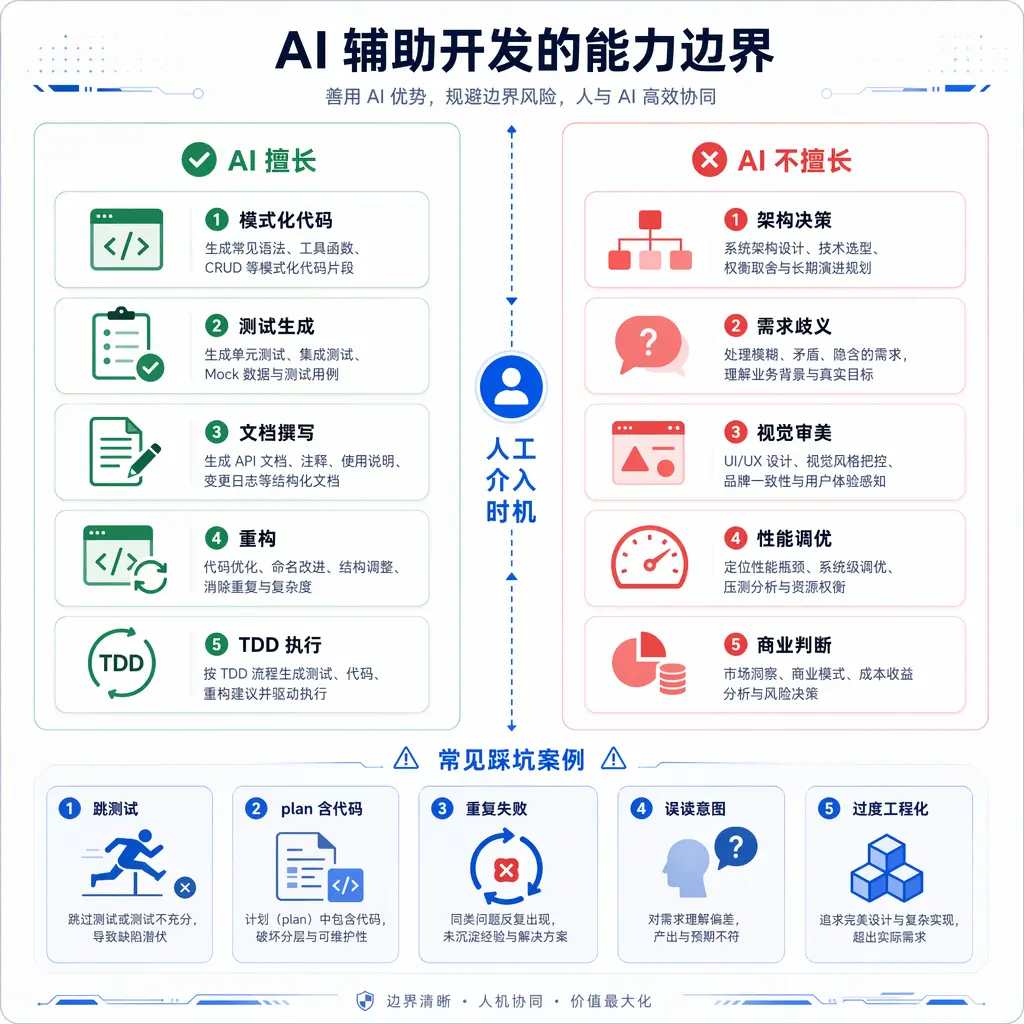
This isn’t tobelittle AI, but to rationally understand the tool. Just as you wouldn’t use a drill to cut vegetables or a kitchen knife to drill holes, you shouldn’t have AI do things it’s not good at.
What AI Excels At
AI performs reliably and steadily in the following scenarios, deserving a higher degree of trust:
Patterned code writing. CRUD interfaces, DTO transformations, configuration file boilerplate, repetitive code with similar structure. These code patterns are fixed, rules are clear, and variations are limited — AI writes them quickly and accurately. Give it an existing similar file as a template, and it can batch-generate an entire set.
Test case generation. Give it a function, and AI can quickly list test matrices for normal input, boundary input, and exceptional input. It’s especially good at enumerating boundary conditions — empty arrays, single elements, maximum values, negative numbers, null values — scenarios that humans often overlook but AI remembers clearly.
Technical documentation writing. Translating code logic into human language is something AI excels at. README feature descriptions, CHANGELOG version records, JSDoc interface documentation, architecture document module explanations — AI writes them in more detail and with more structure than most developers would themselves.
Code refactoring (behavior-preserving) . Renaming variables, extracting common functions, introducing abstraction layers, adjusting file structure — these “behavior unchanged, structure changed” tasks, AI can efficiently complete with test protection. Note theprerequisite: “with test protection.” Without tests, refactoring by AI can introduce errors just like a human.
TDD red-green cycle execution. Write the test first, see RED, write implementation code, see GREEN — this cycle AI executes very mechanically. “Mechanical” here is a compliment, meaning reliable, repeatable, andunaffected by emotion.
What do these areas have in common? Clear rules, immediate feedback, verifiable results. Whether the code AI writes is right or wrong can be immediately determined through tests, type checks, and lint rules. Errors are exposed instantly, and the cost of fixing them is low.
What AI Is Poor At
AI frequently errs or produces poor results in the following scenarios, requiring active limitation of its involvement:
Cross-version architecture decisions. Deciding “should this abstraction be introduced,” “should this layer be split,” “should this interface be unified.” AI has no long-term memory of the project; it sees the current code state, not the code’s evolutionary history. It tends to “add abstractions” — because in its training data, “professional code” is often abstract — but many abstractions are over-engineering for the current project.
Requirement ambiguity resolution. When requirement descriptions contain vague phrases like “it depends,” “flexible,” or “might need in the future,” AI won’t ask “what exactly do you mean” — it will fill in a complete interpretation on its own. And its interpretation is likely not what you actually wanted.
Visual aesthetics and UI design. Page spacing, color schemes, font sizes, animation rhythms — AI has no judgment for “looks good.” It can generate code that follows CSS rules, but not visually tasteful designs.
Performance tuning optimization. Optimizing code from 100ms to 50ms requires understanding runtime characteristics, profiling data, and bottleneck identification. AI tends to rewrite to “look more elegant” — reducing nesting, replacing imperative with functional — but “more elegant” doesn’t equal “faster,” and is sometimes slower.
Business judgment. Feature priority ordering, target user definition, business risk trade-offs. AI doesn’t know your business context. Its priority suggestions often deviate from actual needs — because its training data’s “best practices” are for general scenarios, while your business is unique.
What do these areas have in common? Fuzzy judgment criteria, need for long-term context, reliance on aesthetics or experience. When AI makes mistakes in these areas, the errors don’t immediately surface. It writes code that “looks correct,” but the architecture decision is wrong — three months later when you need to extend that module, you discover the wrong abstraction was chosen, and the cost of changing it is now very high.
General Design: Boundary Awareness and Human Intervention
Understanding AI’s capability boundaries, the next step is translating that understanding into concrete collaboration rules. This methodology consists of “four mandatory intervention scenarios” and “five typical pitfall cases,” centered on one sentence: Trust AI where it excels; constrain AI where it doesn’t.
Four Scenarios Requiring Human Intervention
The following four types of scenarios cannot be left to AI for autonomous decision-making; human intervention is required. The mode of intervention isn’t “don’t let AI participate,” but “AI proposes, human decides, AI executes.”
Scenario 1: Architecture Direction
Introducing new layers, deleting existing abstractions, switching tech stacks, adjusting module boundaries — these decisions have far-reaching consequences. AI can’t see the chain reaction three steps ahead. You make a decision to “add one abstraction layer,” and in the next version, all new code might have to go through two layers. Whether this decision should be made, how to make it, and when to make it — must be determined by a human.
Collaboration mode: Have AI list the options with their pros and cons, you choose the direction, AI executes the specific changes.
Scenario 2: User Preferences
UI style, interaction rhythm, copy tone, naming conventions — these are subjective. AI’s “best practices” may not align with your preferences. For example, AI tends to put buttons floating on the right side of the page, but you prefer them fixed at the bottom. AI tends to use “search” as a search box placeholder, but you want “search for something.”
Collaboration mode: Clearly write preferences in project_memory so AI has a basis to follow. Proactively update when preferences change.
Scenario 3: Security Boundaries
Permission models, key management, input validation, trust boundaries — the cost of errors here is extremely high. AI’s default tendency is “make it work first,” and security is often sacrificed in trade-offs. It will write code that doesn’t validate input, doesn’t handle unauthorized access, and doesn’t encrypt transmission, because “the current version should prioritize functionality.”
Collaboration mode: Security rules must be tool-ified. Don’t just say “be careful about security” — use constraints like input validation templates, SQL injection prevention rules, and mandatory API key access patterns — so AI has no path to skip security.
Scenario 4: Business Judgment
Feature priorities, target users, technical trade-offs for business needs. AI doesn’t know why your project exists, who your users are, or which features deliver core value. Its priority suggestions often read as a “complete feature catalog” — listing every possible feature because “comprehensive” looks most professional. But you know which features are core and which are icing on the cake.
Collaboration mode: You set priorities during the spec phase. AI is only responsible for implementing the items within those priorities.
Pitfall Case 1: AI Skips Tests and Writes Implementation Directly
Phenomenon: You ask AI to implement a feature, and it directly writes the complete implementation code without writing tests first. You ask “where are the tests,” and it replies “I’ll add them later,” or “this feature is simple, it doesn’t need tests.”
Consequence: The written code “looks correct,” but at runtime you discover it references nonexistent APIs or misses boundary conditions. The “added later” tests never come — because the next feature is already waiting.
Why AI does this: Skipping tests and going straight to implementation is the “shorter path.” AI is goal-oriented — your goal is “implement this feature,” so it chooses the shortest path. Writing tests is an extra step; if notmandatorily required, AI will choose to skip it.
Solution: Use process to enforce TDD, not prompt suggestions. A prompt-level “please use TDD” is treated by AI as a “suggestion” — it verbally agrees but selectively ignores it when writing code. You need tool-level constraints: before writing implementation code,mandatorily AI to write tests, run them to see RED, then write implementation. The tool framework can enforce a mandatory order of “no tests, no implementation.”
Lesson: Constraints must be tool-ified, notstay at prompt level. Prompts are suggestions (AI can selectively comply), tools are processes (AI must complete them).
Pitfall Case 2: AI Writes Implementation Code in the Plan
Phenomenon: You ask AI to write an implementation plan, and instead of giving a “task list + verification steps,” it gives “complete implementation code + brief explanation.” The plan becomes a code draft.
Consequence: Code written during the plan phase can’t be verified — because there’s no test driving it. AI treats the plan as a “draft to be pasted,” and during implementation it directly copies this code, breaking the TDD red → green cycle. Errors are planted in the plan phase and only surface during testing, making the cost oftrace back much higher.
Why AI does this: In AI’s training data, “plan” and “code” are often mixed together — many technical blog posts’ “implementation plans” are just code dumps. AI learned this pattern and doesn’t know that in your project, plan and implementation are separated.
Solution: Clearly state in the constraint documents that “plan only contains descriptive content, no implementation code.” The plan is a task list for AI to read, not code output. Implementation code can only be written in the TDD cycle. If AI writes code in the plan, the main control agent (you or the upper orchestrator) should intercept and require a rewrite.
Lesson: Document layering must be explicitly declared. AI won’t distinguish the boundaries between plan / spec / design on its own; you must clearly tell it what content each document allows.
Pitfall Case 3: AI Repeatedly Fails on the Same Error
Phenomenon: A test fails continuously. AI tries different approaches — changing variable names, tweaking parameters, adjusting import order — but the fundamental approach doesn’t change. Five, ten retries later, it still hasn’t passed. Tokens burned, time wasted, and the final result is still wrong.
Worse variant: AI might “accidentally” turn the test green — not by fixing the code, but by weakening assertions, skipping certain cases, or mocking out real logic. This “fake green” is ten times more dangerous than “true red.” True red at least tells you something is wrong; fake green makes you think the feature works, until a production bug reveals the test was testing nothing.
Why AI does this: AI doesn’t have the metacognitive ability to “stop and think.” It won’t proactively say “this approach might be wrong, I should try a differentapproach.” Its default behavior is to “keep fine-tuning in the current direction” — a human developer, after three failed attempts, would question the approach itself; AI will keep fine-tuning after ten failed attempts.
Solution: Introduce a circuit breaker mechanism. If the same subtask fails 3 consecutive times,mandatorily stop, record the failure information, skip this subtask, and enter a review phase. The review isn’t about “how to try again” — it’s about “is the subtask decomposition wrong? Is there a problem with the spec decision? Should this feature not be done right now?” Three failures usually mean the direction is wrong, not that the details needadjustment.
Lesson: AI-assisted development must have a stop-loss mechanism. AI doesn’t have the ability to “stop and think”; you must use process tomandatorily it to stop.
Pitfall Case 4: AI Misreads User Intent
Phenomenon: You say “add a search box,” and AI interprets it as “implement full-text search + fuzzy matching + search highlighting + search history + trending search recommendations.” What you actually wanted was just a “simple exact-match input box.” AI extrapolated your “add a search box” into a “complete search feature.”
Consequence: AI implements a bunch of features you didn’t ask for, violating the YAGNI principle. Code bloats, tests bloat, maintenance costs bloat. You get a product that “looks professional” but “isn’t what you wanted.”
Why AI does this: In AI’s training data, “implement a feature” is often associated with “implement it completely.” A person says “add a search box,” and a technical article expands it into “how to design a complete search system.” AI learned this association, so ittends toward the “most complete version.” Moreover, “complete” means “looks professional” — AI is trained to make its output look as professional as possible.
Solution: In the spec phase, explicitly state “what NOT to do.” For example, “search feature: exact match only, no fuzzy search, no search history, no pinyin correction.” Writing “what not to do” clearly is more effective at constraining AI’s output scope than just writing “what to do.” Additionally, require AI to proactively use AskUserQuestion when encountering ambiguous requirements — “exact match or fuzzy match for the search box? Do you need search history?” — prioritize asking back rather than defaulting to the most complete version.
Lesson: When in doubt, ask, don’t guess. AI’s extrapolation is often “the most complete version,” but what you need is usually “the smallest version.” Proactive clarification costs far less thanafter-the-fact rollback.
Pitfall Case 5: AI Over-Engineers
Phenomenon: You ask AI to implement a simple feature — like reading configuration from a JSON file — and it introduces abstract factories, strategy patterns, configuration-driven design, and plugin mechanisms. The code “looks very professional,” with complete design patterns, multiple abstraction layers, and interface definitions. But the feature itself only needed 20 lines.
Consequence: Maintenance costs far exceed the feature’s value. To change a simple behavior — like adding a configuration field — now you have to touch four files and understand three layers of abstraction. In the next version, when you want to add features, you find the abstraction layers are blocking the way, and AI suggests “add another abstraction layer” to solve it — abstraction nesting continues tobloat.
Why AI does this: In AI’s training data, “professional code” is often accompanied by abstractions. AI learned “abstraction = professional.” But it doesn’t know your project’s scale and doesn’t perceive that “a 20-line feature doesn’t need design patterns.” It substitutes “looks professional” for “actually appropriate.”
Solution: Clearly state in project_memory that “YAGNI is a hard constraint — only implement current requirements, don’treserved future extensions.” When AI proposes design patterns or abstractions, require it to justify “why this abstraction is necessary in the current version,” not “it might be needed in the future.” Additionally, you can set “maximum lines per file” and “number of interfaces per module” as review indicators — when indicators are exceeded, reassess whether there’s over-design.
Lesson: AI tends to over-design. You need to actively suppress this tendency. “Simple = professional” is a more correct judgment than “abstract = professional” in most projects.
Constraints as Freedom
Five pitfall cases, five different manifestations, but all pointing to the same core problem: AI doesn’t make optimal choices without constraints. It defaults to the “shortest path” (skipping tests), the “most complete direction” (over-implementing requirements), and the “most professional appearance” (over-abstracting) — but these choices aren’t necessarily good for your project.
This is the philosophy of “constraints as freedom”: on the surface, constraints limit AI’s freedom, but in reality, constraints let AI freely perform where it excels while preventing it from creating chaos where it doesn’t.
Specifically, constraints serve three functions:
- Focus: Concentrate AI’s capabilities on what it’s good at (patterned code, testing, documentation, refactoring, TDD execution), letting itfull force perform there.
- Stop-loss: Set boundaries where AI is weak (architecture decisionsreturned to humans, ambiguous requirements proactively ask, 3 failuresmandatorily stop), preventing it from running too far in a wrong direction.
- Signal: Constraints aren’t for constraint’s sake — they provide signals. When a constraint is frequently triggered (e.g., the same subtask repeatedly circuit-breaking), it indicates the problem isn’t with AI’s execution but at a higher level (spec design, task decomposition, requirement definition).
Constraints as freedom isn’t a slogan — it’s the basic contract of collaboration. You give AI clear boundaries, AI gives you stable output.
Comparison with Other Approaches
Facing the problem of AI’s capability boundaries, different projects and teams adoptdrastically different attitudes. There are roughly three typical approaches.
Approach A: Total Trust in AI
The core attitude of this approach is “AI is always right.” Developers hand over almost all tasks to AI, including architecture decisions, security design, and requirements analysis. Whatever AI outputs is accepted, no review, no circuit breaker mechanism.
Applicable scenarios: Quick prototype validation, one-off scripts, personal hobby projects (not involving production environments or user data).
Advantages: Fastest development speed,almost no human intervention delay. AI handles everything from zero to completion.
Cost: Quality is completely uncontrollable. AI may planthidden risks in security, architecture, performance, etc., which only surface in production or later project stages. No circuit breaker means AI wastesmassive tokens and time on one thing. No review means code that “looks correct but is actually wrong” gets merged directly.
Approach A is reasonable when the scenario matches — for a disposable prototype, strict quality control is indeed unnecessary. But applying Approach A to production-grade projects is gambling. AI’s error rate isn’t zero, and in production-grade projects, the cost of that error rate could be user trust or production incidents.
Approach B: Total Distrust of AI
This approach goes to the other extreme: distrust everything AI produces. Every line of code AI writes must be manually reviewed, every decision must be manually confirmed. AI is treated as a “slow but occasionally useful drafting tool.”
Applicable scenarios: Security-sensitive projects, projects with strict compliance requirements, developers in thenovice period who don’t yet understand AI’s capability boundaries.
Advantages: Highest security, human judgment covers every decision point. No risk of AI planting security or architecture time bombs.
Cost: Loses the core advantage of AI-assisted development — efficiency. If every line of AI output must be manually reviewed line by line, the point of using AI is greatly diminished. Worse, if starting from “distrust,” people tend to rewrite AI’s code rather than optimize it, leading to a negative efficiency cycle of “AI writes → human rewrites.”
The problem with Approach B is “distrust everything regardless of scenario.” AI performs very well on patterned code, test generation, and documentation writing — these scenarios should be trusted. Total distrust means you’re not letting AI help you even where you’re most tired.
Approach C: Boundary Awareness + Tool-ified Constraints + Circuit Breaker
This is the methodology described in the “General Design” section. The core attitude is “trust but verify” — understand AI’s capability boundaries, grant higher trust where it excels, and use constraints to limit it where it doesn’t.
Specific features:
- Boundary awareness: The team has a clear consensus on “what AI can and cannot do.” Not a slogan on the wall, but a principleimplemented in every collaboration.
- Tool-ified constraints: Not using prompts to “suggest” how AI should work, but using processes tomandatorily AI follow the rules. TDD isn’t “please use it” — it’s “must write tests first.” Circuit breaking isn’t “please stop if you fail” — it’s “automatically stop and record after 3 failures.”
- Rhythmic human intervention: Not “all decisions need human review,” but “architecture direction, security boundaries, business judgment, user preferences — these four types must be decided by humans.” Other things are left to AI.
- Continuous calibration: During each version’s cool-down period, re-examine AI’s capability boundaries. After model upgrades, some things AI was previously poor at may become things it excels at, and some things it was previously good at may become unreliable due to model behavior changes. Boundaries are dynamic.
Applicable scenarios: Production-grade projects, continuously iterating projects, mature human-AI collaboration.
Advantages: Balances efficiency and quality. AI freely performs where it excels, humans maintain control at key nodes. Process-based constraints ensure stability and predictability of collaboration.
Cost: Requires effort to set up and maintain the constraint system; requires continuous awareness of AI’s capability boundaries (not “set and forget”).
Design Philosophy Comparison
| Dimension | Approach A (Total Trust) | Approach B (Total Distrust) | Approach C (Boundary + Constraints) |
|---|---|---|---|
| Core attitude | AI is always right | AI is never trustworthy | Trust but verify |
| Testing strategy | AI self-tests or skips | Human writes tests | TDD mandatory + AI generates |
| Architecture decisions | AI decides | Human decides | AI proposes + human decides |
| Circuit breaker | None | None (but humanthroughout reviews) | Auto-break after 3 failures |
| Security | High risk | Most secure | Rule constraints + human review at key points |
| Development speed | Fastest | Slowest | Medium (but sustainable) |
| Applicable stage | Prototype validation | Security-sensitive | Product iteration |
The essential difference between the three approaches is “what they treat AI as”: Approach A treats AI as an all-powerfulreplacement, Approach B treats AI as an untrustworthyauxiliarytool, Approach C treats AI as a collaborator with specialized strengths.
aptbot’s Design Features
aptbot chose Approach C as its collaboration foundation. Not because it’s “most advanced,” but because it best suits the positioning of a learning-oriented project — aptbot needs to develop efficiently while maintaining code quality and comprehensibility, and demonstrate “how to correctly collaborate with AI.”
In concrete practice, aptbot implements boundary awareness through the following mechanisms:
Tool-ified TDD constraints. aptbot’s TDD isn’t a “please use TDD” written in a prompt — it’smandatorily enforced through the test-driven-development skill. Before AI writes any implementation code, it must go through the complete cycle of “write test → run to see RED → write implementation → see GREEN.” AI cannot “skip tests and write code first” — if it tries to skip, the skill intercepts and guides it back to the TDD flow.
Plan-no-code rule. aptbot’s workflow documents clearly state that “plan only contains task descriptions and verification commands, no implementation code.” If AI writes code during the plan phase, the main agent detects it and requires a rewrite. This constraint ensures the TDD cycle isn’t broken by “pre-written code” from the plan phase.
3-strike circuit breaker. Each subtask has a clear failure counter. If the same subtask fails 3 consecutive times, it automatically stops, recording the failure reason, current state, and approaches attempted, then jumps to the cool-down/review flow. Circuit breaking isn’t “abandoning the feature” — it’s “review first, then decide how to proceed.” Possible outcomes include: adjusting subtask decomposition, modifying the spec design, or temporarily shelving the feature.
AskUserQuestionpriority. When encountering ambiguous requirements, AI’s default behavior isn’t “guess the most likely meaning and execute” — it’s “list the ambiguities and let the user choose.” This behavior isn’t “suggested” through prompts — it’s configured as the default behavior through constraints.
YAGNI hard constraint. project_memory explicitly states that YAGNI is a hard constraint. When AI proposes abstractions or design patterns, it must justify “why the current version needs this” — “it might be needed in the future” is not an acceptable reason. This constraint directly suppresses the tendency to over-engineer.
Four-quadrant human intervention. aptbot defines four scenarios that must be decided by humans (architecture direction, user preferences, security boundaries, business judgment), and marks these “decision points” in the workflow. AI is only responsible for providing options and pros/cons analysis at these points, not for making the final decision.
aptbot’s design conveys a core philosophy: Constraints aren’t limitations on AI — they’re protection for AI. An AI with boundaries is a reliable collaborator.
Future Directions
AI’s capability boundaries aren’t fixed. With model upgrades, tool evolution, and methodology maturation, boundaries are constantly shifting. Several trends are worthattention:
Dynamic capability boundaries. What AI is “poor at” today may be what AI “excels at” tomorrow. For example, visual aesthetics — currently AI has no aesthetic judgment, but visual generation models are developing rapidly. Performance tuning — as AI’s understanding of runtime deepens, it may be able to give more precise optimization suggestions in the future. Boundary awareness needs continuous updating — you can’t set it and forget it.
Automated boundary detection. In the future, automated tools may emerge that detect in real-time whether AI is crossing capability boundaries during task execution — for example, automatically alerting when AI makes architecture decisions, or automatically triggering circuit breaking when the same error repeats 3 times, without manual configuration.
Risk-based trusttiered. Different types of changes have different risk levels. Low risk (fixing typos, changing constants, adding comments) can be fully automated; medium risk (adding tests, refactoring internal functions) can be AI-executed with human spot-checking; high risk (architecture adjustments, security logic) requires human approval. Trust is no longer a binary “trust/distrust” — it’s gradient trust based on risk.
aptbot will continue to track these trends and iterate its collaboration methodology in subsequent versions. But the core principle remains unchanged: understanding boundaries isn’t about limiting AI — it’s about letting AI better help you where it’s strongest.
Summary
The core information of this article can bedistilled into three sentences:
- AI has clear capability boundaries — it excels at patterned code, testing, documentation, refactoring, and TDD execution; it’s poor at architecture decisions, requirement ambiguity resolution, visual aesthetics, performance tuning, and business judgment.
- Four scenarios require human intervention — architecture direction, user preferences, security boundaries, and business judgment. The intervention mode is “AI proposes, human decides, AI executes.”
- Constraints are freedom — clear boundaries and circuit breaker mechanisms aren’t limitations; they’re the conditions that let AI freely perform where it excels.
Five typical pitfalls (skipping tests, writing code in plan, repeated failures, misreading intent, over-engineering) appear repeatedly in practice, and each has corresponding constraint strategies. Remember these pitfalls, check once before each collaboration, and you can avoid 90% of AI collaboration problems.
Among the three approaches, Approach C (boundary awareness + tool-ified constraints + circuit breaker) is the most sustainable choice for production-grade projects. In the next article, we discuss how to continuously improve this collaboration — learning, reviewing, adjusting — making collaboration smoother over time.