Tool System: Declarative Registry and Security Boundaries
If the LLM is the agent’s “brain,” then tools are the agent’s “hands.” The brain thinks about “what to do,” and the hands make it happen. Without tools, an agent is just a chatbot that can talk—it knows the answers but cannot touch the world. But tools are a double-edged sword: a tool that can execute bash commands means the model holds keys that can operate your entire operating system. How to enable the agent to “act” without “misbehaving” is the core challenge of tool system design.
This article starts with the basic concepts of a tool system, compares several mainstream tool management approaches, and then delves into how aptbot balances “capability” and “security.”
1. Concepts: What Is a Tool and Why Do We Need a Tool System
1.1 From “Talking” to “Doing”
Let’s start with a thought experiment. Imagine you have an AI assistant and you tell it: “Check how much disk space is left on the server.”
If it’s just a chatbot, it will tell you: “You can use the df -h command to check.” Then you go to the command line and execute it yourself.
If it’s an agent with tools, it will directly call the bash tool to execute df -h, read back the results, and then tell you the current disk usage.
This is the meaning of tools—they transform the LLM from an “advisor” into an “executor.” The model no longer just tells you what to do; it actually does it for you.
1.2 The Role of Tools in the ReAct Loop
In the ReAct loop, tools are the concrete carriers of the “Acting” phase:
- Reasoning: The model determines “I need to know the disk space”
- Acting: The model calls the bash tool to execute
df -h - Observation: The tool returns the execution result
- Back to step 1: The model decides the next step based on the result
Each “action” step is completed by a tool. So the tool system is essentially a bridge from the LLM’s intent to actual operations. The LLM says “I want to read a file,” and the file is read; the LLM says “I want to modify code,” and the code is modified.
1.3 Three Core Responsibilities of a Tool System
Any agent’s tool system needs to answer three questions:
- How does the model know what tools are available?—Tools need to be “announced” to the model. This is typically done through the function calling protocol, injecting the tool’s name, description, and parameter structure into the LLM’s request.
- How does the model call a tool?—The LLM returns a structured call request (tool name + parameters), and the system must correctly route this request to the corresponding implementation function and execute it.
- Where are the boundaries of calls?—Not all operations should be allowed. A tool system must have security boundaries to prevent the model from intentionally or unintentionally executing dangerous operations.
These three questions seem simple, but different projects give vastly different answers. Their differences reflect different design philosophies.
2. General Design Principles
2.1 Tool Definition and Registration
Regardless of the implementation, a tool system has two basic abstractions: tool definition and tool registry.
A tool definition describes “what a tool looks like,” typically containing:
- Name: A unique identifier for the model to reference this tool
- Description: Natural language explanation telling the model “when to use this tool”
- Parameter structure: Expected parameter list with respective types and constraints
- Execution function: The actual execution logic
A tool registry is a container holding the collection of all available tools. Its core responsibilities are:
- Managing tool additions, deletions, and modifications
- Formatting all tool definitions into a format the LLM can understand when needed (e.g., function calling schema)
- Finding the corresponding tool by name and executing it when the model requests a call
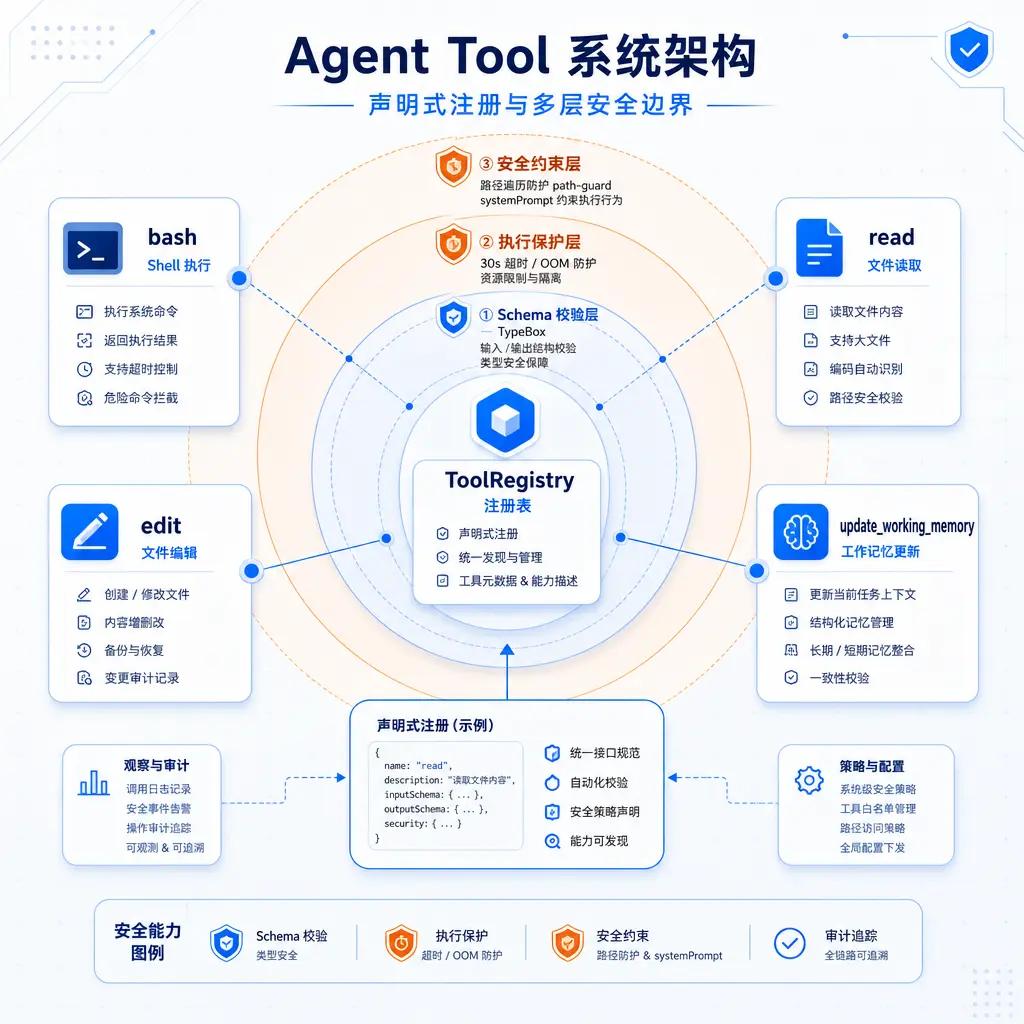
The following diagram shows the complete tool system architecture from registration to execution to security protection:
2.2 Tool-LLM Interaction Flow
A typical tool call cycle goes as follows:
- The system assembles all tools’ name + description + parameter schema into function calling definitions and sends them together with the user message to the LLM
- After reasoning, the LLM decides “I need to call a certain tool” and returns a structured call request
- The system parses the request and finds the corresponding tool from the registry
- Validates that the parameters are legal
- Executes the tool function
- Returns the execution result as a tool result to the LLM
- The LLM continues reasoning based on the result
This flow seems straightforward, but each step has engineering trade-offs—how strictly should parameters be validated? How should timeouts be handled? What if the result is too large? These details determine the reliability and security of the tool system.
2.3 Strategies for Setting Tool Capability Boundaries
When designing a tool set, there is a fundamental decision: should we provide fewer but more powerful “universal tools,” or more numerous but more specialized “dedicated tools”?
- Universal tool strategy: Provide a single tool that can execute arbitrary code (e.g.,
code_run), allowing the model to accomplish almost everything with it. The advantage is an extremely short tool list; the disadvantage is that security boundaries are hard to narrow. - Dedicated tool strategy: Break capabilities into multiple small tools (read file, write file, execute command, search, etc.), each with clearly limited scope. The advantage is clear security boundaries; the disadvantage is a longer tool list, requiring the model to learn more tools.
This is not a difference in technical capability, but a difference in design philosophy—trust the model more, or constrain the model more.
3. Comparison of Other Tool Management Approaches
Existing agent projects broadly fall into three design approaches for tool management. Understanding their trade-offs helps us see why aptbot chose its current path.
3.1 Approach A: Multiple Tools, Loose Constraints
This approach starts from “give the model as many tool choices as possible.” The number of tools may reach 30-50, each with loosely defined capability boundaries, and security constraints rely mainly on the model’s own judgment.
Design characteristics:
- Rich tool variety: Covers file operations, code analysis, network requests, database queries, and various other scenarios. The model can almost always find a tool “dedicated to the current task.”
- Security relies on system prompt: No hard security validation at the tool layer; instead, constraints like “don’t delete important files” and “don’t execute dangerous commands” are written in the system prompt to guide model behavior.
- Loose parameter validation: Basic type checking is done, but complex constraints (like path whitelists, command blacklists) are not enforced at the schema layer.
Advantages:
- Rich model ecosystem, ready to handle various tasks out of the box
- Simple for developers to implement—fewer tool definitions, less security logic
Disadvantages:
- Concentrated security risk: loose tools + loose validation means that if the model hallucinates or is hit by a prompt injection attack, the potential damage scope is large
- Relies on the model’s own judgment: when the model is on the boundary (e.g., asked by the user to “ignore safety rules”), it won’t be blocked at the tool layer
- Large number of tools leads to high token overhead for function calling
3.2 Approach B: Universal Tool Strategy
This approach goes to the other extreme—providing only one or a few “universal” tools (such as code_run), letting the model use code to accomplish everything. This is common in some Python-ecosystem agent projects.
Design characteristics:
- Single entry point: All operations are executed through one tool. Reading files with code, writing files with code, calling APIs with code—the model expresses all intent through Python scripts.
- Extremely short tool list: Possibly only 2-3 tools, resulting in very low function calling token overhead.
- Security pressure shifted later: Security boundaries are not handled at the tool layer but in the Python execution sandbox (if one exists).
Advantages:
- Minimalist design—tool registration and routing logic is only a few dozen lines
- Full release of model capabilities: the model can write arbitrarily complex logic without being limited by tool capability boundaries
- Minimal function calling token overhead
Disadvantages:
- Security boundaries are hard to narrow: a single
code_runis a complete code execution. To prevent it from reading/etc/passwd, writing to~/.ssh, or executing sudo, an additional Python sandbox must be implemented, with complexity comparable to the multi-tool approach. - High debugging cost: when model-written code has bugs, the agent itself must read the traceback, modify the code, and retry. Each failure may cost more tokens than the multi-tool approach.
- Not suitable for “precise editing” tasks: modifying a single line in a file is an atomic operation (edit tool) in the dedicated tool approach, but in the universal tool approach, the model needs to write a read-parse-replace-save Python script, with higher error probability.
3.3 Approach C: Declarative Registration + Multi-Layer Security
This approach introduces strict structured constraints at the tool definition stage and distributes security defenses across multiple layers rather than concentrating them in one place.
Design characteristics:
- Declarative registration: Each tool is an independent declarative object containing four fields: name, description, inputSchema, and execute. Tool registration is explicit—there are no “implicitly available” tools.
- Schema-level security: Parameter validation includes not just type checking but also business constraints (paths must be relative, command length limits, prohibition of specific characters).
- Execution-level security: Timeout control, resource limits (large file rejection), path traversal protection, etc.
- Behavior-level security: The system prompt clearly defines boundaries as the first line of behavioral guidance.
Advantages:
- Security defenses are multi-layered and clear—each layer intercepts different threat surfaces
- The tool list is enumerable and auditable—a glance at the registry reveals what the agent can do
- Each tool can be tested independently without requiring a full agent environment
Disadvantages:
- Requires more framework code—each new tool requires writing schema + execute + security validation
- As the number of tools increases, function calling token costs grow linearly
- More constraining for developers—can’t “casually add a tool” without thinking about security boundaries
3.4 Three Approaches Comparison
| Dimension | Approach A (Multi-tool Loose) | Approach B (Universal Tool) | Approach C (Declarative + Multi-layer Security) |
|---|---|---|---|
| Number of tools | 30-50 | 1-3 | 4-10 |
| Security boundaries | Relies on system prompt | Relies on sandbox (if any) | Multi-layer (schema/execution/behavior) |
| Parameter validation | Basic type checking | None (or very basic) | Type + business constraints |
| Function calling token | High | Very low | Medium |
| Debug convenience | Medium | Low (model self-debugging) | High (each tool independently testable) |
| Implementation complexity | Low | Medium (sandbox complexity) | Medium-high |
| Suitable scenarios | Rapid prototyping | Data science / batch processing | Production-grade agents |
4. aptbot’s Design Characteristics
4.1 A Small but Refined Tool Set
aptbot 0.2.x includes 4 built-in tools, covering four basic categories of operations: “execute/read/write/memorize.”
- bash: Execute shell commands. The most powerful and the most dangerous; it’s the main way the agent “takes action.” Command execution is controlled by a 30-second timeout.
- read: Read files. More restricted than bash—read-only, with OOM protection for large files (rejects reads exceeding a threshold).
- edit: Edit files. Uses a precise editing mode based on “find old string, replace with new string” to avoid the risk of overwriting entire files.
- update_working_memory: Allows the agent to actively update its own working memory. This is the tool for the agent to “remember” things.
These 4 tools may seem simple, but 90% of an agent’s daily tasks (code maintenance, documentation changes, project exploration) can be accomplished with them. This is an intentional choice—fewer tools means less decision burden on the model when selecting tools, each tool’s description can be more detailed, and the model can more easily understand when to use which.
Compared to Approach B’s “one tool does everything,” aptbot’s choice is “each tool does one thing, but does it clearly.” Compared to Approach A’s “30-50 tools,” aptbot chooses restraint—only expanding the tool set when a clear need for a new tool arises.
4.2 Declarative Registration for Enumerable Capabilities
Each tool implements the AgentTool interface and is declaratively registered through ToolRegistry:
1 | AgentTool interface: |
Tools are not called directly in the agent loop; they are first registered in the registry. In each loop iteration, the agent loop retrieves all tool definitions from the registry and automatically assembles them into a function calling list to send to the LLM. After the LLM returns a call request, the loop looks up the corresponding tool from the registry and executes it.
This has three benefits:
- Enumerable: A glance at the registry’s registration list reveals what capabilities the agent has. For security auditing, you don’t need to chase through the code to find “where tools are registered.”
- Replaceable: To replace a tool’s implementation (e.g., changing the bash tool’s underlying mechanism from
exectospawn), you only need to change the execute function at registration time, without touching the agent loop code. - Testable: Each tool can be tested independently. You don’t need to start the entire agent to test the read tool’s behavior when a file doesn’t exist.
4.3 TypeBox Schema Validation: Guarding the First Gate Before Parameters Enter Execution
Each tool’s inputSchema is defined using TypeBox. Parameters returned by the LLM must pass schema validation before entering the execute function.
Validation addresses two types of problems:
Unstable model output: The LLM occasionally returns structurally malformed JSON—missing fields, wrong types, extra fields. TypeBox’s strict mode blocks these issues before execute, preventing the tool from crashing due to unexpected parameters.
Security constraints upfront: The schema itself can encode security rules. For example, constraining path parameters to relative paths (forbidding absolute paths), setting command length limits, or disallowing pipe or redirect characters. These constraints are intercepted before the parameters reach execute.
Validation failures are not silently discarded; they are returned to the LLM as structured error information, allowing the model to correct parameters in the next round. This forms an interesting closed loop: model attempts → validation intercepts → error feedback → model corrects. The model learns “which parameters are legal” through interaction.
4.4 Multi-Layered Security Defenses
aptbot’s security design is not a single point but a multi-layered defense system:
First layer: systemPrompt behavior guidance
Security constraints are explicitly written into the system prompt—“don’t modify .env files,” “don’t execute sudo,” “don’t write to ~/.ssh directory,” “don’t git push –force,” etc.
This layer is not a technical defense (the model can violate it), but behavioral guidance. It solves the problem of “the model doesn’t know certain operations are dangerous”—most violations aren’t because the model is malicious, but because it wasn’t told these are off-limits. After clearly informing the model of boundaries, most models will comply.
Second layer: TypeBox schema parameter constraints
Each tool’s inputSchema encodes parameter-level restrictions. For example, ensuring paths are relative paths, command length doesn’t exceed a threshold, etc. This layer intercepts calls with “illegal parameters.”
Third layer: 30-second hard timeout
Any command executed by the bash tool cannot exceed 30 seconds. After timeout, SIGTERM is sent first to give the process a graceful exit opportunity; if it hasn’t exited after a few more seconds, SIGKILL forces termination. This prevents the agent from getting stuck waiting for a command to finish—such as npm install hanging due to network issues, a mistaken sleep 1000 test, or an accidentally triggered infinite loop script.
30 seconds is an empirical value. Most meaningful commands (git operations, file processing, test runs) complete within 30 seconds. Too short (5 seconds) would kill reasonable operations; too long (5 minutes) would deadlock the agent. It’s a compromise between “protecting the agent from getting stuck” and “allowing reasonably long tasks.”
Fourth layer: Large file OOM protection
The read tool checks file size before reading. If it exceeds a threshold (e.g., 10MB), it refuses to read. This prevents the agent from “curiously” reading a huge log file or binary file and causing the Node.js process to crash from memory overflow. Without this defense, the agent could easily read itself to death.
Fifth layer: Path traversal protection (path-guard)
Both the bash and edit tools deal with file paths. The model might (intentionally or unintentionally) attempt path traversal attacks: ../../etc/passwd, /etc/shadow, ~/.ssh/id_rsa.
path-guard normalizes all paths to absolute paths within the workspace:
- Resolves all
..and symbolic links to get the real absolute path - Checks whether the path is within the workspace root directory
- If not, rejects it
This is essentially a minimal “sandbox”—without introducing OS-level sandboxing (chroot, containers, Docker), it uses only path validation, but that’s sufficient for this project’s positioning.
The relationship between the five layers is: systemPrompt guides behavior, schema constrains parameters, timeout and OOM protect resources, and path-guard locks down paths. If any layer is breached, the next layer provides backup. This is far more secure than Approach A’s “all relying on system prompt” and far simpler than Approach B’s “all relying on sandbox.”
5. Future Directions
The tool system has several noteworthy directions in aptbot’s future evolution:
5.1 Richer Tool Ecosystem
The current 4 tools cover basic operations, but many scenarios need new tools: search (grep/find wrapper), network requests (HTTP GET/POST), higher-level Git operations (not just executing git commands through bash). Subsequent versions will gradually expand the tool set based on actual needs, but will maintain the “small but refined” principle—each new tool must undergo sufficient necessity justification.
5.2 Tool Chain Composition
Currently, each tool runs independently and tools are unaware of each other. In the future, we can consider a “tool chain” concept—combining multiple tool steps into a pipeline, allowing the agent to dispatch multiple tools at once (e.g., “read file A, read file B, compare differences, write to file C”), reducing the number of round trips to the LLM.
5.3 More Granular Permission Control
Currently, security defenses are “global one-size-fits-all”—all sessions share the same tool permissions. In the future, per-user or per-session permission policies could be introduced, such as “forbid the bash tool in project A” or “all write operations require user confirmation in read-only mode.” This would make aptbot safer for multi-project, multi-user scenarios.
5.4 Tool Execution Observability
Currently, tool execution results are returned directly to the LLM, and users only see the execution process through logs. In the future, richer observability could be added—real-time display of tool execution progress, resource consumption, and execution traces, allowing users to track the agent’s operations like watching a CI/CD pipeline.
Summary
The Tool system is the agent’s “hands” and the most dangerous interface through which it interacts with the outside world. This article breaks down tool system design from three dimensions:
Conceptual level: Tools transform the agent from “talking” to “doing” and are the concrete implementation of the “Acting” phase in the ReAct loop. A tool system needs to answer three core questions: “How does the model know what tools are available,” “how does it call them,” and “where are the boundaries.”
Approach comparison: Approach A (multi-tool loose) pursues a rich tool ecosystem but relies on model self-discipline for security; Approach B (universal tool) pursues a minimal interface but shifts security pressure to the sandbox layer; Approach C (declarative registration + multi-layer security) uses structured definitions and layered protection for controllability.
aptbot’s choice: 4 tools cover “execute/read/write/memorize” basic operations, ToolRegistry declarative registration makes capabilities enumerable, TypeBox schema guards the parameter entry point, and five layers of security defense (systemPrompt → schema → timeout → OOM → path-guard) intercept risks at multiple levels.
In the next article, we look at the Memory system: how the agent “remembers” the right information across multi-turn conversations and multiple sessions.