What Is an Agent: From Chatbot to Agent
If you’re new to the term “agent,” you might be wondering: how is it different from a chatbot like ChatGPT? Why is everyone talking about agents? And what is aptbot? This article starts from scratch, explains “what an agent really is,” compares several mainstream agent design approaches, and finally lands on aptbot’s choices.
1. Concepts: From Chatbot to Agent
To understand agents, the best way is to see how AI conversation systems evolved to their current form. There are three main forms along this path: chatbot, assistant, and agent. They may all “converse,” but their underlying paradigms are fundamentally different.
1.1 Chatbot: A Passive Response System
A chatbot is the most basic form. Its core loop is user input → model reply → end of turn. You ask, it answers. The model doesn’t proactively do things, nor does it execute multi-step tasks continuously.
Early rule-based bots (like keyword-matching customer service), intent-recognition bots from the RASA era, and ChatGPT’s default conversation mode all fall under the chatbot category. Their common characteristic is: the model is merely a “responder,” and the user holds all decision-making power. Whatever you ask, it answers, then waits for the next question.
The advantage of a chatbot is its simplicity and controllability: each interaction has clear boundaries and won’t “go off track.” The downside is obvious—it cannot handle tasks like “help me get something done,” because completing tasks often requires multiple steps, calling external tools, and adjusting strategies based on intermediate results. A chatbot can only talk, not act.
1.2 Assistant: Enhanced Capabilities but External Decisions
An assistant adds a layer of “capability” on top of a chatbot: it can call tools. For example, when you ask “What’s the weather in Beijing today,” an assistant calls a weather_api tool, gets the result, and organizes it into a natural language response.
This looks a lot like an agent, but there’s a key difference: the assistant’s tool-calling logic is hardcoded by the developer. The developer predefines “when the user asks about weather, call weather_api” and “when the user asks a math question, call calculator.” The model merely acts as a trigger within a fixed flow. What to do, when to do it, and in what order—all decided by developer-written rules.
1 | Assistant's decision flow (developer-preset): |
An assistant can already “do things,” but it’s essentially declarative flow orchestration—the developer plans every path, and the model just executes. When encountering situations not covered by the rules, the assistant fails.
1.3 Agent: A Paradigm Shift to Model Self-Decision
The fundamental shift with an agent is: the model decides what to do itself.
Give an agent a goal (e.g., “help me fix this bug”), and it breaks it down into sub-tasks on its own: first read the code to understand the problem, then locate the error, then edit the file to fix it, then run tests to verify, and finally give a summary. Throughout this process, the model decides which tool to call, in what order, and when the task is complete.
The instruction changes from “declarative” to “goal-oriented,” and decision-making power shifts from the developer to the model. This is a paradigm-level difference:
| Form | Input | Decision Maker | Execution Method | Termination Condition |
|---|---|---|---|---|
| chatbot | One sentence | No decision | One reply | User leaves |
| assistant | One sentence + trigger rules | Developer (preset rules) | Single tool call | Rule chain ends |
| agent | Goal | Model (autonomous reasoning) | Multi-step tool loop | Model judges complete |
An intuitive comparison: You ask “how to delete a git branch”—a chatbot tells you the command, and you copy-paste and execute it yourself; an assistant might execute it for you when you click a certain button; an agent, when you say “delete all local branches named old-feature in this repository,” will run git branch to list them, git branch -D to delete them, verify the results, and give you a completion report—all on its own.
1.4 The ReAct Loop: The Heartbeat of an Agent
The core operating mode that enables an agent’s “autonomous decision-making” is ReAct (Reasoning + Acting). This concept was proposed by Yao et al. in 2022, but it only became truly viable after LLMs developed sufficiently strong reasoning capabilities.
The ReAct loop structure is:
- Reasoning: The model thinks about the current state, what to do next, and why
- Acting: The model calls a tool (read file, execute command, search…)
- Observation: The tool returns a result, which feeds into the next round of reasoning as new information
- Repeat: Until the model determines “task complete” and outputs the final answer
The following diagram shows the complete ReAct loop flow:
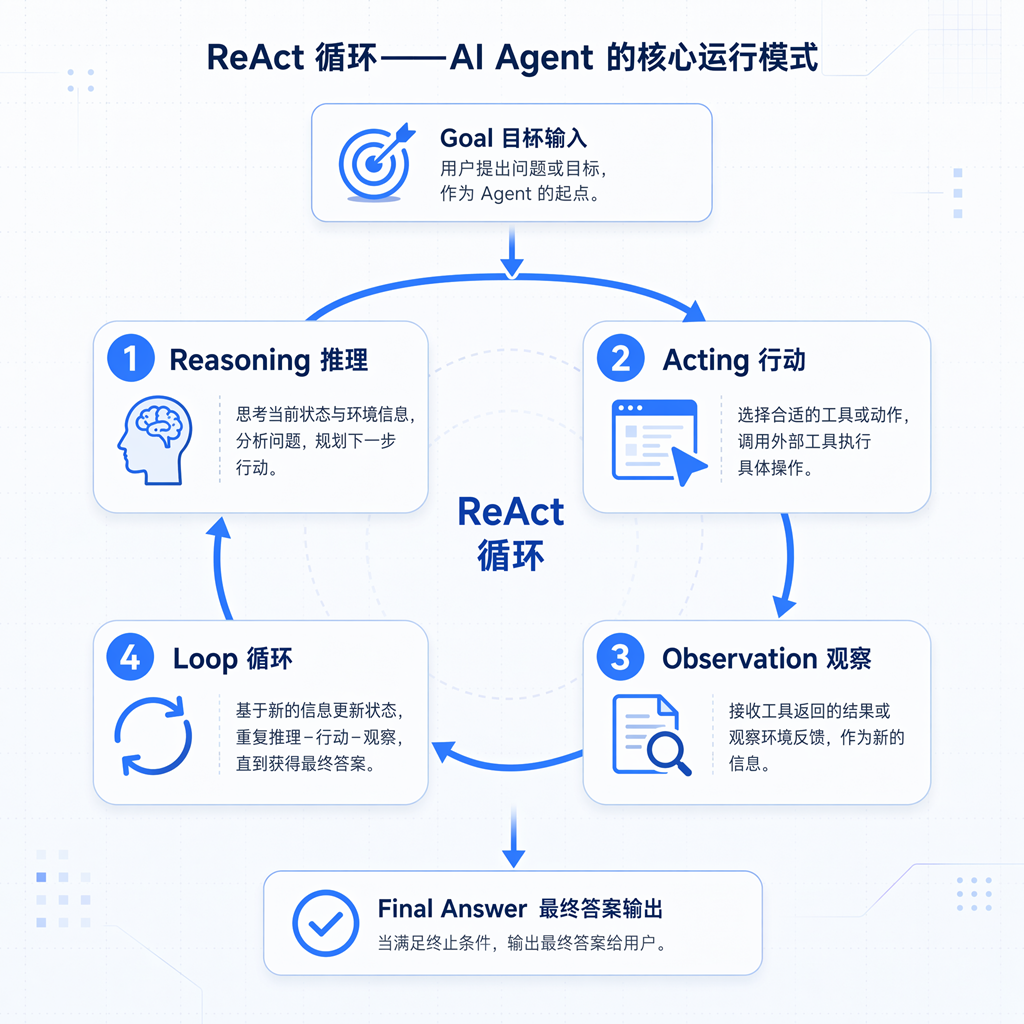
The key to this loop isn’t “calling a tool,” but that the model does reasoning at every step. It’s not an if-else trigger; it’s “I saw X errors in the read output, which suggests module Y has a problem, so next I should edit that file.” Every decision is based on the actual result of the previous step, not a pre-written script.
This means the same agent facing the same task might take completely different paths on two separate runs—and this is the essential difference between an agent and traditional software: traditional software follows declarative instructions (the developer writes every step), while an agent engages in autonomous decision-making (the developer only provides tools and goals; the path is determined by the model on the fly).
2. General Design Principles: Core Agent Architecture
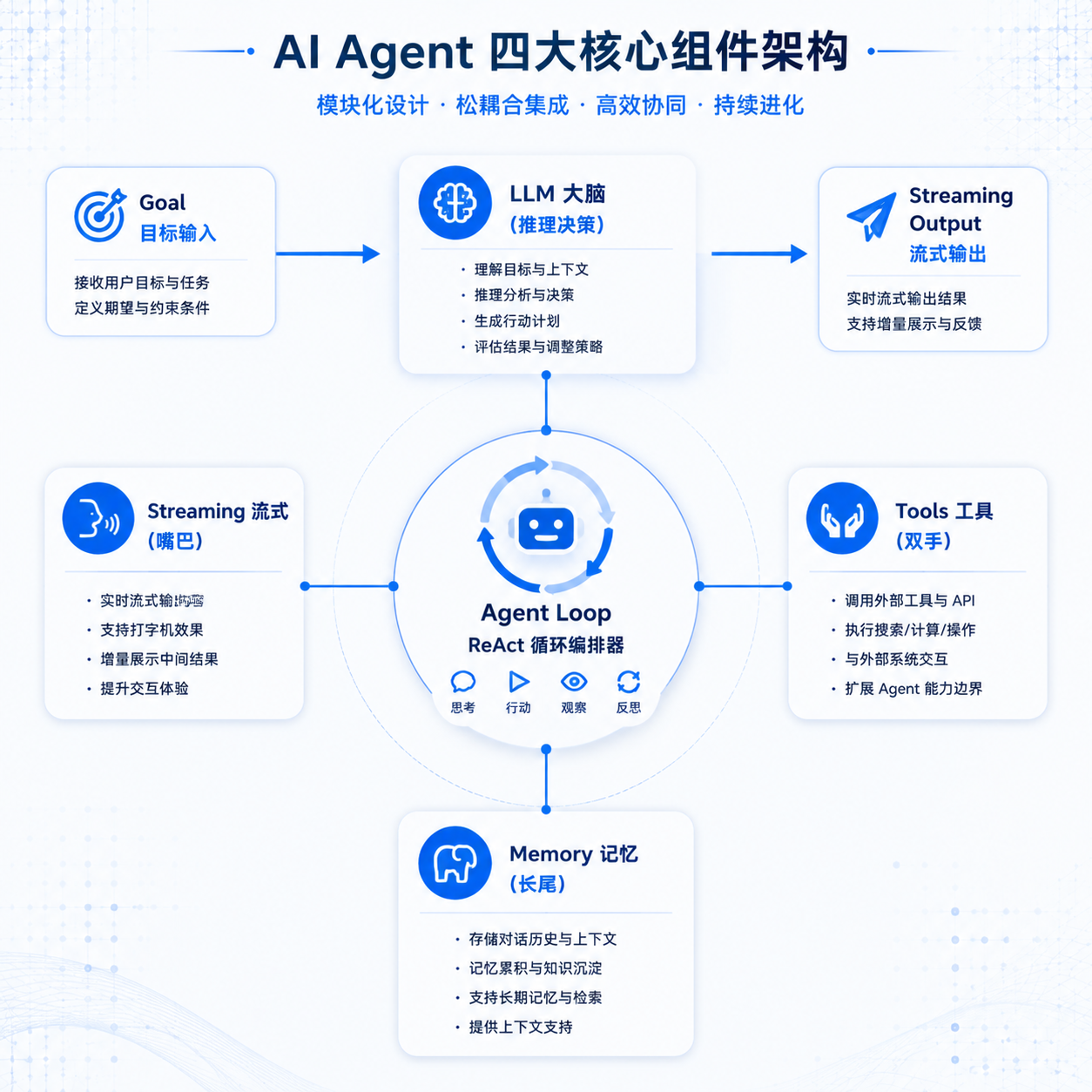
Now that we understand the ReAct loop, let’s look at how to engineer an agent. While different projects have different implementations, almost all agent frameworks center around four core components.
2.1 Four Core Components
If we break an agent down, we can summarize it into four core components. Using a human body analogy for easy recall:
- LLM Brain: Handles reasoning, decision-making, language understanding, and generation. It’s the agent’s “thinking organ” and determines the upper limit of the agent’s intelligence.
- Tool Hands: Enables the agent to “do things.” Read files, execute commands, edit code, search the web—without tools, an agent is just a chatbot that can talk.
- Memory Tail: Short-term memory is conversation history; long-term memory is cross-session accumulation. Without memory, the agent starts from zero every time and cannot sustain ongoing projects.
- Streaming Mouth: The agent’s output isn’t given all at once but is generated while thinking. Streaming isn’t just a UX optimization—it’s the basic rhythm of human-agent collaboration. Humans can see in real-time what the agent is doing and interrupt when necessary.
The relationship between these four components is illustrated below:
2.2 Component Collaboration Data Flow
In a complete agent task, the data flow goes roughly like this:
- User inputs a goal → enters the agent loop
- Assemble context: retrieve conversation history + system prompt + tool definitions from memory, send to LLM
- LLM reasons: returns “what tool to call next” or “final answer”
- If it returns a tool call: execute the tool, append the result as an observation to the context, go back to step 2
- If it returns a final answer: stream output to the user, task complete
The key is step 4—the tool result enters the next round of reasoning as new information. This is the engineering implementation of the ReAct loop: the context grows with each turn, and the model makes decisions based on the accumulated context.
This also introduces the core engineering challenge of agents: the context keeps growing—how to control it? How to ensure tool execution doesn’t produce errors? How to prevent memory from losing critical information? These are the topics the subsequent articles will break down.
2.3 Engineering Implementation of the Agent Loop
From a code perspective, an agent loop is typically a while loop (or generator/async generator), with each iteration comprising: build request → call LLM → parse response → execute tool → collect result. The loop exits when “the model no longer requests tool calls” or “maximum turns reached.”
Different frameworks make different engineering trade-offs on this basic structure. Somepursue minimalism (core loop 100-150 lines), otherspursue feature completeness (loop with embedded error recovery, context compression, hook mechanisms). These trade-offs have no absolute right or wrong—they depend on project positioning: is it an SDK for others to extend, or a product serving end users directly?
3. Comparison of Mainstream Agent Designs
There are already many open-source projects in the agent space, and they differ significantly in design philosophy. Understanding these differences helps us see aptbot’s choices more clearly. Here we compare three representative design approaches, referred to as Approach A, Approach B, and Approach C (each corresponds to certain open-source agents, but this article focuses on design thinking rather than specific projects).
3.1 Approach A: Minimal Core + Type Safety
The core philosophy of this approach is “less is more”—the agent loop is a stateless generator function, with the core code only 100-150 lines, allowing the upper harness/session layers to freely compose.
Design characteristics:
- Stateless core: The agent loop is a pure function that holds no state. State is managed by the upper session layer. This allows the core to be freely composed, tested, and reused.
- Strong type system: TypeScript + schema validation (e.g., TypeBox/Zod) ensure end-to-end type safety. Tool definitions, configurations, and event streams all have type constraints.
- Event stream model: The agent’s output is not a string but an
EventStream<AgentEvent>, where each event (text chunk, tool call, tool result) is a typed object. The upper UI can precisely subscribe to events of interest. - Complexity moved upward: The core is minimal, but the upper layer (e.g., the coding agent’s interaction layer) may include 40+ components for rich interaction.
Suitable for: Developers who want to embed an agent into their own products (SDK route), requiring type safety and composability.
Cost: Although the core is small, building a complete product requires a lot of interactive logic in the upper layer; the event stream model is heavyweight for simple scenarios.
3.2 Approach B: Self-Evolution + Ultra-Low Token
This approach is the most radical—no preset skills for the agent; it accumulates skills on its own while solving tasks. The more the agent is used, the smarter it becomes.
Design characteristics:
- Automatic task crystallization: After completing a task, the agent distills the successful path into a new skill, which can be reused directly when encountering similar tasks next time.
- Ultra-low token consumption: By “sending only new messages” (not full history) + tag truncation + working memory checkpoints, each turn’s context is kept under 30K tokens, far below the 200K-1M range of other approaches.
- Atomic tool set: Doesn’tpursue tool abundance; instead uses 9 atomic tools (with
code_runcovering both Python and bash execution) to handle all capabilities. - Bootstrapping: The repository itself was created by the agent—the agent not only uses tools but can also improve its own code.
Suitable for: Personal desktop automation, long-term personal assistants (the longer you use it, the smarter it gets).
Cost: The skill library is empty on first use, so performance is worse than approaches with preset skills; the self-evolution path is uncontrollable and may crystallize low-quality skills; the threading + generator model is more complex for multi-end access compared to async.
3.3 Approach C: Full-Stack Engineering + Multi-Platform
This approach pursues “production-ready”—covers everything from IM channels to WebUI to scheduled tasks, all configuration-driven without code changes.
Design characteristics:
- Channel abstraction: Each chat platform (Telegram, Discord, Slack…) is abstracted as a Channel, and the agent communicates with all platforms through a unified MessageBus.
- Configuration-driven: 30+ built-in providers, 20+ built-in channels, all switchable through configuration files without code changes.
- In-loop recovery: The agent loop is a single ~400-line method, with built-in orphan repair, backfill, micro-compaction, tool_result_budget, and various other error recovery paths.
- Weak typing: Heavy use of runtime dict/JSON passing; Pydantic covers only the configuration layer; type safety is incomplete.
Suitable for: Scenarios needing rapid integration with multiple IM platforms and pursuing production-ready operations.
Cost: The single 400-line loop has poor readability; weak typing poses high risks during refactoring; feature-complete but each module lacks refinement.
3.4 Design Philosophy Comparison
| Dimension | Approach A (Minimal SDK) | Approach B (Self-Evolution) | Approach C (Full-Stack Engineering) |
|---|---|---|---|
| Core philosophy | Less is more, composable | No preset skills, evolve through use | Production-ready, config-driven |
| Core loop size | ~150 lines | ~100 lines | ~400 lines |
| Type safety | Strong (end-to-end) | Weak (almost no typing) | Weak (config layer only) |
| Token strategy | Medium | Ultra-low (<30K) | High (large context window) |
| Tool strategy | User-written + built-in | Atomic tools + auto-crystallization | Rich built-in |
| Multi-platform | None (pure SDK) | Limited (multi-frontend, not Channel) | 20+ Channels |
| Who it’s for | Developers embedding | Personal long-term use | Multi-platform operations |
These three approaches have no absolute superiority—they are trade-offs based on different positioning. Approach A leaves complexity to the upper layers in exchange for a pure core; Approach B trades controllability for ultra-low tokens and self-evolution; Approach C trades elegance for full functionality.
4. aptbot’s Design Characteristics
As a “learning-oriented personal assistant project,” aptbot draws lessons from the above approaches while making its own trade-offs based on its positioning.
4.1 Project Positioning: Learning-Oriented + Personal Assistant
aptbot has a dual identity:
- Learning project: Its code exists to help people understand agents—every layer is clearly architected, readable, documented, and can serve as teaching material for “understanding agents from scratch.”
- Personal assistant: At the same time, it must be genuinely usable, helping developers with daily tasks (code maintenance, documentation generation, automated operations). It’s not a toy.
This dual positioning determines aptbot’s design tone: architecture must be clear enough to teach, functionality must be complete enough to use. It can’t be like Approach A, which is just an SDK (learners can’t see a complete product). It can’t be like Approach C, which piles on features (learners would be overwhelmed). And it can’t be like Approach B, which pursues self-evolution (beginners can’t understand uncontrollable skill crystallization).
4.2 Architectural Trade-offs
Based on this positioning, aptbot makes the following choices on key dimensions:
- Type safety: Chooses TypeScript + Zod, aligning with Approach A. Type safety is both an engineering quality guarantee and a teaching advantage—reading the code reveals the shape of every data structure.
- Core loop: References Approach A’s layered approach (stateless core + stateful session), keeping the core loop around 150 lines, with complexity moved up to the session and harness layers. This allows newcomers to first understand the minimal loop, then progressively look at upper layers.
- Event stream: Uses a typed EventStream (rather than Approach B’s string yield) to ensure readability and type safety.
- Tool system: Provides a clear, well-documented preset tool set (rather than Approach B’s atomic tool self-crystallization), so learners can see at a glance what the agent can do.
- Multi-end access: MVP focuses on CLI + WebSocket, leaving IM integration for later versions. Doesn’t pursue Approach C’s 20+ channels but retains the Channel abstraction for future extensibility.
- Memory and reliability: This is where aptbot invests the most effort—Provider failover, tool security boundaries, memory compaction, Hook plugin mechanism—each addresses “how to make the agent more reliable.”
4.3 Teaching-First Readability Constraint
Compared to other approaches, aptbot has a unique constraint: teaching-first readability.
Other approaches optimize for performance (low latency), tokens (low cost), or feature coverage (multi-platform). aptbot considers these but adds an extra criterion: the code and architecture must be readable by beginners.
This means aptbot actively avoids some “clever but obscure” implementation techniques. A concrete example: aptbot’s configuration loading doesn’t use “runtime reflection + auto-binding of config classes” magic. Instead, it uses an explicit three-step flow: readConfig() → validateConfig() → applyConfig(). The former is more “elegant” (less code), while the latter is more “plain” (people reading the code can follow step by step how the config is loaded and applied).
This isn’t a technical concession—from the project’s positioning, a project designed to teach agents cannot itself be a black box. If aptbot itself is hard to understand, it loses its reason to exist.
5. Future Directions
Understanding the basic concepts of agents and aptbot’s positioning, several directions are worth watching for future evolution:
- Smarter context management: Currently, the agent’s context keeps growing. Future versions need more refined compression strategies (e.g., attention-based memory retention, hierarchical memory systems).
- Semi-automatic skill accumulation: Drawing inspiration from Approach B but maintaining controllability—letting users review each crystallized skill rather than fully automatic crystallization.
- Multi-agent collaboration: A single agent has limited capabilities. Future versions may introduce a sub-agent mechanism, where the main agent delegates sub-tasks to specialized sub-agents.
- More natural interaction rhythm: The current streaming output + tool call display is decent, but there’s room to improve the experience of human interruption, correction, and supplementary instructions (steering mechanisms).
- Reliability toolchain: How to make the agent detect errors, roll back, and retry on its own, rather than throwing errors at the user.
aptbot will gradually explore these directions in subsequent versions. The last article in this series will specifically discuss the evolution roadmap.
Summary
In this article, we understood agents from three levels:
- Conceptual evolution: A chatbot passively responds, an assistant calls tools by rules, and an agent makes autonomous decisions. The ReAct loop (Reason → Act → Observe) is the agent’s heartbeat.
- General architecture: Four core components (LLM Brain / Tool Hands / Memory Tail / Streaming Mouth) + agent loop orchestration form the skeleton of almost all agent frameworks.
- Design comparison: Mainstream approaches trade off between “minimalism/self-evolution/full-stack.” aptbot chooses the route of “type safety + clear layering + teaching readability.”
With this mental model in place, every design decision discussed in the following 11 articles can be mapped: does it belong to the brain, hands, tail, or mouth? What reliability problem does it solve? In the next article, we’ll look at how aptbot’s overall architecture carries this mental model.