AI-Assisted Development Workflow: Taming Uncertainty with Process Constraints
If you’ve tried using AI to write code, you’ve likely encountered this scenario: The first conversation produces a beautiful solution, you nod and say “great, let’s go with this,” but during execution the AI starts freelancing — skipping tests, stuffing implementation code into planning documents, trying the same mistake ten times over, or halfway through contradicting its own earlier design. This isn’t the AI being unintelligent; it’s that you lack a workflow to constrain it. AI output is inherently unpredictable, and relying on “writing careful prompts” is far from enough. You need a process to manage the uncertainty.
Overview: Why Workflow Constraints Are Necessary
To understand the value of an AI-assisted development workflow, you first need to recognize a fundamental truth: Large language models are probabilistic generators at heart. The same input can produce completely different outputs on separate tries. For the same task, the AI might follow a perfect path the first time and fall into the same pit repeatedly the second time.
This is fundamentally different from human developers. A human developer has an “internal model” — they know what they’re doing, why they’re doing it, and how far along they are. AI doesn’t have this internal model. Each reasoning cycle starts fresh from the current context, with no continuity of “I remember we already decided X earlier.” If you don’t give it structured process constraints, its behavior is akin to “opening a different page of the same book each time” — lacking global consistency.
This is where workflow constraints provide value. They don’t limit AI’s capabilities; they give AI a decision-making framework. The four stages (brainstorming → spec → plan → TDD implementation) essentially make decisions at different levels of abstraction, letting the AI do the right thing at the right level:
- Brainstorming answers “what should we do” — align goals, list options, make choices.
- Spec answers “what should the system look like” — solidify design decisions, define scope boundaries.
- Plan answers “what’s step one, what’s step two” — break down execution steps, set acceptance criteria.
- TDD implementation answers “how to write the code” — drive correct code through the red-green cycle.
Each stage focuses on one core question without cross-level decision-making. Brainstorming doesn’t discuss how to write code, spec doesn’t discuss execution order, and plan doesn’t contain implementation code. This layered constraint transforms AI output from “undisciplined” to “predictably progressing.”
General Design: The Four-Stage Workflow
A mature AI-assisted development workflow typically consists of four core stages. Each stage produces different documents and addresses different levels of problems.
Brainstorming: Aligning Goals Before Writing Code
The brainstorming stage answers the question: “What exactly are we going to do?” It sounds simple, but in practice, this is the most frequently skipped step — and the most costly one to skip.
The standard output of brainstorming is a decision table. For each open question, list all possible options, the rationale for the chosen option, and why the other options were excluded. For example, the question “where to store user data” might have options including SQLite, PostgreSQL, JSON files, and cloud APIs. The decision table analyzes each option’s pros and cons, then gives a clear conclusion.
The value of a decision table isn’t in “recording” but in forcing clarity. When you write down “why choose A over B,” you often realize you hadn’t thought it through. The decision table turns fuzzy ideas into clear judgments.
Spec: The Constitution of Design Decisions
After brainstorming produces the decision table, the process moves into the spec stage. The spec solidifies each choice from the decision table into the system’s design commitments.
A complete spec includes: functional scope (in scope / out of scope), architecture overview, file structure, key interface signatures, data models, testing strategy, and acceptance criteria. It serves as the “constitution” for all subsequent work — plan cannot violate the spec, and implementation cannot deviate from the spec.
The most important action in the spec stage is dual review:
- Self-review: The AI goes through a checklist — checking for placeholder leftovers, consistency, reasonable scope, and ambiguous phrasing. This catchs most low-level errors.
- User review gate: After self-review passes, the spec is submitted for user review. No next step is allowed until the user approves. This gate isn’t a formality — when writing specs, AI often includes “future version” content in the current spec, or uses vague terms (“roughly”, “maybe”, “it depends”) to cover undecided open questions. User review is the last chance to surface these issues.
Plan: Breaking Down Into Executable Tasks
After spec review passes, the process enters the plan stage. The plan breaks the spec into a concrete list of subtasks. Each subtask consists of three elements: what to do, how to verify, and what it depends on.
The plan has one hard rule: No implementation code is allowed in the plan. The value of this rule deserves special emphasis:
- Code written during the plan stage cannot be verified — without test-driven development, correctness relies entirely on AI imagination.
- Code in the plan solidifies implementation thinking, rendering the TDD red-green cycle ineffective.
- Code in the plan distorts the kanban — “subtask complete” becomes “code pasted” rather than “all tests green.”
The only “code” allowed in the plan is TDD command descriptions (e.g., “run npx vitest run xxx.spec.ts, expect RED”) and verification commands. All other code must be written during the TDD implementation stage.
Another key mechanism of the plan is kanban management. Each subtask has a checkbox — mark [x] for completed, [~] for in progress. This mechanism has irreplaceable value in AI-assisted development: it makes progress visible, supports resume from interruption, and provides clear criteria for completion.
TDD Implementation: Driving Code with the Red-Green Cycle
After the plan is confirmed, the process enters the TDD implementation stage. This is the only stage where writing code is allowed. TDD here is not a “best practice suggestion” — it is the only allowed coding method.
The structure of the TDD red-green cycle:
- RED: Write the test first, run it, and you must see failure in the terminal. If you don’t see RED before writing implementation, you haven’t really written a test.
- GREEN: Write the minimum code to make the test pass. Don’t write a single extra line of “incidental” code.
- REFACTOR: Only refactor after the test passes, then run the test again to confirm it’s still green.
Why is witnessing RED so important? Because AI often writes tests that “look correct but always pass” — assertions referencing the wrong variable name, tests that never actually call the function under test, mock configurations that let any input pass. Seeing RED first proves the test is actually testing what you want it to test, making the GREEN phase meaningful.
The “minimum code” in the GREEN phase is equally critical. AI tends to write a complete implementation in one go, including various unrequested extensions. This not only violates YAGNI (You Aren’t Gonna Need It) but also leaves no work for subsequent subtasks.
Circuit Breaker Mechanism
AI repeatedly attempting failing solutions is a common problem. If the same test fails 3 consecutive times, the circuit must break — stop the current subtask, record the failure reason, skip it, and review.
Circuit breaking isn’t giving up; it’s stopping the bleeding. Three failures typically mean the AI has entered a “try differently but think the same” death spiral — changing variable names, tweaking parameters, adjusting import order, but the fundamental approach hasn’t changed. Continuing only burns tokens and time. The review after a circuit break shouldn’t ask “how do we try again,” but rather “is this subtask itself incorrectly decomposed?” or “is some decision in the spec flawed?”
Circuit break records should be preserved. Reviewing these records over time reveals systematic blind spots in the AI — such as consistently misinterpreting a particular API signature or always overlooking certain boundary conditions. These patterns inform subsequent optimization of prompts and constraint rules.
Workflow Overview
The diagram below shows the complete closed loop of the four-stage process described above:
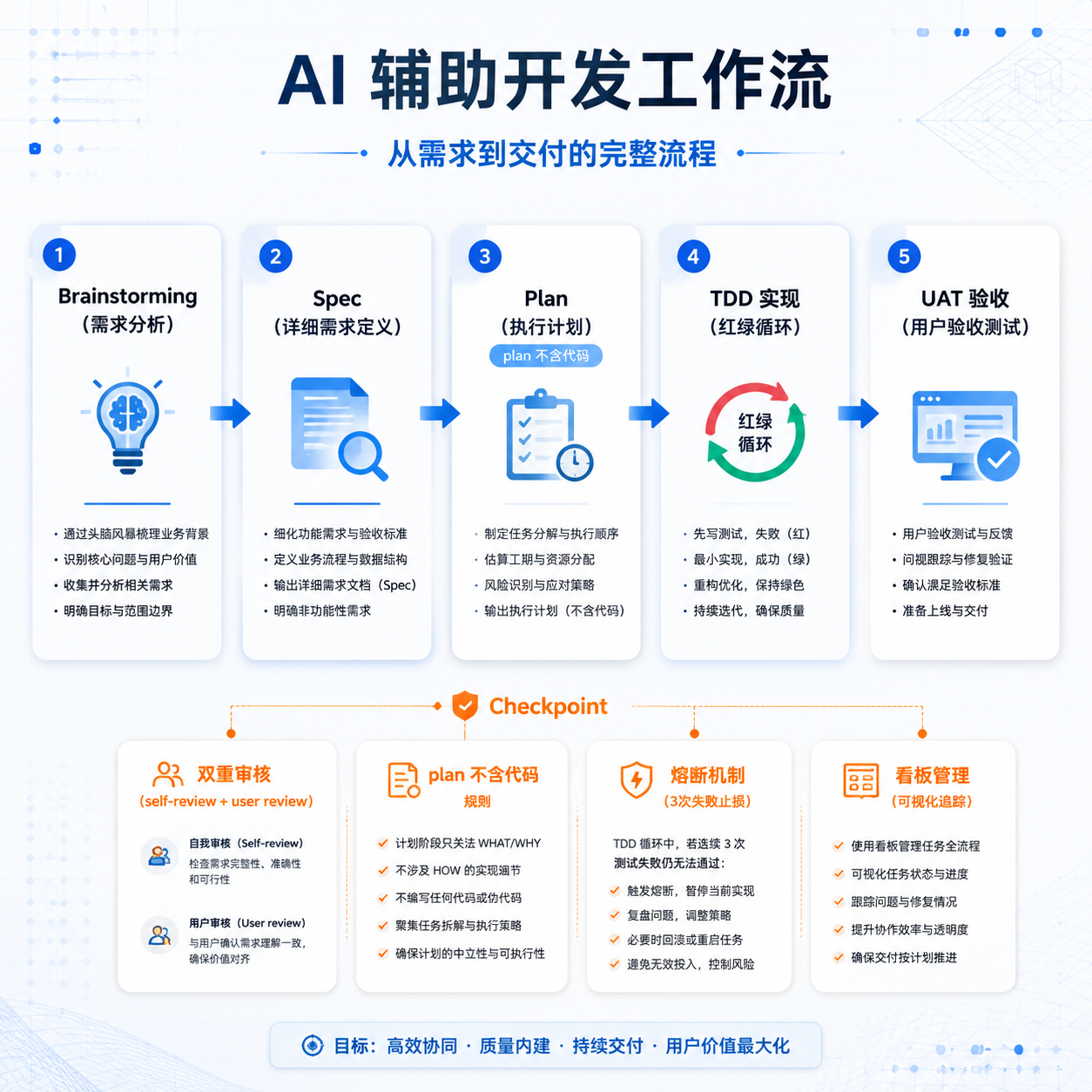
Starting from brainstorming, going through the spec review gate, plan decomposition, TDD implementation, and finally completion wrap-up, each stage has clear deliverables and quality gates. The core idea of this workflow is: put unpredictable AI output into a predictable process pipeline.
Comparison with Other Approaches
Now that we understand the four-stage workflow design, let’s look at other common approaches to AI-assisted development. They can be grouped into three approaches, each with its own applicable scenarios and limitations.
Approach A: Free Chat
This is the most intuitive approach — open a chat window, directly tell the AI “help me write a user login feature,” the AI outputs code directly, and you copy-paste it into use.
Design characteristics:
- Zero process: No brainstorming, spec, or plan — straight to coding
- Single-session conversation: All context is contained in one chat session, lost when the window closes
- Complete reliance on AI improvisation: The AI makes decisions based on “general best practices” from its training data
- Passive user response: The AI outputs something, the user approves it — no review gate
Applicable scenarios: One-off scripts, quick prototype validation, personal small tools. When the code is disposable and doesn’t need long-term maintenance, this approach is most efficient.
Limitations: Any project requiring multiple iterations, cross-session collaboration, team work, or long-term maintenance will spiral out of control. The AI might contradict its own first-iteration design by the third iteration, and you can no longer remember why you made certain decisions.
Approach B: Single-Prompt Engineering
This approach goes a step further than free chat — users carefully craft prompts, specifying requirements, constraints, tech stack, and output format all at once, expecting the AI to complete the full feature in a single response.
Design characteristics:
- Carefully engineered prompts: Users spend time organizing requirement details, anticipating where the AI might make mistakes, and constraining them in advance within the prompt
- Single generation: Relies on the AI to produce complete, correct code in one shot, without needing multiple rounds of interaction
- Efficient for simple tasks: When the task is simple enough and boundaries are clear enough, a single prompt can produce usable code
- Unreliable for complex tasks: The more complex the task, the lower the probability of the AI generating correct code in one go
Applicable scenarios: Moderately complex standalone features (e.g., “write a CSV parser,” “implement a JWT middleware”), tasks with clear boundaries, simple dependencies, and single-generation usability.
Limitations: Real projects rarely have “usable from a single generation” tasks. Complex business logic requires multiple rounds of refinement and testing to stabilize. When a single prompt fails, there’s no recovery path — what do you do when it errors? You have to write an even longer prompt and retry from scratch. Moreover, the longer the prompt, the more severe the AI’s “lost in the middle” attention problem becomes — core constraints can get buried in lengthy prompts.
Approach C: Structured Workflow
This is the four-stage workflow detailed earlier — managing AI output through document layering, review gates, circuit breaker mechanisms, and TDD constraints.
Design characteristics:
- Four-stage layering: Brainstorming → spec → plan → TDD implementation, each layer focused on one core question
- Document-driven: Each stage produces structured documents, preserving project memory across sessions
- Dual review: Self-review + user review gate, ensuring quality at each stage
- Circuit breaker: Stop losses after 3 failures, no wasted tokens
- TDD red line: Write tests before implementation, ensuring one-to-one correspondence between code and tests
- Kanban management: Subtask progress is visible, supporting resume from interruption
Applicable scenarios: Complex long-term projects, multi-person collaboration, product-grade code requiring continuous iteration.
Cost: The highest process overhead. Writing specs, doing reviews, and maintaining kanbans all take extra time. A simple bug fix going through the entire workflow may not be worthwhile.
Comparison Summary
| Dimension | Approach A (Free Chat) | Approach B (Single Prompt) | Approach C (Structured Workflow) |
|---|---|---|---|
| Process cost | Lowest | Low | High |
| Traceability | None | Low | High |
| Cross-session memory | None | None | Yes |
| Quality assurance | Relies on AI improvisation | Relies on prompt quality | Multi-layer constraints |
| Complex project suitability | Poor | Fair | Good |
| Simple task efficiency | Highest | High | Low |
| Error recovery | Start over | Rewrite prompt | Circuit breaker + backtrack |
There is no absolutely optimal approach; the key is the context. For a disposable script, Approach A is fastest. For a standalone module with clear boundaries, Approach B suffices. But for projects built for long-term iteration, Approach C is the only sustainable choice.
aptbot’s Design Features
aptbot, as an open-source learning-oriented AI Agent project, made a clear choice when designing its workflow: adopt Approach C, but tailored and optimized according to the project’s positioning.
Why Approach C
aptbot is positioned as a “learning-oriented personal assistant” — meaning it must not only handle real development tasks but also maintain a code architecture clean enough to serve as teaching material. Both goals require high-quality, maintainable code output. Approaches A and B cannot meet this requirement.
Specifically, the following characteristics of Approach C align well with aptbot’s positioning:
- Traceability: Every spec and plan is learning material, allowing readers to trace back “why it was designed this way”
- Quality assurance: The TDD red line ensures every feature has test coverage, suitable for teaching demonstrations
- Kanban management: The subtask progression process serves as a teaching example of the development process
- Review gates: Demonstrates the engineering practice that “design decisions need review”
What Makes aptbot Unique
aptbot doesn’t blindly copy Approach C across the board; it makes its own choices in several dimensions:
TDD as the only coding method: In Approach C, TDD is a “recommended practice”; aptbot upgrades it to a “hard constraint” — enforced through the
test-driven-developmentskill, intercepting any attempt by the agent to skip tests. This turns TDD from “a suggestion in a prompt” into “a system-level red line.”Subagent task delegation: aptbot implements a layered architecture with a main agent and sub-agents. The main agent handles planning and scheduling, while sub-agents execute specific subtasks. This isolation lets each sub-agent see only its own context, undisturbed by global noise. Typical Approach C implementations use a single agent to complete all tasks sequentially, with the context window growing longer and the probability of going off-track increasing.
Circuit breaker recording and analysis: aptbot transforms circuit break records into analyzable data for subsequent optimization of prompts and constraint rules. This already carries a flavor of “meta-learning” — not just completing the current task but learning from failures to improve the workflow itself.
Teaching-first documentation style: aptbot’s specs and plans serve not only as execution guides but also as teaching material — the documents explain “why this choice was made,” not just “what was chosen,” helping learners understand the trade-offs behind design decisions.
Differences from Other Approaches
Compared to the three approaches, aptbot’s biggest difference is treating process constraints as a product feature. Approaches A and B treat the process as a personal habit of the user; Approach C treats the process as a project norm; aptbot goes further — the process is encoded into tools and skills, and the agent operates under process constraints rather than being corrected by review after “freelancing.”
This means that in aptbot, actions like brainstorming, spec review, and the TDD red-green cycle aren’t “agreements” between human and AI — they are hard constraints of the AI’s runtime environment. The agent cannot skip spec review to write a plan directly, and cannot write implementation code without seeing RED first. This “tool-ified constraint” is far more reliable than “verbal agreements.”
Future Directions
AI-assisted development workflows continue to evolve rapidly. Several directions are worth watching:
Smarter stage transitions: Currently, the four stages progress linearly, but in practice some scenarios can skip or merge stages. In the future, the system might automatically determine based on task complexity that “this change doesn’t need a spec, start directly from the plan,” reducing process overhead for small changes.
Automated review: Self-review currently has the AI reviewing its own output, which has blind spots. In the future, “dual-agent cross-review” could be introduced — one agent writes the spec, another agent plays the role of a critical architect reviewing it. Perspective shifts can surface more issues.
Smarter circuit breaking: The current 3-failure circuit break is a static rule. In the future, a “prediction model” could be trained based on historical circuit break data — issuing warnings before the AI starts down the wrong path, rather than stopping losses after 3 failures.
Cross-session process memory: Currently, each task’s workflow is independent. In the future, decisions, failure patterns, and success patterns generated during the process could beconsolidateed into long-term memory, letting the AI automatically reuse them in subsequent tasks.
Workflow visualization: Currently, the subtask kanban is a markdown checklist — fairly primitive. In the future, visual progress charts and dependency graphs could be generated, giving humans a more intuitive view of the AI’s development progress.
Summary
The core proposition of AI-assisted development workflow is always the same: how to make unpredictable AI output controllable. This article explored this proposition from three levels:
- Why process constraints are needed: AI lacks an internal model and continuity, requiring a structured framework to ensure decision consistency.
- General design approach: The four-stage workflow (brainstorming → spec → plan → TDD implementation) combined with document layering, dual review, circuit breaker mechanism, kanban management, and the TDD red-green cycle together form a complete constraint system.
- Approach comparison: Approach A (free chat) is fastest but least controllable, Approach B (single prompt) is moderate, and Approach C (structured workflow) is most reliable but has the highest process cost. aptbot chooses Approach C and tool-ifies process constraints into red lines.
Workflow constraints aren’t meant to limit AI, but to give AI a predictable track to run on. Within this track, AI can safely exercise its creativity without being led astray by its own probabilistic nature. In the next article, we shift focus from process to quality — how TDD, version control, and UAT work together to elevate AI-written code from “it works” to “it’s trustworthy.”